A - AOI CASE ACK EN, A - Reply Open, A - 1 Hour Delay rslv, LOCKED
Current case
Customer issue
Hi Tech Support, We are recieving a new-to-us error message on our line 3 AOI 730. Happens on one type of board and only on this AOI machine. Shows up after the boards is already out so nothing to remove. Hit Recovery and we run the next one thru. Happens only on 1 type of board and only on this AOI. We are not down; just a slower process. When someone has a chance would they mind letting us know what we might want to check on our 730? Tks. Gary Gustine Sr. Manufacturing Engineer Creation Technologies Cell: [phone] 1001 Klein Road | Suite 100, Plano TX | 75074-3707 [email] | www.creationtech.com
Conversation
Engineer and customer thread
12 messages
OA
Omron Application EngineerOmron reply | Feb 20, 2026 at 9:13 AM
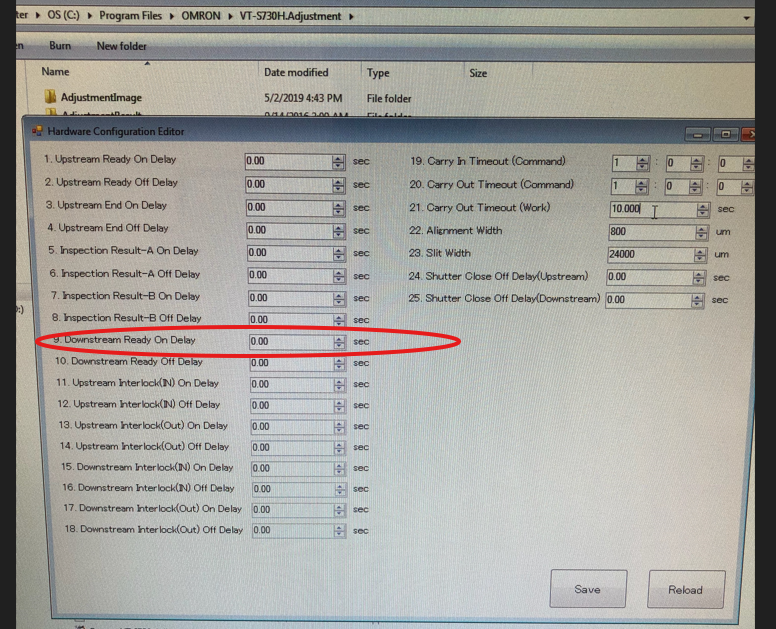
Hello Gary, Please exit out of AOI application and go to program files\Omron\VT-S730Adjustment folder and launch HardwareCofigurationEditor and put a delay of 30 in the downstream ready off delay. this should help with this problem. Best Regards
C
CustomerCustomer reply | Feb 20, 2026 at 2:43 PM
Hi Saqib, We have tried changing the setting; even varying between its original 0 setting and 30 and we still get the same error. When you have a spare minute, if there is something else we might try, please let us know. Thank you. Gary Gustine Sr. Manufacturing Engineer Creation Technologies Cell: [phone] 1001 Klein Road | Suite 100, Plano TX | 75074-3707 [email] | www.creationtech.com ________________________________
OA
Omron Application EngineerOmron reply | Feb 20, 2026 at 3:14 PM
Hello Gary, Can you use a 100 instead of 30 and let us know that helps. This issue caused by conveyor turning the ready signal off before board is out of the AOI machine. If this time doesn't then please at conveyor settings. Best Regards
C
CustomerCustomer reply | Feb 24, 2026 at 8:02 AM
Hi Saqib, We did adjust it and no change. We also started running the next board and no issues. Also, with that we created a new program for the board. Ran a few samples thru and the error returned. It appears specific pcba related at this point. In your last email you mentioned something about the conveyor. We would like to try it. When you have a chance if you wouldn't mind detailing what we need to do (if its in our maintance manual we can check it out and get back if we have any Q's.) Thank you again for your help. Best Regards, Gary Gustine Sr. Manufacturing Engineer Creation Technologies Cell: [phone] 1001 Klein Road | Suite 100, Plano TX | 75074-3707 [email] | www.creationtech.com ________________________________
OA
Omron Application EngineerOmron reply | Feb 24, 2026 at 9:36 AM
Hello Gary, What is the length of this PCB? The stream conveyor is turning it Ready ON signal before this board in question is exited out of the machine. I'm not sure how the exit conveyor is turning off the Ready ON signal. It is usually by a sensor on the exit conveyor and some timer in the program. If this is only happening on one product then then it could be related to the size of this board. Best Regards
C
CustomerCustomer reply | Feb 25, 2026 at 5:09 PM
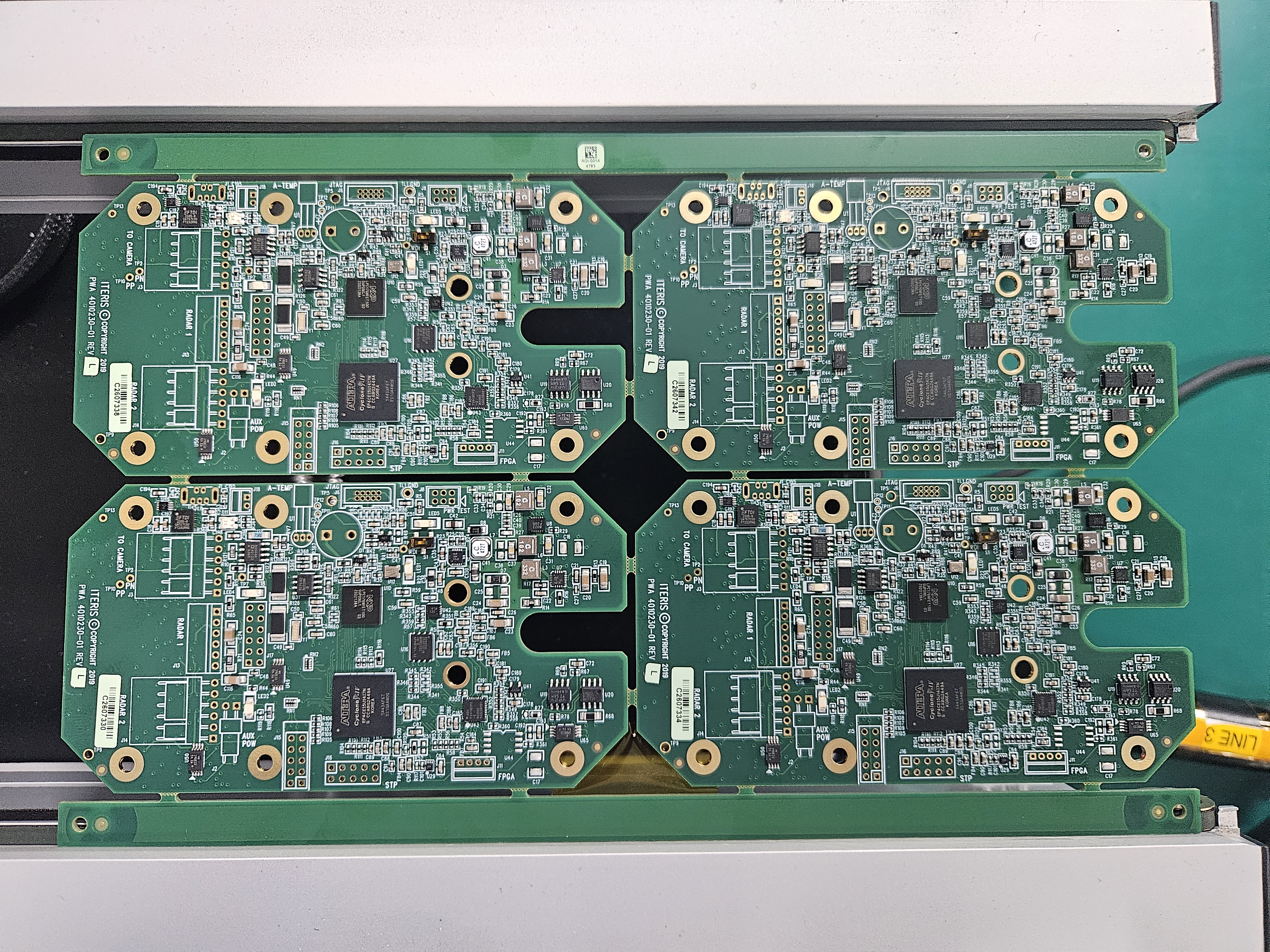
Hi Saqib, Wanted to get back and let you know we found what was causing the issue with this pcba. It is the pcba, and in the attached pic in the middle of the panel to the far left you will see a piece of Kapton tape. Once placed, the issue has gone away. Odd it didn't do it on the other line we had run on for over a year but glad we have stopped it. Would seem the unit has a sensor that doesn't like the opening and possibly something we might be able to adjust. When time allows, any direction/suggestions on what we might adjust would be great. Best Regards, Gary Gustine Sr. Manufacturing Engineer Creation Technologies Cell: [phone] 1001 Klein Road | Suite 100, Plano TX | 75074-3707 [email] | www.creationtech.com ________________________________
20260225_131304.jpg
OA
Omron Application EngineerOmron reply | Feb 26, 2026 at 12:37 AM
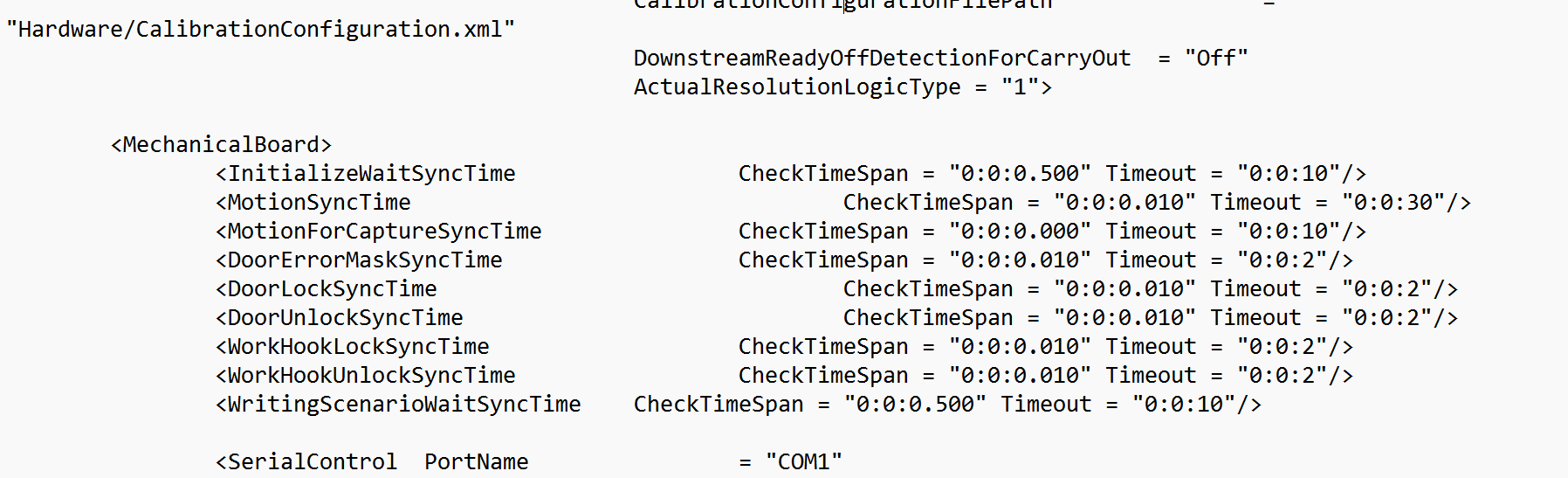
Hello Gary, Hope you are doing well! Your PCB has a cutout, slot, or edge feature that's creating a brief gap in the fiber sensor's line of sight. This makes the machine think the board has exited prematurely, so it drops the downstream ready signal and stops the conveyor. The kapton tape blocks that gap, so the sensor stays happy and the system works. The fix. Try these steps: 1. Locate the configuration file: C:\Program Files\OMRON\VT-S730\Configuration\Hardware\HardwareConfiguration.xml 2. Make a backup copy first (just in case): • Right-click the file, copy it, paste in the same folder, rename to HardwareConfiguration.xml.backup 3. Open the file in Notepad and find this line: 34000 4. Increase the value by 25-30%: • Change 34000 to 44000 or 45000. This gives the sensor more time to detect the board despite the cutout. 5. Save the file and restart the VT-S730 application 6. Test with your problematic PCB. Does it run smoothly without the tape? If that doesn't work, try Option 2: Find this line in the same file: On Change On to Off, save, and restart. This disables the aggressive "board exit" detection altogether. Let us know? Thanks,
C
CustomerCustomer reply | Feb 26, 2026 at 5:17 PM
Hi Jeremiah, Yes we will try those solutions. For the moment tho, we have finished running that board so will need to wait for the next run. Thank you for the recommendations. Best Regards, Gary Gustine Sr. Manufacturing Engineer Creation Technologies Cell: [phone] 1001 Klein Road | Suite 100, Plano TX | 75074-3707 [email] | www.creationtech.com ________________________________
C
CustomerCustomer reply | Feb 26, 2026 at 6:59 PM
Hi Jesse, Jeremiah at Omron has provided us with some possible fixes for the AOI line 3. We would like to try and implement one of them. When you have time. Tks. Gary Gustine Sr. Manufacturing Engineer Creation Technologies Cell: [phone] 1001 Klein Road | Suite 100, Plano TX | 75074-3707 [email] | www.creationtech.com ________________________________
freshdesk-inline-150150708491.png
C
CustomerCustomer reply | Feb 27, 2026 at 8:31 AM
Not seeing C:\Program Files\OMRON\VT-S730\Configuration\Hardware\HardwareConfiguration.xml Do not see On in hardwareadjustmentconfiguration.xml or hardwareuserconfiguration.xml Should I make the modification in c:\Program Files\OMRON\VT-S730\Configuration\hardwareconfiguration.xml [email] Jesse Herrera Systems Administrator Creation Technologies Mobile: [phone] [email] | www.creationtech.com
freshdesk-inline-150151609021.png
1 tiny or repeated image hidden.
OA
Omron Application EngineerOmron reply | Feb 27, 2026 at 10:19 AM
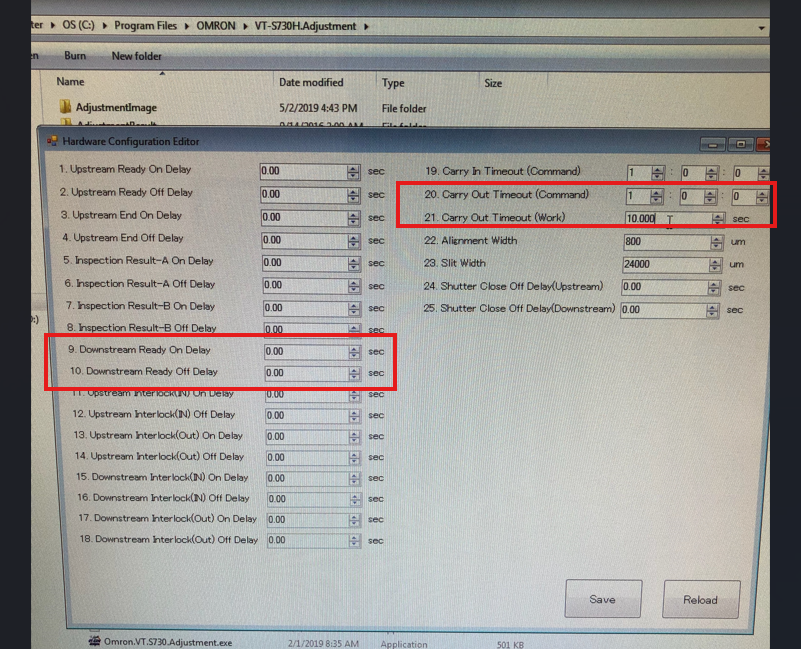
Hello Gary, Please work with one of the timers circled in attached screenshot of the Hardware Adjustment Configuration tool. That should help resolve this issue. Best Regards
freshdesk-inline-150151628320.png
OI
Omron internalPrivate note | Feb 27, 2026 at 2:26 PM
Private
Subject: RE: AOI 730 Error Message [ AOI Case# 1704569] has been resolved. Description: Hello Gary, Thank you for your recent inquiry. We’re pleased to inform you that your case 1704569 has been resolved. As always, we're here to support you. If you need assistance in the future, please don’t hesitate to reach out to us via our support email: [email] If you believe further support is needed regarding this case, simply reply to this message with a brief status update, and we’ll be happy to assist you. Saqib Toor Your Omron AOI Technical Support Group