AOI support workspace
Ticket #1717401
AOI US
Closed
VT-X750 Server enable to boot
CustomerNot indexed
CompanyNot indexed
Priority3
TypeAOI - No Action Required
UpdatedApr 9, 2026 at 2:24 PM
Thread73 messages
Ticket metadata
- Group
- AOI US (150000419797)
- Status
- Closed (5)
- Created
- Mar 9, 2026 at 1:00 PM
- Requester
- Not indexed
- Company
- Not indexed
- Last synced
- Aug 2, 2026 at 9:57 PM
- Resolved
- Mar 30, 2026 at 10:11 AM
- Closed
- Apr 7, 2026 at 1:32 PM
- Tags
- A - AOI CASE ACK EN, A - Reply Open, A - 1 Hour Delay rslv, LOCKED
Current case
Customer issue
Hi, The Server enable to boot. below is screen shot. Thanks. This morning Regards, Robert Khaw New email address: [email] From: "AOI Tech Support - US" To: [email] Date: 02/05/2026 07:26 AM Subject: RE: RE: RE: Follow up regarding "Destination" error text you sent me [ AOI Case# 1669147] has been resolved. [ AOI Case# 1679080] has been resolved. [ AOI Case# 1689910] has been resolved. Hello Robert., Thank you for your recent inquiry. We’re pleased to inform you that your case 1689910 has been resolved. As always, we're here to support you. If you need assistance in the future, please don’t hesitate to reach out to us via our support email: [email] If you believe further support is needed regarding this case, simply reply to this message with a brief status update, and we’ll be happy to assist you. Ryan Morrow Your Omron AOI Technical Support Group 1689910:2549832
Conversation
Engineer and customer thread
73 messages
Conversation
Engineer and customer thread
-
CCustomer Customer reply | Mar 9, 2026 at 1:38 PMHI Omron Service, It looks like the server is down, Please take a look, How can we solve the issue? Or replacement of the computer is needed? Thanks, John Kuo

Server boot fail.jpg -
OAOmron Application Engineer Omron reply | Mar 9, 2026 at 1:41 PMHello Robert., Please reboot the server and press F12 when the Lenovo logo appears. In the One-Time Boot Menu, check if Windows Boot Manager is listed. If it appears, please select it to attempt a normal boot. If it is not listed, reboot again and press F1 to enter System Setup, then check Storage → RAID Configuration and confirm whether the RAID virtual disk is present and healthy. Also, can you look at the front of the server, and tell me if you see all "Green" lights for the HD? Green LED = healthy Amber LED = failed No LED = drive not detected
-
CCustomer Customer reply | Mar 9, 2026 at 2:31 PMHi Jeremiah, Please reboot the server and press F12 when the Lenovo logo appears. After reboot the server Press F12 but the system no response see screen shot Can you look at the front of the server, and tell me if you see all "Green" lights for the HD? Check front panel HD light on Slot HD7 has Green and Amber light on.The rest of the HD slots are Green lights. Regards, Robert Khaw New email address: [email]

HD7- Green and Amber light.jpg 
F12- one time boot.jpg -
OAOmron Application Engineer Omron reply | Mar 9, 2026 at 3:33 PMHello Robert., Please reboot the server and repeatedly press F1 when the Lenovo logo appears to enter the BIOS setup. Once inside: Go to Boot Options / Boot Manager and check if Windows Boot Manager is listed. Go to System Settings → Storage → RAID Configuration and check the status of the RAID virtual disk (Optimal / Degraded / Missing). Check the System Event Log for any disk or RAID errors. Please send screenshots or photos of these screens so we can determine the next step.
-
CCustomer Customer reply | Mar 9, 2026 at 3:40 PMHi Jeremiah, Any of the function keys no response so I can not able to log in to the BIOS setup. please advise. Thanks. Regards, Robert Khaw New email address: [email]

F1-system setup.jpg -
OIOmron internal Private note | Mar 9, 2026 at 3:47 PMPrivatewow, this server seems....busted good.
-
OAOmron Application Engineer Omron reply | Mar 9, 2026 at 3:58 PMHello Robert., Please power the server off completely by holding the power button for about 10 seconds. After it powers off, disconnect the power cable for about 30 seconds. Then remove the drive in slot HD7 (the one showing the green and amber LED) and power the server back on. A failed drive can sometimes prevent the RAID controller from completing initialization during boot. Let us know if this resolves the issue? Or at least gets you to the BIOS screen? If it still freezes, then try to unplug the keyboard and mouse as well, then reboot again.
-
CCustomer Customer reply | Mar 9, 2026 at 5:02 PMPlease power the server off completely by holding the power button for about 10 seconds. done. After it powers off, disconnect the power cable for about 30 seconds. Done Then remove the drive in slot HD7 (the one showing the green and amber LED) and power the server back on. Done A failed drive can sometimes prevent the RAID controller from completing initialization during boot. Let us know if this resolves the issue? Or at least gets you to the BIOS screen? Still can not get into the BIOS If it still freezes, then try to unplug the keyboard and mouse as well, then reboot again. unplus keyboard and mouse. Done. no help. Regards, Robert Khaw New email address: [email]
-
OAOmron Application Engineer Omron reply | Mar 9, 2026 at 10:33 PMHello Robert., Can you do a test for us? Please power off the server, open the PC and remove this card from the PCI-e slot? Once removed, try to power the server back up, and see if you get past POST. Let us know?

freshdesk-inline-150152894403.png 
freshdesk-inline-150152894437.png 
freshdesk-inline-150152894460.png -
OAOmron Application Engineer Omron reply | Mar 10, 2026 at 11:24 AMHello Robert., Any update on this?
-
CCustomer Customer reply | Mar 10, 2026 at 12:38 PMHi Jeremiah, yesterday i let the system on over night and this morning on the screen show Bios with the note. please advise. see below image. Regards, Robert Khaw New email address: [email]
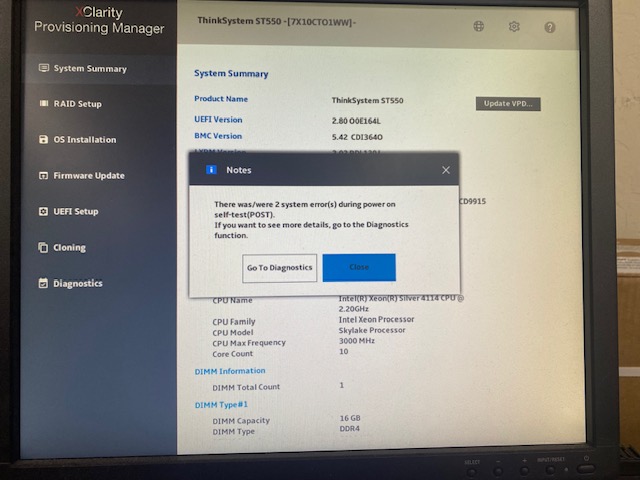
Bios screen.jpg -
OAOmron Application Engineer Omron reply | Mar 10, 2026 at 1:04 PMHello Robert., That's great news. Let's see if we can find root cause of what's going on? Please goto Diagnostics, then System Event Log and send us a screenshot of the issues that have occured? Once you've done that, can you then goto UEFI Setup -> Boot Manager -> Boot Options Once past that, you'll see something like: Windows Boot Manager RAID Volume LSI MegaRAID If Windows Boot Manager exists, they try: Boot Manager → Windows Boot Manager This may boot to windows cleanly. Can you let us know what you find, and please send screenshots of the above? Thanks!

freshdesk-inline-150153008356.png 
freshdesk-inline-150153008646.png -
CCustomer Customer reply | Mar 10, 2026 at 2:33 PMHi Jeremiah, i goto diagnostics and here is a screen shot. Diagnostics still running or freeze. it's been for a while Regards, Robert Khaw New email address: [email]

IMG_9059.jpg -
OAOmron Application Engineer Omron reply | Mar 10, 2026 at 2:49 PMHello Robert, Hmm, ok. This is quite telling. Are you able to hit ESC, and cancel out of that? The diagnostics may take a long time if a disk is failing. Instead of waiting for the scan to finish, please exit diagnostics and go to RAID Setup, then send a screenshot of the RAID virtual disk status and physical disk status. Look for: Virtual Disk Status Physical Disk Status There should be something like: RAID1 – Degraded PD7 – Failed Couple issues here and scenarios here. First Scenario: Only one disk failed (most likely) Fix: 1. Replace the failed disk (one with amber light) 2. RAID rebuild automatically 3. Server continues working Second Scenario: RAID controller failing Fix: Replace: RAID 530-8i controller The RAID config lives on the disks, so it usually imports automatically. This is what I'm going off of here. This RAID should boot up even if one disk is failing, but...it's POSSIBLE that is causing the hangups here. Might be quickest to just get another HD of same size or bigger, and swap that drive out to see if the server automatically rebuilds. Second, I would start looking for another one of these raid controllers that you can buy from a 3rd party. Thoughts? Let me know?
-
OAOmron Application Engineer Omron reply | Mar 10, 2026 at 3:08 PMHello Robert., For your reference, I would look at buying this card IF neccessary: https://www.newegg.com/p/0WX-00DV-00029?item=9SIAD07K753410&utm_source=google&utm_medium=organic+shopping&utm_campaign=knc-googleadwords-_-network%20-%20interface%20cards-_-lenovo-_-9SIAD07K753410&source=region&srsltid=AfmBOoqEBbgO1IfRB7CqfTHhIjUvrHoZW5vMPnruarrMTkitFDOTX4P0yWg
-
CCustomer Customer reply | Mar 10, 2026 at 3:30 PMHi Jeremiah, I try to hit Esc key not stop so should I wait ? Regards, Robert Khaw New email address: [email]
-
OAOmron Application Engineer Omron reply | Mar 10, 2026 at 4:12 PMHello Robert., Yes, like last night, it will eventually get through this. If you ask me, the raid controller card is probably bad, and that's why this is going so slow. Easiest fix would be to pull that HD with teh amber light and see if replacing it with a new HD will "fix" this sluggish issue with the raid controller. Thanks for the update.
-
CCustomer Customer reply | Mar 10, 2026 at 4:21 PMHi Jeremiah, Should I buy the raid controller card that you recommend? pls advise. thanks Regards, Robert Khaw New email address: [email]
-
OAOmron Application Engineer Omron reply | Mar 10, 2026 at 6:46 PMHello Robert., For $275 dollars, I would. Just to have it on hand, and if it doesn't work, you could always return it. First I would try replacing that HD with the amber light, and see if the server jolts back into action. If that fails, replace the raid controller. If that fails, we need to talk about server migration.
-
OIOmron internal Private note | Mar 10, 2026 at 7:11 PMPrivatePlease take a look at ticket 1717401 raised by Robert. khaw [email] Hi guys, Just wanted to make you guys aware of this ticket, as this customer's AXI server has been down for couple days now....and I'm giving guidance, but not sure if we should just be chiming in to offer them a new server to get them up and running (unsure of recovering their RAID data yet)....or just seeing if they're ok with replacing suspect bad parts, all while being down. My last reply in the thread might of made it sound like they have to wait before doing a server migration. Thoughts? Feel free to hijack the ticket if needed. Thanks.
-
CCustomer Customer reply | Mar 10, 2026 at 7:30 PM+ Glen in the email loop. Thanks, John
-
CCustomer Customer reply | Mar 10, 2026 at 7:32 PMOK. I will get the control card and also Hard Drives.the diagnostic still running.I will wait until tomorrow to see the result. Thanks. Regards, Robert Khaw New email address: [email]
-
OAOmron Application Engineer Omron reply | Mar 10, 2026 at 8:04 PMHello Robert., Correction, this is the right card. https://www.newegg.com/p/14G-000U-000M4 This matches the model number of the card in your server. Either way, can you open the server up and confirm this?

freshdesk-inline-150153065515.png -
CCustomer Customer reply | Mar 10, 2026 at 9:09 PMOk. I will check tomorrow. Thanks. Regards, Robert Khaw New email address: [email]
-
OIOmron internal Private note | Mar 10, 2026 at 11:37 PMPrivateFYI, Adam just messaged me and said that this raid controller issue happened as Astronautics, so replacing the card should be good and get them running again.
-
OAOmron Application Engineer Omron reply | Mar 11, 2026 at 1:24 AMHi Robert, As a next step, we recommend replacing the RAID controller in the server. Based on the system configuration, the original controller installed is a Lenovo ThinkSystem RAID 530-8i (Part Number:02JG102). If that controller has failed, the system may hang during hardware initialization or diagnostics as we have observed. One compatible replacement option is the Lenovo ThinkSystem RAID 730-8i (Part Number: 01PE852), which is supported for the ThinkSystem ST550 server. This controller uses the same 12 Gb SAS interface and connectors and should work with the existing drive backplane and cabling. Because the RAID configuration is stored on the disks themselves, the replacement controller should detect the current RAID array during boot and prompt to import the existing configuration, allowing the system to access the data again. A supplier that currently lists this controller with expedited shipping is: https://www.serversupply.com/CONTROLLERS/SAS-SATA/RAID%20CONTROLLER/LENOVO/01PE852_361099.htm After installing the replacement controller, the system should prompt to import the foreign configuration during boot so the existing RAID array can come online. Please ensure the “Import Foreign Configuration” option is selected and avoid initializing or creating a new array, as this could overwrite the existing RAID configuration. The controller replacement itself is a straightforward hardware swap (PCIe card replacement and reconnecting the SAS cables). If needed, we would be happy to assist during installation or while importing the configuration. Wanted to give this option to you versus waiting longer for the previous newegg.com link I showed you. I've done some research and it appears this is a solid option (upgrade) that will get your server back up and running the quickest (1 day turn around). Please let us know if you have any questions. Best regards,
-
CCustomer Customer reply | Mar 11, 2026 at 3:10 PMHi Jeremiah, Thanks for the note and the link for the controller card. Here is an update: the system boots up normally without the RAID card. This confirms that the issue was caused by the failed RAID card. The original controller card installed is a Lenovo ThinkSystem RAID 530-8i (Part Number: 02JG102) REFURBISHED, which is available to order. I think replacing it with the original part would be the best option to avoid any compatibility issues. We are going to place the order now and will let you know the ETA. Thanks again for the support.
-
OAOmron Application Engineer Omron reply | Mar 11, 2026 at 4:49 PMHello Kok, Previously Robert was able to get to this screen below. Can you please try to get this screen below again (I know it took a long time)....and then select the 3 options here? Please export these json files to a disk, so your data isn't lost. Supposably this card "wont" need these files to re-initialize this array, but if you're able to get back to this screen and download these files, it would be very beneficial. Let me know? Do you guys have a RAID expert there that understands all this? I just don't want to see Foxconn lose all their data if the order of operations isn't done properly.

freshdesk-inline-150153226131.png -
CCustomer Customer reply | Mar 11, 2026 at 5:09 PMHi Jeremiah, We’re not experts on this, but we can try your suggestion. However, I’m not sure how we can export the JSON files to disk since we had to remove the RAID card in order to boot into the system settings. Thanks.
-
OAOmron Application Engineer Omron reply | Mar 11, 2026 at 5:12 PMHello Kok, Please reinstall the RAID card, and put the system back to normal. I know it will take a long time to boot to BIOS, but this part could be criticial. Can you please try this? Last time Robert had to boot the server and leave it over night to get the BIOS to show up. Please let us know?
-
CCustomer Customer reply | Mar 11, 2026 at 5:35 PMHi Jeremiah, we reinstall the RAID card and now we can get into the BIOS.see below screen we close the message window and to diagnostic see below screen and now what you want us to do next? Can I call you ? Regards, Robert Khaw New email address: [email]

BIOS.jpg 
diagnostic.jpg -
OAOmron Application Engineer Omron reply | Mar 11, 2026 at 5:35 PMHello Kok. We are discussing options for this. We will get back to you. Sorry for the delay.
-
OAOmron Application Engineer Omron reply | Mar 11, 2026 at 5:37 PMHello Robert., Yes call me [phone]
-
OAOmron Application Engineer Omron reply | Mar 12, 2026 at 8:31 AMHello Kok. I talked with Robert, and he told me that the extra server is a Linux Mint OS. This is example of server we would need. What are the specs on that spare server? Are they somewhat similar? Robert told me he's going to ask IT to see if they can redo it to Windows Server 2019 at least. I talked with one of our supervisors, and they should be sending a quote off to get this temporary server up and running (pending your IT can redo that server). I will add him to this email chain. Thanks,

freshdesk-inline-150153310811.png -
CCustomer Customer reply | Mar 13, 2026 at 2:05 PMHi Jeremiah, Yes, Robert checked with IT and they confirmed that it’s possible to move to Windows Server 2019. Have you sent the quote yet? I’d like the management team to review it and give their approval. The management team is concerned that the line has been down and hasn’t been brought back up for several days. Also, Robert mentioned that you would send instructions on how to successfully retrieve the JSON files. Thanks.
-
OAOmron Application Engineer Omron reply | Mar 13, 2026 at 2:17 PMHello Kok., No I have not sent the quote. I will follow up with Brian Andersen about that. We understand the frustration with the line being down this long. We will work together to find a resolution. @Brian can you please send quote for remote server install? Sounds like their IT has created a Windows 2019 server for us to use. As far as the JSON files, I don't believe we need them. Robert and I were unable to extract them, but I believe it's not neccessary. I will follow up with Brian again right now. Thanks.
-
CCustomer Customer reply | Mar 17, 2026 at 5:36 PMHi Jeremiah, Thank you for helping us last night with all the recovery options. Unfortunately, none of them allowed the system to boot into the Windows Server OS. This is urgent, as we need to recover the data to support the customer’s request. Could you please advise on the next steps as soon as possible? Thanks.
-
OAOmron Application Engineer Omron reply | Mar 20, 2026 at 11:51 AMHello Kok., We have two things to pursue here: Attempt to repair to original server Build a new server For option 1, we are not clear on the path forward for a hardware fix. Here is my recommendation: Since the issue is with the Lenovo hardware, try reaching out to Lenovo to schedule a repair service for the server. Make sure to explain to them that you want to retain your data. I am pretty certain that your Lenovo server is beyond the Lenovo warranty period. They would likely charge Foxconn for the repair, but I cannot comment on their rates. For option 2, a remote server build is no problem for Omron. However, it seems like there are some issues on Foxconn's end procuring suitable server hardware with a compatible OS. We can sell you a new server, but I am guessing that it would be better to use something you have on-site already. Please tell me how you would like to proceed, and I will plan accordingly. Regards,
-
CCustomer Customer reply | Mar 20, 2026 at 9:39 PMHi Jeremiah, Thanks for your note and advice. We would like to move forward by upgrading the current server and bringing it back online. The server has now been upgraded and is ready for you to perform a remote rebuild. I believe the PO has already been sent to you for this service. TeamViewer has been installed, and we will provide the connection IP when you are ready to remote in . Please let me know when you are available to remote in. Here is the current server configuration: Memory upgraded from 16 GB to 64 GB Windows Server 2019 reinstalled on a separate drive (2 x M.2 in RAID) to prevent downtime in case of drive failure 2 x 10 TB drives configured as RAID for data storage (we would like all images stored on this XShareData drive.) The remaining 4 drives are set up as individual drives for backup Thanks.

freshdesk-inline-150154492175.png -
CCustomer Customer reply | Mar 23, 2026 at 4:42 PMHi Jeremiah and Brian, When you will be available to setup the Server?.Appreciated. Regards, Robert Khaw New email address: [email]

freshdesk-inline-150154724510.png -
OIOmron internal Private note | Mar 23, 2026 at 7:23 PMPrivateSubject: RE: Fw: VT-X750 Server enable to boot [Case: 1717401] [ AOI Case# 1719945] has been resolved. Description: Hello Kok., Thank you for your recent inquiry. We’re pleased to inform you that your case 1719945 has been resolved. As always, we're here to support you. If you need assistance in the future, please don’t hesitate to reach out to us via our support email: [email] If you believe further support is needed regarding this case, simply reply to this message with a brief status update, and we’ll be happy to assist you. Brian Andersen Your Omron AOI Technical Support Group
-
OAOmron Application Engineer Omron reply | Mar 24, 2026 at 1:18 PMHello Kok., Apologies for the delay. Jeremiah is on-site this week, so he cannot support this. I can help with this either today or tomorrow if you can provide remote access. Regards,
-
OAOmron Application Engineer Omron reply | Mar 24, 2026 at 3:55 PMHello Kok., Please sign in to the server with the User: "rvs" and Password: "rvs", then start Teamviewer and provide me a connection again. Regards,
-
CCustomer Customer reply | Mar 24, 2026 at 4:32 PMHi Brian, I believe the PC has been rebooted after the software installation. I’ve just logged back in please use the password below: 3f9av6mu Thanks.
-
OAOmron Application Engineer Omron reply | Mar 24, 2026 at 4:34 PMHello Kok., Sorry, please log in again with the rvs user, not the Administrator user. Please click "Log In with another user" to change the user before logging in. After logging in with rvs, please send Teamviewer again Regards,
-
OAOmron Application Engineer Omron reply | Mar 24, 2026 at 4:59 PMHello Kok., Thank you for changing the user. I have 1 or 2 more reboot cycles to perform, can you log back in again? I will try to change the Teamviewer settings to keep me logged in during each reboot.
-
OAOmron Application Engineer Omron reply | Mar 24, 2026 at 5:53 PMHello Kok., I've finished installing the SQL software and environment setup. Just need to run the applications. Can you send Teamviewer one more time?
-
CCustomer Customer reply | Mar 24, 2026 at 5:56 PMHi Brian, e2jv2cjp Thanks.
-
OAOmron Application Engineer Omron reply | Mar 24, 2026 at 6:28 PMHello Kok., I have finished setting up the server, and configured the connections to the X750, CTS-X PC, and RVS-X PC. As far as I can tell, everything should function properly. You guys will have to add some programs to the network and try running them to make sure everything works correctly. Do you have any product you can run now? Regards,
-
CCustomer Customer reply | Mar 24, 2026 at 7:00 PMHi Brian, Thank you! Since all the data has been wiped from the old server, Robert will need to create the new program to test. I’ll ask him to update you on the status once it’s ready. Thanks again for your support.
-
OIOmron internal Private note | Mar 25, 2026 at 3:38 PMPrivateTickets with IDs 1728057 is merged into this ticket.
-
OIOmron internal Private note | Mar 25, 2026 at 3:38 PMPrivateMerged from ticket 1728057 Subject: Fw: Omron - PO#Q260091 - VT-X750 Server enable to boot [Case: 1717401] [Case: 1719945] Description: PC, Please process the attached PO for remote support at Foxconn CA and provide an SA number. Regards, From: [email] Sent: Friday, March 20, 2026 6:51 PM To: Brian Andersen / OEI ; AOISupport-US-A Cc: [email] ; [email] ; [email] ; [email] ; [email] Subject: Omron - PO#Q260091 - VT-X750 Server enable to boot [Case: 1717401] [Case: 1719945] You don't often get email from [email] Learn why this is important Hello Brian, Please find attached PO#Q260091 for Xray machine repair service. Please review and process our PO. Thank you! Phuong Tran iDSBG | San Jose NPI site O +[phone] M +[phone] [email] 1705 Junction Ct. Suite #200, San Jose, CA 95112 From: John Kuo/PCE/FOXCONN From: "AOI Tech Support - US" To: [email] Cc: [email] [email] [email] [email] Date: 03/20/2026 08:51 AM Subject: Re: Fw: VT-X750 Server enable to boot [Case: 1717401] [Case: 1719945] Hello Kok., We have two things to pursue here: 1. Attempt to repair to original server 2. Build a new server For option 1, we are not clear on the path forward for a hardware fix. Here is my recommendation: Since the issue is with the Lenovo hardware, try reaching out to Lenovo to schedule a repair service for the server. Make sure to explain to them that you want to retain your data. I am pretty certain that your Lenovo server is beyond the Lenovo warranty period. They would likely charge Foxconn for the repair, but I cannot comment on their rates. For option 2, a remote server build is no problem for Omron. However, it seems like there are some issues on Foxconn's end procuring suitable server hardware with a compatible OS. We can sell you a new server, but I am guessing that it would be better to use something you have on-site already. Please tell me how you would like to proceed, and I will plan accordingly. Regards, On Tue, 17 Mar at 4:36 PM , Kok. yee wrote: Hi Jeremiah, Thank you for helping us last night with all the recovery options. Unfortunately, none of them allowed the system to boot into the Windows Server OS. This is urgent, as we need to recover the data to support the customer’s request. Could you please advise on the next steps as soon as possible? Thanks. From: "AOI Tech Support - US" To: [email] Cc: [email] [email] [email] [email] Date: 03/13/2026 11:17 AM Subject: Re: Fw: VT-X750 Server enable to boot [Case: 1717401] [Case: 1719945] Hello Kok., No I have not sent the quote. I will follow up with Brian Andersen about that. We understand the frustration with the line being down this long. We will work together to find a resolution. @Brian can you please send quote for remote server install? Sounds like their IT has created a Windows 2019 server for us to use. As far as the JSON files, I don't believe we need them. Robert and I were unable to extract them, but I believe it's not neccessary. I will follow up with Brian again right now. Thanks. On Fri, 13 Mar at 1:05 PM , Kok. yee wrote: Hi Jeremiah, Yes, Robert checked with IT and they confirmed that it’s possible to move to Windows Server 2019. Have you sent the quote yet? I’d like the management team to review it and give their approval. The management team is concerned that the line has been down and hasn’t been brought back up for several days. Also, Robert mentioned that you would send instructions on how to successfully retrieve the JSON files. Thanks. From: "AOI Tech Support - US" To: [email] Cc: [email] [email] [email] [email] Date: 03/12/2026 05:31 AM Subject: Re: Fw: VT-X750 Server enable to boot [Case: 1717401] [Case: 1719945] Hello Kok. I talked with Robert, and he told me that the extra server is a Linux Mint OS. This is example of server we would need. What are the specs on that spare server? Are they somewhat similar? Robert told me he's going to ask IT to see if they can redo it to Windows Server 2019 at least. I talked with one of our supervisors, and they should be sending a quote off to get this temporary server up and running (pending your IT can redo that server). I will add him to this email chain. Thanks, On Wed, 11 Mar at 4:35 PM , AOI Tech Support - US wrote: Hello Kok. We are discussing options for this. We will get back to you. Sorry for the delay. On Wed, 11 Mar at 4:02 PM , Kok. yee wrote: Hi Jeremiah, We have placed an order for the RAID card, and the ETA is next Friday (3/20) or the following week. The downtime will be more than a week, and we have units that need to be tested to meet the shipping commitment. We do have a server that we can temporarily set up to support the production process until we receive the replacement card. Could you please advise what needs to be installed or configured on the server to support this? Thanks. ----- Forwarded by Kok Yee/USA/FOXCONN on 03/11/2026 01:48 PM ----- From: Kok Yee/USA/FOXCONN To: "AOI Tech Support - US" Cc: [email] [email] Simon [email] Date: 03/11/2026 12:09 PM Subject: Re: VT-X750 Server enable to boot [Case: 1717401] Hi Jeremiah, Thanks for the note and the link for the controller card. Here is an update: the system boots up normally without the RAID card. This confirms that the issue was caused by the failed RAID card. The original controller card installed is a Lenovo ThinkSystem RAID 530-8i (Part Number: 02JG102) REFURBISHED, which is available to order. I think replacing it with the original part would be the best option to avoid any compatibility issues. We are going to place the order now and will let you know the ETA. Thanks again for the support. From: "AOI Tech Support - US" To: [email] Cc: [email] [email] Date: 03/11/2026 11:42 AM Subject: Re: VT-X750 Server enable to boot [Case: 1717401] Hi Robert, As a next step, we recommend replacing the RAID controller in the server. Based on the system configuration, the original controller installed is a Lenovo ThinkSystem RAID 530-8i (Part Number:02JG102). If that controller has failed, the system may hang during hardware initialization or diagnostics as we have observed. One compatible replacement option is the Lenovo ThinkSystem RAID 730-8i (Part Number: 01PE852), which is supported for the ThinkSystem ST550 server. This controller uses the same 12 Gb SAS interface and connectors and should work with the existing drive backplane and cabling. Because the RAID configuration is stored on the disks themselves, the replacement controller should detect the current RAID array during boot and prompt to import the existing configuration, allowing the system to access the data again. A supplier that currently lists this controller with expedited shipping is: https://www.serversupply.com/CONTROLLERS/SAS-SATA/RAID%20CONTROLLER/LENOVO/01PE852_361099.htm After installing the replacement controller, the system should prompt to import the foreign configuration during boot so the existing RAID array can come online. Please ensure the “Import Foreign Configuration” option is selected and avoid initializing or creating a new array, as this could overwrite the existing RAID configuration. The controller replacement itself is a straightforward hardware swap (PCIe card replacement and reconnecting the SAS cables). If needed, we would be happy to assist during installation or while importing the configuration. Wanted to give this option to you versus waiting longer for the previous newegg.com link I showed you. I've done some research and it appears this is a solid option (upgrade) that will get your server back up and running the quickest (1 day turn around). Please let us know if you have any questions. Best regards, On Tue, 10 Mar at 8:09 PM , Robert. khaw wrote: Ok. I will check tomorrow. Thanks. Regards, Robert Khaw New email address: [email] From: "AOI Tech Support - US" To: [email] Cc: [email] [email] Date: 03/10/2026 05:04 PM Subject: Re: VT-X750 Server enable to boot [Case: 1717401] Hello Robert., Correction, this is the right card. https://www.newegg.com/p/14G-000U-000M4 This matches the model number of the card in your server. Either way, can you open the server up and confirm this? On Tue, 10 Mar at 6:32 PM , Robert. khaw wrote: OK. I will get the control card and also Hard Drives.the diagnostic still running.I will wait until tomorrow to see the result. Thanks. Regards, Robert Khaw New email address: [email] From: "AOI Tech Support - US" To: [email] Cc: [email] Date: 03/10/2026 03:46 PM Subject: Re: VT-X750 Server enable to boot [Case: 1717401] Hello Robert., For $275 dollars, I would. Just to have it on hand, and if it doesn't work, you could always return it. First I would try replacing that HD with the amber light, and see if the server jolts back into action. If that fails, replace the raid controller. If that fails, we need to talk about server migration. On Tue, 10 Mar at 3:21 PM , Robert. khaw wrote: Hi Jeremiah, Should I buy the raid controller card that you recommend? pls advise. thanks Regards, Robert Khaw New email address: [email] From: "AOI Tech Support - US" To: [email] Cc: [email] Date: 03/10/2026 01:12 PM Subject: Re: VT-X750 Server enable to boot [Case: 1717401] Hello Robert., Yes, like last night, it will eventually get through this. If you ask me, the raid controller card is probably bad, and that's why this is going so slow. Easiest fix would be to pull that HD with teh amber light and see if replacing it with a new HD will "fix" this sluggish issue with the raid controller. Thanks for the update. On Tue, 10 Mar at 2:30 PM , Robert. khaw wrote: Hi Jeremiah, I try to hit Esc key not stop so should I wait ? Regards, Robert Khaw New email address: [email] From: "AOI Tech Support - US" To: [email] Cc: [email] Date: 03/10/2026 11:49 AM Subject: Re: VT-X750 Server enable to boot [Case: 1717401] Hello Robert, Hmm, ok. This is quite telling. Are you able to hit ESC, and cancel out of that? The diagnostics may take a long time if a disk is failing. Instead of waiting for the scan to finish, please exit diagnostics and go to RAID Setup, then send a screenshot of the RAID virtual disk status and physical disk status. Look for: Virtual Disk Status Physical Disk Status There should be something like: RAID1 – Degraded PD7 – Failed Couple issues here and scenarios here. First Scenario: Only one disk failed (most likely) Fix: 1. Replace the failed disk (one with amber light) 2. RAID rebuild automatically 3. Server continues working Second Scenario: RAID controller failing Fix: Replace: RAID 530-8i controller The RAID config lives on the disks, so it usually imports automatically. This is what I'm going off of here. This RAID should boot up even if one disk is failing, but...it's POSSIBLE that is causing the hangups here. Might be quickest to just get another HD of same size or bigger, and swap that drive out to see if the server automatically rebuilds. Second, I would start looking for another one of these raid controllers that you can buy from a 3rd party. Thoughts? Let me know? On Tue, 10 Mar at 1:33 PM , Robert. khaw wrote: Hi Jeremiah, i goto diagnostics and here is a screen shot. Diagnostics still running or freeze. it's been for a while Regards, Robert Khaw New email address: [email] From: "AOI Tech Support - US" To: [email] Cc: [email] Date: 03/10/2026 10:04 AM Subject: Re: VT-X750 Server enable to boot [Case: 1717401] Hello Robert., That's great news. Let's see if we can find root cause of what's going on? Please goto Diagnostics, then System Event Log and send us a screenshot of the issues that have occured? Once you've done that, can you then goto UEFI Setup -> Boot Manager -> Boot Options Once past that, you'll see something like: Windows Boot Manager RAID Volume LSI MegaRAID If Windows Boot Manager exists, they try: Boot Manager → Windows Boot Manager This may boot to windows cleanly. Can you let us know what you find, and please send screenshots of the above? Thanks! On Tue, 10 Mar at 11:38 AM , Robert. khaw wrote: Hi Jeremiah, yesterday i let the system on over night and this morning on the screen show Bios with the note. please advise. see below image. Regards, Robert Khaw New email address: [email] From: "AOI Tech Support - US" To: [email] Cc: [email] Date: 03/10/2026 08:24 AM Subject: Re: VT-X750 Server enable to boot [Case: 1717401] Hello Robert., Any update on this? On Mon, 9 Mar at 9:33 PM , AOI Tech Support - US wrote: Hello Robert., Can you do a test for us? Please power off the server, open the PC and remove this card from the PCI-e slot? Once removed, try to power the server back up, and see if you get past POST. Let us know? On Mon, 9 Mar at 4:02 PM , Robert. khaw wrote: Please power the server off completely by holding the power button for about 10 seconds. done. After it powers off, disconnect the power cable for about 30 seconds. Done Then remove the drive in slot HD7 (the one showing the green and amber LED) and power the server back on. Done A failed drive can sometimes prevent the RAID controller from completing initialization during boot. Let us know if this resolves the issue? Or at least gets you to the BIOS screen? Still can not get into the BIOS If it still freezes, then try to unplug the keyboard and mouse as well, then reboot again. unplus keyboard and mouse. Done. no help. Regards, Robert Khaw New email address: [email] From: "AOI Tech Support - US" To: [email] Cc: [email] Date: 03/09/2026 12:58 PM Subject: Re: VT-X750 Server enable to boot [Case: 1717401] Hello Robert., Please power the server off completely by holding the power button for about 10 seconds. After it powers off, disconnect the power cable for about 30 seconds. Then remove the drive in slot HD7 (the one showing the green and amber LED) and power the server back on. A failed drive can sometimes prevent the RAID controller from completing initialization during boot. Let us know if this resolves the issue? Or at least gets you to the BIOS screen? If it still freezes, then try to unplug the keyboard and mouse as well, then reboot again. On Mon, 9 Mar at 2:40 PM , Robert. khaw wrote: Hi Jeremiah, Any of the function keys no response so I can not able to log in to the BIOS setup. please advise. Thanks. Regards, Robert Khaw New email address: [email] From: "AOI Tech Support - US" To: [email] Cc: [email] Date: 03/09/2026 12:33 PM Subject: Re: VT-X750 Server enable to boot [Case: 1717401] Hello Robert., Please reboot the server and repeatedly press F1 when the Lenovo logo appears to enter the BIOS setup. Once inside: 1. Go to Boot Options / Boot Manager and check if Windows Boot Manager is listed. 2. Go to System Settings → Storage → RAID Configuration and check the status of the RAID virtual disk (Optimal / Degraded / Missing). 3. Check the System Event Log for any disk or RAID errors. Please send screenshots or photos of these screens so we can determine the next step. On Mon, 9 Mar at 1:31 PM , Robert. khaw wrote: Hi Jeremiah, Please reboot the server and press F12 when the Lenovo logo appears. After reboot the server Press F12 but the system no response see screen shot Can you look at the front of the server, and tell me if you see all "Green" lights for the HD? Check front panel HD light on Slot HD7 has Green and Amber light on.The rest of the HD slots are Green lights. Regards, Robert Khaw New email address: [email] From: "AOI Tech Support - US" To: [email] Cc: [email] Date: 03/09/2026 10:41 AM Subject: Re: VT-X750 Server enable to boot [Case: 1717401] Hello Robert., Please reboot the server and press F12 when the Lenovo logo appears. In the One-Time Boot Menu, check if Windows Boot Manager is listed. If it appears, please select it to attempt a normal boot. If it is not listed, reboot again and press F1 to enter System Setup, then check Storage → RAID Configuration and confirm whether the RAID virtual disk is present and healthy. Also, can you look at the front of the server, and tell me if you see all "Green" lights for the HD? Green LED = healthy Amber LED = failed No LED = drive not detected On Mon, 9 Mar at 12:38 PM , Johnkuo wrote: HI Omron Service, It looks like the server is down, Please take a look, How can we solve the issue? Or replacement of the computer is needed? Thanks, John Kuo From: Robert Khaw/USA/FOXCONN To: "AOI Tech Support - US" Cc: John [email] Date: 03/09/2026 10:00 AM Subject: VT-X750 Server enable to boot Sent by: robert khaw Hi, The Server enable to boot. below is screen shot. Thanks. This morning Regards, Robert Khaw New email address: [email] From: "AOI Tech Support - US" To: [email] Date: 02/05/2026 07:26 AM Subject: RE: RE: RE: Follow up regarding "Destination" error text you sent me [ AOI Case# 1669147] has been resolved. [ AOI Case# 1679080] has been resolved. [ AOI Case# 1689910] has been resolved. Hello Robert., Thank you for your recent inquiry. We’re pleased to inform you that your case 1689910 has been resolved. As always, we're here to support you. If you need assistance in the future, please don’t hesitate to reach out to us via our support email: [email] If you believe further support is needed regarding this case, simply reply to this message with a brief status update, and we’ll be happy to assist you. Ryan Morrow Your Omron AOI Technical Support Group 1689910:2549832 1717401:2549832 1717401:2549832 1717401:2549832 1717401:2549832 1717401:2549832 1717401:2549832 1717401:2549832 1717401:2549832 1717401:2549832 1717401:2549832 1719945:2549832 1719945:2549832 1719945:2549832 WARNING! This is an email from an external party. Do not click on any link or open any attachment if you cannot ascertain that it is safe.
-
OIOmron internal Private note | Mar 25, 2026 at 3:38 PMPrivateThis ticket is closed and merged into ticket 1717401
-
OIOmron internal Private note | Mar 25, 2026 at 3:39 PMPrivateTickets with IDs 1719945 is merged into this ticket.
-
OIOmron internal Private note | Mar 25, 2026 at 3:39 PMPrivateMerged from ticket 1719945 Subject: Fw: VT-X750 Server enable to boot [Case: 1717401] Description: Hi Jeremiah, We have placed an order for the RAID card, and the ETA is next Friday (3/20) or the following week. The downtime will be more than a week, and we have units that need to be tested to meet the shipping commitment. We do have a server that we can temporarily set up to support the production process until we receive the replacement card. Could you please advise what needs to be installed or configured on the server to support this? Thanks. ----- Forwarded by Kok Yee/USA/FOXCONN on 03/11/2026 01:48 PM ----- From: Kok Yee/USA/FOXCONN To: "AOI Tech Support - US" Cc: [email] [email] Simon [email] Date: 03/11/2026 12:09 PM Subject: Re: VT-X750 Server enable to boot [Case: 1717401] Hi Jeremiah, Thanks for the note and the link for the controller card. Here is an update: the system boots up normally without the RAID card. This confirms that the issue was caused by the failed RAID card. The original controller card installed is a Lenovo ThinkSystem RAID 530-8i (Part Number: 02JG102) REFURBISHED, which is available to order. I think replacing it with the original part would be the best option to avoid any compatibility issues. We are going to place the order now and will let you know the ETA. Thanks again for the support. From: "AOI Tech Support - US" To: [email] Cc: [email] [email] Date: 03/11/2026 11:42 AM Subject: Re: VT-X750 Server enable to boot [Case: 1717401] Hi Robert, As a next step, we recommend replacing the RAID controller in the server. Based on the system configuration, the original controller installed is a Lenovo ThinkSystem RAID 530-8i (Part Number:02JG102). If that controller has failed, the system may hang during hardware initialization or diagnostics as we have observed. One compatible replacement option is the Lenovo ThinkSystem RAID 730-8i (Part Number: 01PE852), which is supported for the ThinkSystem ST550 server. This controller uses the same 12 Gb SAS interface and connectors and should work with the existing drive backplane and cabling. Because the RAID configuration is stored on the disks themselves, the replacement controller should detect the current RAID array during boot and prompt to import the existing configuration, allowing the system to access the data again. A supplier that currently lists this controller with expedited shipping is: https://www.serversupply.com/CONTROLLERS/SAS-SATA/RAID%20CONTROLLER/LENOVO/01PE852_361099.htm After installing the replacement controller, the system should prompt to import the foreign configuration during boot so the existing RAID array can come online. Please ensure the “Import Foreign Configuration” option is selected and avoid initializing or creating a new array, as this could overwrite the existing RAID configuration. The controller replacement itself is a straightforward hardware swap (PCIe card replacement and reconnecting the SAS cables). If needed, we would be happy to assist during installation or while importing the configuration. Wanted to give this option to you versus waiting longer for the previous newegg.com link I showed you. I've done some research and it appears this is a solid option (upgrade) that will get your server back up and running the quickest (1 day turn around). Please let us know if you have any questions. Best regards, On Tue, 10 Mar at 8:09 PM , Robert. khaw wrote: Ok. I will check tomorrow. Thanks. Regards, Robert Khaw New email address: [email] From: "AOI Tech Support - US" To: [email] Cc: [email] [email] Date: 03/10/2026 05:04 PM Subject: Re: VT-X750 Server enable to boot [Case: 1717401] Hello Robert., Correction, this is the right card. https://www.newegg.com/p/14G-000U-000M4 This matches the model number of the card in your server. Either way, can you open the server up and confirm this? On Tue, 10 Mar at 6:32 PM , Robert. khaw wrote: OK. I will get the control card and also Hard Drives.the diagnostic still running.I will wait until tomorrow to see the result. Thanks. Regards, Robert Khaw New email address: [email] From: "AOI Tech Support - US" To: [email] Cc: [email] Date: 03/10/2026 03:46 PM Subject: Re: VT-X750 Server enable to boot [Case: 1717401] Hello Robert., For $275 dollars, I would. Just to have it on hand, and if it doesn't work, you could always return it. First I would try replacing that HD with the amber light, and see if the server jolts back into action. If that fails, replace the raid controller. If that fails, we need to talk about server migration. On Tue, 10 Mar at 3:21 PM , Robert. khaw wrote: Hi Jeremiah, Should I buy the raid controller card that you recommend? pls advise. thanks Regards, Robert Khaw New email address: [email] From: "AOI Tech Support - US" To: [email] Cc: [email] Date: 03/10/2026 01:12 PM Subject: Re: VT-X750 Server enable to boot [Case: 1717401] Hello Robert., Yes, like last night, it will eventually get through this. If you ask me, the raid controller card is probably bad, and that's why this is going so slow. Easiest fix would be to pull that HD with teh amber light and see if replacing it with a new HD will "fix" this sluggish issue with the raid controller. Thanks for the update. On Tue, 10 Mar at 2:30 PM , Robert. khaw wrote: Hi Jeremiah, I try to hit Esc key not stop so should I wait ? Regards, Robert Khaw New email address: [email] From: "AOI Tech Support - US" To: [email] Cc: [email] Date: 03/10/2026 11:49 AM Subject: Re: VT-X750 Server enable to boot [Case: 1717401] Hello Robert, Hmm, ok. This is quite telling. Are you able to hit ESC, and cancel out of that? The diagnostics may take a long time if a disk is failing. Instead of waiting for the scan to finish, please exit diagnostics and go to RAID Setup, then send a screenshot of the RAID virtual disk status and physical disk status. Look for: Virtual Disk Status Physical Disk Status There should be something like: RAID1 – Degraded PD7 – Failed Couple issues here and scenarios here. First Scenario: Only one disk failed (most likely) Fix: 1. Replace the failed disk (one with amber light) 2. RAID rebuild automatically 3. Server continues working Second Scenario: RAID controller failing Fix: Replace: RAID 530-8i controller The RAID config lives on the disks, so it usually imports automatically. This is what I'm going off of here. This RAID should boot up even if one disk is failing, but...it's POSSIBLE that is causing the hangups here. Might be quickest to just get another HD of same size or bigger, and swap that drive out to see if the server automatically rebuilds. Second, I would start looking for another one of these raid controllers that you can buy from a 3rd party. Thoughts? Let me know? On Tue, 10 Mar at 1:33 PM , Robert. khaw wrote: Hi Jeremiah, i goto diagnostics and here is a screen shot. Diagnostics still running or freeze. it's been for a while Regards, Robert Khaw New email address: [email] From: "AOI Tech Support - US" To: [email] Cc: [email] Date: 03/10/2026 10:04 AM Subject: Re: VT-X750 Server enable to boot [Case: 1717401] Hello Robert., That's great news. Let's see if we can find root cause of what's going on? Please goto Diagnostics, then System Event Log and send us a screenshot of the issues that have occured? Once you've done that, can you then goto UEFI Setup -> Boot Manager -> Boot Options Once past that, you'll see something like: Windows Boot Manager RAID Volume LSI MegaRAID If Windows Boot Manager exists, they try: Boot Manager → Windows Boot Manager This may boot to windows cleanly. Can you let us know what you find, and please send screenshots of the above? Thanks! On Tue, 10 Mar at 11:38 AM , Robert. khaw wrote: Hi Jeremiah, yesterday i let the system on over night and this morning on the screen show Bios with the note. please advise. see below image. Regards, Robert Khaw New email address: [email] From: "AOI Tech Support - US" To: [email] Cc: [email] Date: 03/10/2026 08:24 AM Subject: Re: VT-X750 Server enable to boot [Case: 1717401] Hello Robert., Any update on this? On Mon, 9 Mar at 9:33 PM , AOI Tech Support - US wrote: Hello Robert., Can you do a test for us? Please power off the server, open the PC and remove this card from the PCI-e slot? Once removed, try to power the server back up, and see if you get past POST. Let us know? On Mon, 9 Mar at 4:02 PM , Robert. khaw wrote: Please power the server off completely by holding the power button for about 10 seconds. done. After it powers off, disconnect the power cable for about 30 seconds. Done Then remove the drive in slot HD7 (the one showing the green and amber LED) and power the server back on. Done A failed drive can sometimes prevent the RAID controller from completing initialization during boot. Let us know if this resolves the issue? Or at least gets you to the BIOS screen? Still can not get into the BIOS If it still freezes, then try to unplug the keyboard and mouse as well, then reboot again. unplus keyboard and mouse. Done. no help. Regards, Robert Khaw New email address: [email] From: "AOI Tech Support - US" To: [email] Cc: [email] Date: 03/09/2026 12:58 PM Subject: Re: VT-X750 Server enable to boot [Case: 1717401] Hello Robert., Please power the server off completely by holding the power button for about 10 seconds. After it powers off, disconnect the power cable for about 30 seconds. Then remove the drive in slot HD7 (the one showing the green and amber LED) and power the server back on. A failed drive can sometimes prevent the RAID controller from completing initialization during boot. Let us know if this resolves the issue? Or at least gets you to the BIOS screen? If it still freezes, then try to unplug the keyboard and mouse as well, then reboot again. On Mon, 9 Mar at 2:40 PM , Robert. khaw wrote: Hi Jeremiah, Any of the function keys no response so I can not able to log in to the BIOS setup. please advise. Thanks. Regards, Robert Khaw New email address: [email] From: "AOI Tech Support - US" To: [email] Cc: [email] Date: 03/09/2026 12:33 PM Subject: Re: VT-X750 Server enable to boot [Case: 1717401] Hello Robert., Please reboot the server and repeatedly press F1 when the Lenovo logo appears to enter the BIOS setup. Once inside: 1. Go to Boot Options / Boot Manager and check if Windows Boot Manager is listed. 2. Go to System Settings → Storage → RAID Configuration and check the status of the RAID virtual disk (Optimal / Degraded / Missing). 3. Check the System Event Log for any disk or RAID errors. Please send screenshots or photos of these screens so we can determine the next step. On Mon, 9 Mar at 1:31 PM , Robert. khaw wrote: Hi Jeremiah, Please reboot the server and press F12 when the Lenovo logo appears. After reboot the server Press F12 but the system no response see screen shot Can you look at the front of the server, and tell me if you see all "Green" lights for the HD? Check front panel HD light on Slot HD7 has Green and Amber light on.The rest of the HD slots are Green lights. Regards, Robert Khaw New email address: [email] From: "AOI Tech Support - US" To: [email] Cc: [email] Date: 03/09/2026 10:41 AM Subject: Re: VT-X750 Server enable to boot [Case: 1717401] Hello Robert., Please reboot the server and press F12 when the Lenovo logo appears. In the One-Time Boot Menu, check if Windows Boot Manager is listed. If it appears, please select it to attempt a normal boot. If it is not listed, reboot again and press F1 to enter System Setup, then check Storage → RAID Configuration and confirm whether the RAID virtual disk is present and healthy. Also, can you look at the front of the server, and tell me if you see all "Green" lights for the HD? Green LED = healthy Amber LED = failed No LED = drive not detected On Mon, 9 Mar at 12:38 PM , Johnkuo wrote: HI Omron Service, It looks like the server is down, Please take a look, How can we solve the issue? Or replacement of the computer is needed? Thanks, John Kuo From: Robert Khaw/USA/FOXCONN To: "AOI Tech Support - US" Cc: John [email] Date: 03/09/2026 10:00 AM Subject: VT-X750 Server enable to boot Sent by: robert khaw Hi, The Server enable to boot. below is screen shot. Thanks. This morning Regards, Robert Khaw New email address: [email] From: "AOI Tech Support - US" To: [email] Date: 02/05/2026 07:26 AM Subject: RE: RE: RE: Follow up regarding "Destination" error text you sent me [ AOI Case# 1669147] has been resolved. [ AOI Case# 1679080] has been resolved. [ AOI Case# 1689910] has been resolved. Hello Robert., Thank you for your recent inquiry. We’re pleased to inform you that your case 1689910 has been resolved. As always, we're here to support you. If you need assistance in the future, please don’t hesitate to reach out to us via our support email: [email] If you believe further support is needed regarding this case, simply reply to this message with a brief status update, and we’ll be happy to assist you. Ryan Morrow Your Omron AOI Technical Support Group 1689910:2549832 1717401:2549832 1717401:2549832 1717401:2549832 1717401:2549832 1717401:2549832 1717401:2549832 1717401:2549832 1717401:2549832 1717401:2549832 1717401:2549832
-
OIOmron internal Private note | Mar 25, 2026 at 3:40 PMPrivateTickets with IDs 1728057 is merged into this ticket.
-
OIOmron internal Private note | Mar 25, 2026 at 3:40 PMPrivateMerged from ticket 1728057 Subject: Fw: Omron - PO#Q260091 - VT-X750 Server enable to boot [Case: 1717401] [Case: 1719945] Description: PC, Please process the attached PO for remote support at Foxconn CA and provide an SA number. Regards, From: [email] Sent: Friday, March 20, 2026 6:51 PM To: Brian Andersen / OEI ; AOISupport-US-A Cc: [email] ; [email] ; [email] ; [email] ; [email] Subject: Omron - PO#Q260091 - VT-X750 Server enable to boot [Case: 1717401] [Case: 1719945] You don't often get email from [email] Learn why this is important Hello Brian, Please find attached PO#Q260091 for Xray machine repair service. Please review and process our PO. Thank you! Phuong Tran iDSBG | San Jose NPI site O +[phone] M +[phone] [email] 1705 Junction Ct. Suite #200, San Jose, CA 95112 From: John Kuo/PCE/FOXCONN From: "AOI Tech Support - US" To: [email] Cc: [email] [email] [email] [email] Date: 03/20/2026 08:51 AM Subject: Re: Fw: VT-X750 Server enable to boot [Case: 1717401] [Case: 1719945] Hello Kok., We have two things to pursue here: 1. Attempt to repair to original server 2. Build a new server For option 1, we are not clear on the path forward for a hardware fix. Here is my recommendation: Since the issue is with the Lenovo hardware, try reaching out to Lenovo to schedule a repair service for the server. Make sure to explain to them that you want to retain your data. I am pretty certain that your Lenovo server is beyond the Lenovo warranty period. They would likely charge Foxconn for the repair, but I cannot comment on their rates. For option 2, a remote server build is no problem for Omron. However, it seems like there are some issues on Foxconn's end procuring suitable server hardware with a compatible OS. We can sell you a new server, but I am guessing that it would be better to use something you have on-site already. Please tell me how you would like to proceed, and I will plan accordingly. Regards, On Tue, 17 Mar at 4:36 PM , Kok. yee wrote: Hi Jeremiah, Thank you for helping us last night with all the recovery options. Unfortunately, none of them allowed the system to boot into the Windows Server OS. This is urgent, as we need to recover the data to support the customer’s request. Could you please advise on the next steps as soon as possible? Thanks. From: "AOI Tech Support - US" To: [email] Cc: [email] [email] [email] [email] Date: 03/13/2026 11:17 AM Subject: Re: Fw: VT-X750 Server enable to boot [Case: 1717401] [Case: 1719945] Hello Kok., No I have not sent the quote. I will follow up with Brian Andersen about that. We understand the frustration with the line being down this long. We will work together to find a resolution. @Brian can you please send quote for remote server install? Sounds like their IT has created a Windows 2019 server for us to use. As far as the JSON files, I don't believe we need them. Robert and I were unable to extract them, but I believe it's not neccessary. I will follow up with Brian again right now. Thanks. On Fri, 13 Mar at 1:05 PM , Kok. yee wrote: Hi Jeremiah, Yes, Robert checked with IT and they confirmed that it’s possible to move to Windows Server 2019. Have you sent the quote yet? I’d like the management team to review it and give their approval. The management team is concerned that the line has been down and hasn’t been brought back up for several days. Also, Robert mentioned that you would send instructions on how to successfully retrieve the JSON files. Thanks. From: "AOI Tech Support - US" To: [email] Cc: [email] [email] [email] [email] Date: 03/12/2026 05:31 AM Subject: Re: Fw: VT-X750 Server enable to boot [Case: 1717401] [Case: 1719945] Hello Kok. I talked with Robert, and he told me that the extra server is a Linux Mint OS. This is example of server we would need. What are the specs on that spare server? Are they somewhat similar? Robert told me he's going to ask IT to see if they can redo it to Windows Server 2019 at least. I talked with one of our supervisors, and they should be sending a quote off to get this temporary server up and running (pending your IT can redo that server). I will add him to this email chain. Thanks, On Wed, 11 Mar at 4:35 PM , AOI Tech Support - US wrote: Hello Kok. We are discussing options for this. We will get back to you. Sorry for the delay. On Wed, 11 Mar at 4:02 PM , Kok. yee wrote: Hi Jeremiah, We have placed an order for the RAID card, and the ETA is next Friday (3/20) or the following week. The downtime will be more than a week, and we have units that need to be tested to meet the shipping commitment. We do have a server that we can temporarily set up to support the production process until we receive the replacement card. Could you please advise what needs to be installed or configured on the server to support this? Thanks. ----- Forwarded by Kok Yee/USA/FOXCONN on 03/11/2026 01:48 PM ----- From: Kok Yee/USA/FOXCONN To: "AOI Tech Support - US" Cc: [email] [email] Simon [email] Date: 03/11/2026 12:09 PM Subject: Re: VT-X750 Server enable to boot [Case: 1717401] Hi Jeremiah, Thanks for the note and the link for the controller card. Here is an update: the system boots up normally without the RAID card. This confirms that the issue was caused by the failed RAID card. The original controller card installed is a Lenovo ThinkSystem RAID 530-8i (Part Number: 02JG102) REFURBISHED, which is available to order. I think replacing it with the original part would be the best option to avoid any compatibility issues. We are going to place the order now and will let you know the ETA. Thanks again for the support. From: "AOI Tech Support - US" To: [email] Cc: [email] [email] Date: 03/11/2026 11:42 AM Subject: Re: VT-X750 Server enable to boot [Case: 1717401] Hi Robert, As a next step, we recommend replacing the RAID controller in the server. Based on the system configuration, the original controller installed is a Lenovo ThinkSystem RAID 530-8i (Part Number:02JG102). If that controller has failed, the system may hang during hardware initialization or diagnostics as we have observed. One compatible replacement option is the Lenovo ThinkSystem RAID 730-8i (Part Number: 01PE852), which is supported for the ThinkSystem ST550 server. This controller uses the same 12 Gb SAS interface and connectors and should work with the existing drive backplane and cabling. Because the RAID configuration is stored on the disks themselves, the replacement controller should detect the current RAID array during boot and prompt to import the existing configuration, allowing the system to access the data again. A supplier that currently lists this controller with expedited shipping is: https://www.serversupply.com/CONTROLLERS/SAS-SATA/RAID%20CONTROLLER/LENOVO/01PE852_361099.htm After installing the replacement controller, the system should prompt to import the foreign configuration during boot so the existing RAID array can come online. Please ensure the “Import Foreign Configuration” option is selected and avoid initializing or creating a new array, as this could overwrite the existing RAID configuration. The controller replacement itself is a straightforward hardware swap (PCIe card replacement and reconnecting the SAS cables). If needed, we would be happy to assist during installation or while importing the configuration. Wanted to give this option to you versus waiting longer for the previous newegg.com link I showed you. I've done some research and it appears this is a solid option (upgrade) that will get your server back up and running the quickest (1 day turn around). Please let us know if you have any questions. Best regards, On Tue, 10 Mar at 8:09 PM , Robert. khaw wrote: Ok. I will check tomorrow. Thanks. Regards, Robert Khaw New email address: [email] From: "AOI Tech Support - US" To: [email] Cc: [email] [email] Date: 03/10/2026 05:04 PM Subject: Re: VT-X750 Server enable to boot [Case: 1717401] Hello Robert., Correction, this is the right card. https://www.newegg.com/p/14G-000U-000M4 This matches the model number of the card in your server. Either way, can you open the server up and confirm this? On Tue, 10 Mar at 6:32 PM , Robert. khaw wrote: OK. I will get the control card and also Hard Drives.the diagnostic still running.I will wait until tomorrow to see the result. Thanks. Regards, Robert Khaw New email address: [email] From: "AOI Tech Support - US" To: [email] Cc: [email] Date: 03/10/2026 03:46 PM Subject: Re: VT-X750 Server enable to boot [Case: 1717401] Hello Robert., For $275 dollars, I would. Just to have it on hand, and if it doesn't work, you could always return it. First I would try replacing that HD with the amber light, and see if the server jolts back into action. If that fails, replace the raid controller. If that fails, we need to talk about server migration. On Tue, 10 Mar at 3:21 PM , Robert. khaw wrote: Hi Jeremiah, Should I buy the raid controller card that you recommend? pls advise. thanks Regards, Robert Khaw New email address: [email] From: "AOI Tech Support - US" To: [email] Cc: [email] Date: 03/10/2026 01:12 PM Subject: Re: VT-X750 Server enable to boot [Case: 1717401] Hello Robert., Yes, like last night, it will eventually get through this. If you ask me, the raid controller card is probably bad, and that's why this is going so slow. Easiest fix would be to pull that HD with teh amber light and see if replacing it with a new HD will "fix" this sluggish issue with the raid controller. Thanks for the update. On Tue, 10 Mar at 2:30 PM , Robert. khaw wrote: Hi Jeremiah, I try to hit Esc key not stop so should I wait ? Regards, Robert Khaw New email address: [email] From: "AOI Tech Support - US" To: [email] Cc: [email] Date: 03/10/2026 11:49 AM Subject: Re: VT-X750 Server enable to boot [Case: 1717401] Hello Robert, Hmm, ok. This is quite telling. Are you able to hit ESC, and cancel out of that? The diagnostics may take a long time if a disk is failing. Instead of waiting for the scan to finish, please exit diagnostics and go to RAID Setup, then send a screenshot of the RAID virtual disk status and physical disk status. Look for: Virtual Disk Status Physical Disk Status There should be something like: RAID1 – Degraded PD7 – Failed Couple issues here and scenarios here. First Scenario: Only one disk failed (most likely) Fix: 1. Replace the failed disk (one with amber light) 2. RAID rebuild automatically 3. Server continues working Second Scenario: RAID controller failing Fix: Replace: RAID 530-8i controller The RAID config lives on the disks, so it usually imports automatically. This is what I'm going off of here. This RAID should boot up even if one disk is failing, but...it's POSSIBLE that is causing the hangups here. Might be quickest to just get another HD of same size or bigger, and swap that drive out to see if the server automatically rebuilds. Second, I would start looking for another one of these raid controllers that you can buy from a 3rd party. Thoughts? Let me know? On Tue, 10 Mar at 1:33 PM , Robert. khaw wrote: Hi Jeremiah, i goto diagnostics and here is a screen shot. Diagnostics still running or freeze. it's been for a while Regards, Robert Khaw New email address: [email] From: "AOI Tech Support - US" To: [email] Cc: [email] Date: 03/10/2026 10:04 AM Subject: Re: VT-X750 Server enable to boot [Case: 1717401] Hello Robert., That's great news. Let's see if we can find root cause of what's going on? Please goto Diagnostics, then System Event Log and send us a screenshot of the issues that have occured? Once you've done that, can you then goto UEFI Setup -> Boot Manager -> Boot Options Once past that, you'll see something like: Windows Boot Manager RAID Volume LSI MegaRAID If Windows Boot Manager exists, they try: Boot Manager → Windows Boot Manager This may boot to windows cleanly. Can you let us know what you find, and please send screenshots of the above? Thanks! On Tue, 10 Mar at 11:38 AM , Robert. khaw wrote: Hi Jeremiah, yesterday i let the system on over night and this morning on the screen show Bios with the note. please advise. see below image. Regards, Robert Khaw New email address: [email] From: "AOI Tech Support - US" To: [email] Cc: [email] Date: 03/10/2026 08:24 AM Subject: Re: VT-X750 Server enable to boot [Case: 1717401] Hello Robert., Any update on this? On Mon, 9 Mar at 9:33 PM , AOI Tech Support - US wrote: Hello Robert., Can you do a test for us? Please power off the server, open the PC and remove this card from the PCI-e slot? Once removed, try to power the server back up, and see if you get past POST. Let us know? On Mon, 9 Mar at 4:02 PM , Robert. khaw wrote: Please power the server off completely by holding the power button for about 10 seconds. done. After it powers off, disconnect the power cable for about 30 seconds. Done Then remove the drive in slot HD7 (the one showing the green and amber LED) and power the server back on. Done A failed drive can sometimes prevent the RAID controller from completing initialization during boot. Let us know if this resolves the issue? Or at least gets you to the BIOS screen? Still can not get into the BIOS If it still freezes, then try to unplug the keyboard and mouse as well, then reboot again. unplus keyboard and mouse. Done. no help. Regards, Robert Khaw New email address: [email] From: "AOI Tech Support - US" To: [email] Cc: [email] Date: 03/09/2026 12:58 PM Subject: Re: VT-X750 Server enable to boot [Case: 1717401] Hello Robert., Please power the server off completely by holding the power button for about 10 seconds. After it powers off, disconnect the power cable for about 30 seconds. Then remove the drive in slot HD7 (the one showing the green and amber LED) and power the server back on. A failed drive can sometimes prevent the RAID controller from completing initialization during boot. Let us know if this resolves the issue? Or at least gets you to the BIOS screen? If it still freezes, then try to unplug the keyboard and mouse as well, then reboot again. On Mon, 9 Mar at 2:40 PM , Robert. khaw wrote: Hi Jeremiah, Any of the function keys no response so I can not able to log in to the BIOS setup. please advise. Thanks. Regards, Robert Khaw New email address: [email] From: "AOI Tech Support - US" To: [email] Cc: [email] Date: 03/09/2026 12:33 PM Subject: Re: VT-X750 Server enable to boot [Case: 1717401] Hello Robert., Please reboot the server and repeatedly press F1 when the Lenovo logo appears to enter the BIOS setup. Once inside: 1. Go to Boot Options / Boot Manager and check if Windows Boot Manager is listed. 2. Go to System Settings → Storage → RAID Configuration and check the status of the RAID virtual disk (Optimal / Degraded / Missing). 3. Check the System Event Log for any disk or RAID errors. Please send screenshots or photos of these screens so we can determine the next step. On Mon, 9 Mar at 1:31 PM , Robert. khaw wrote: Hi Jeremiah, Please reboot the server and press F12 when the Lenovo logo appears. After reboot the server Press F12 but the system no response see screen shot Can you look at the front of the server, and tell me if you see all "Green" lights for the HD? Check front panel HD light on Slot HD7 has Green and Amber light on.The rest of the HD slots are Green lights. Regards, Robert Khaw New email address: [email] From: "AOI Tech Support - US" To: [email] Cc: [email] Date: 03/09/2026 10:41 AM Subject: Re: VT-X750 Server enable to boot [Case: 1717401] Hello Robert., Please reboot the server and press F12 when the Lenovo logo appears. In the One-Time Boot Menu, check if Windows Boot Manager is listed. If it appears, please select it to attempt a normal boot. If it is not listed, reboot again and press F1 to enter System Setup, then check Storage → RAID Configuration and confirm whether the RAID virtual disk is present and healthy. Also, can you look at the front of the server, and tell me if you see all "Green" lights for the HD? Green LED = healthy Amber LED = failed No LED = drive not detected On Mon, 9 Mar at 12:38 PM , Johnkuo wrote: HI Omron Service, It looks like the server is down, Please take a look, How can we solve the issue? Or replacement of the computer is needed? Thanks, John Kuo From: Robert Khaw/USA/FOXCONN To: "AOI Tech Support - US" Cc: John [email] Date: 03/09/2026 10:00 AM Subject: VT-X750 Server enable to boot Sent by: robert khaw Hi, The Server enable to boot. below is screen shot. Thanks. This morning Regards, Robert Khaw New email address: [email] From: "AOI Tech Support - US" To: [email] Date: 02/05/2026 07:26 AM Subject: RE: RE: RE: Follow up regarding "Destination" error text you sent me [ AOI Case# 1669147] has been resolved. [ AOI Case# 1679080] has been resolved. [ AOI Case# 1689910] has been resolved. Hello Robert., Thank you for your recent inquiry. We’re pleased to inform you that your case 1689910 has been resolved. As always, we're here to support you. If you need assistance in the future, please don’t hesitate to reach out to us via our support email: [email] If you believe further support is needed regarding this case, simply reply to this message with a brief status update, and we’ll be happy to assist you. Ryan Morrow Your Omron AOI Technical Support Group 1689910:2549832 1717401:2549832 1717401:2549832 1717401:2549832 1717401:2549832 1717401:2549832 1717401:2549832 1717401:2549832 1717401:2549832 1717401:2549832 1717401:2549832 1719945:2549832 1719945:2549832 1719945:2549832 WARNING! This is an email from an external party. Do not click on any link or open any attachment if you cannot ascertain that it is safe.
5 tiny or repeated images hidden.
-
OIOmron internal Private note | Mar 25, 2026 at 3:40 PMPrivateTickets with IDs 1729550 is merged into this ticket.
-
OIOmron internal Private note | Mar 25, 2026 at 3:40 PMPrivateMerged from ticket 1729550 Subject: Re: Fw: VT-X750 Server enable to boot [Case: 1717401] [Case: 1719945] Description: Hi Brian, The server is ready for you to access remotely. Please use the ID and passcode below. Thanks. From: "AOI Tech Support - US" To: [email] Cc: [email] [email] [email] [email] [email] [email] [email] Date: 03/24/2026 10:18 AM Subject: Re: Fw: VT-X750 Server enable to boot [Case: 1717401] [Case: 1719945] Hello Kok., Apologies for the delay. Jeremiah is on-site this week, so he cannot support this. I can help with this either today or tomorrow if you can provide remote access. Regards, On Mon, 23 Mar at 3:42 PM , Robert. khaw wrote: Hi Jeremiah and Brian, When you will be available to setup the Server?.Appreciated. Regards, Robert Khaw New email address: [email] From: Kok Yee/USA/FOXCONN To: "AOI Tech Support - US" Cc: [email] [email] [email] Simon [email] Stanley [email] robert [email] Date: 03/20/2026 06:38 PM Subject: Re: Fw: VT-X750 Server enable to boot [Case: 1717401] [Case: 1719945] Hi Jeremiah, Thanks for your note and advice. We would like to move forward by upgrading the current server and bringing it back online. The server has now been upgraded and is ready for you to perform a remote rebuild. I believe the PO has already been sent to you for this service. TeamViewer has been installed, and we will provide the connection IP when you are ready to remote in . Please let me know when you are available to remote in. Here is the current server configuration: Memory upgraded from 16 GB to 64 GB Windows Server 2019 reinstalled on a separate drive (2 x M.2 in RAID) to prevent downtime in case of drive failure 2 x 10 TB drives configured as RAID for data storage (we would like all images stored on this XShareData drive.) The remaining 4 drives are set up as individual drives for backup Thanks. From: "AOI Tech Support - US" To: [email] Cc: [email] [email] [email] [email] Date: 03/20/2026 08:51 AM Subject: Re: Fw: VT-X750 Server enable to boot [Case: 1717401] [Case: 1719945] Hello Kok., We have two things to pursue here: 1. Attempt to repair to original server 2. Build a new server For option 1, we are not clear on the path forward for a hardware fix. Here is my recommendation: Since the issue is with the Lenovo hardware, try reaching out to Lenovo to schedule a repair service for the server. Make sure to explain to them that you want to retain your data. I am pretty certain that your Lenovo server is beyond the Lenovo warranty period. They would likely charge Foxconn for the repair, but I cannot comment on their rates. For option 2, a remote server build is no problem for Omron. However, it seems like there are some issues on Foxconn's end procuring suitable server hardware with a compatible OS. We can sell you a new server, but I am guessing that it would be better to use something you have on-site already. Please tell me how you would like to proceed, and I will plan accordingly. Regards, On Tue, 17 Mar at 4:36 PM , Kok. yee wrote: Hi Jeremiah, Thank you for helping us last night with all the recovery options. Unfortunately, none of them allowed the system to boot into the Windows Server OS. This is urgent, as we need to recover the data to support the customer’s request. Could you please advise on the next steps as soon as possible? Thanks. From: "AOI Tech Support - US" To: [email] Cc: [email] [email] [email] [email] Date: 03/13/2026 11:17 AM Subject: Re: Fw: VT-X750 Server enable to boot [Case: 1717401] [Case: 1719945] Hello Kok., No I have not sent the quote. I will follow up with Brian Andersen about that. We understand the frustration with the line being down this long. We will work together to find a resolution. @Brian can you please send quote for remote server install? Sounds like their IT has created a Windows 2019 server for us to use. As far as the JSON files, I don't believe we need them. Robert and I were unable to extract them, but I believe it's not neccessary. I will follow up with Brian again right now. Thanks. On Fri, 13 Mar at 1:05 PM , Kok. yee wrote: Hi Jeremiah, Yes, Robert checked with IT and they confirmed that it’s possible to move to Windows Server 2019. Have you sent the quote yet? I’d like the management team to review it and give their approval. The management team is concerned that the line has been down and hasn’t been brought back up for several days. Also, Robert mentioned that you would send instructions on how to successfully retrieve the JSON files. Thanks. From: "AOI Tech Support - US" To: [email] Cc: [email] [email] [email] [email] Date: 03/12/2026 05:31 AM Subject: Re: Fw: VT-X750 Server enable to boot [Case: 1717401] [Case: 1719945] Hello Kok. I talked with Robert, and he told me that the extra server is a Linux Mint OS. This is example of server we would need. What are the specs on that spare server? Are they somewhat similar? Robert told me he's going to ask IT to see if they can redo it to Windows Server 2019 at least. I talked with one of our supervisors, and they should be sending a quote off to get this temporary server up and running (pending your IT can redo that server). I will add him to this email chain. Thanks, On Wed, 11 Mar at 4:35 PM , AOI Tech Support - US wrote: Hello Kok. We are discussing options for this. We will get back to you. Sorry for the delay. On Wed, 11 Mar at 4:02 PM , Kok. yee wrote: Hi Jeremiah, We have placed an order for the RAID card, and the ETA is next Friday (3/20) or the following week. The downtime will be more than a week, and we have units that need to be tested to meet the shipping commitment. We do have a server that we can temporarily set up to support the production process until we receive the replacement card. Could you please advise what needs to be installed or configured on the server to support this? Thanks. ----- Forwarded by Kok Yee/USA/FOXCONN on 03/11/2026 01:48 PM ----- From: Kok Yee/USA/FOXCONN To: "AOI Tech Support - US" Cc: [email] [email] Simon [email] Date: 03/11/2026 12:09 PM Subject: Re: VT-X750 Server enable to boot [Case: 1717401] Hi Jeremiah, Thanks for the note and the link for the controller card. Here is an update: the system boots up normally without the RAID card. This confirms that the issue was caused by the failed RAID card. The original controller card installed is a Lenovo ThinkSystem RAID 530-8i (Part Number: 02JG102) REFURBISHED, which is available to order. I think replacing it with the original part would be the best option to avoid any compatibility issues. We are going to place the order now and will let you know the ETA. Thanks again for the support. From: "AOI Tech Support - US" To: [email] Cc: [email] [email] Date: 03/11/2026 11:42 AM Subject: Re: VT-X750 Server enable to boot [Case: 1717401] Hi Robert, As a next step, we recommend replacing the RAID controller in the server. Based on the system configuration, the original controller installed is a Lenovo ThinkSystem RAID 530-8i (Part Number:02JG102). If that controller has failed, the system may hang during hardware initialization or diagnostics as we have observed. One compatible replacement option is the Lenovo ThinkSystem RAID 730-8i (Part Number: 01PE852), which is supported for the ThinkSystem ST550 server. This controller uses the same 12 Gb SAS interface and connectors and should work with the existing drive backplane and cabling. Because the RAID configuration is stored on the disks themselves, the replacement controller should detect the current RAID array during boot and prompt to import the existing configuration, allowing the system to access the data again. A supplier that currently lists this controller with expedited shipping is: https://www.serversupply.com/CONTROLLERS/SAS-SATA/RAID%20CONTROLLER/LENOVO/01PE852_361099.htm After installing the replacement controller, the system should prompt to import the foreign configuration during boot so the existing RAID array can come online. Please ensure the “Import Foreign Configuration” option is selected and avoid initializing or creating a new array, as this could overwrite the existing RAID configuration. The controller replacement itself is a straightforward hardware swap (PCIe card replacement and reconnecting the SAS cables). If needed, we would be happy to assist during installation or while importing the configuration. Wanted to give this option to you versus waiting longer for the previous newegg.com link I showed you. I've done some research and it appears this is a solid option (upgrade) that will get your server back up and running the quickest (1 day turn around). Please let us know if you have any questions. Best regards, On Tue, 10 Mar at 8:09 PM , Robert. khaw wrote: Ok. I will check tomorrow. Thanks. Regards, Robert Khaw New email address: [email] From: "AOI Tech Support - US" To: [email] Cc: [email] [email] Date: 03/10/2026 05:04 PM Subject: Re: VT-X750 Server enable to boot [Case: 1717401] Hello Robert., Correction, this is the right card. https://www.newegg.com/p/14G-000U-000M4 This matches the model number of the card in your server. Either way, can you open the server up and confirm this? On Tue, 10 Mar at 6:32 PM , Robert. khaw wrote: OK. I will get the control card and also Hard Drives.the diagnostic still running.I will wait until tomorrow to see the result. Thanks. Regards, Robert Khaw New email address: [email] From: "AOI Tech Support - US" To: [email] Cc: [email] Date: 03/10/2026 03:46 PM Subject: Re: VT-X750 Server enable to boot [Case: 1717401] Hello Robert., For $275 dollars, I would. Just to have it on hand, and if it doesn't work, you could always return it. First I would try replacing that HD with the amber light, and see if the server jolts back into action. If that fails, replace the raid controller. If that fails, we need to talk about server migration. On Tue, 10 Mar at 3:21 PM , Robert. khaw wrote: Hi Jeremiah, Should I buy the raid controller card that you recommend? pls advise. thanks Regards, Robert Khaw New email address: [email] From: "AOI Tech Support - US" To: [email] Cc: [email] Date: 03/10/2026 01:12 PM Subject: Re: VT-X750 Server enable to boot [Case: 1717401] Hello Robert., Yes, like last night, it will eventually get through this. If you ask me, the raid controller card is probably bad, and that's why this is going so slow. Easiest fix would be to pull that HD with teh amber light and see if replacing it with a new HD will "fix" this sluggish issue with the raid controller. Thanks for the update. On Tue, 10 Mar at 2:30 PM , Robert. khaw wrote: Hi Jeremiah, I try to hit Esc key not stop so should I wait ? Regards, Robert Khaw New email address: [email] From: "AOI Tech Support - US" To: [email] Cc: [email] Date: 03/10/2026 11:49 AM Subject: Re: VT-X750 Server enable to boot [Case: 1717401] Hello Robert, Hmm, ok. This is quite telling. Are you able to hit ESC, and cancel out of that? The diagnostics may take a long time if a disk is failing. Instead of waiting for the scan to finish, please exit diagnostics and go to RAID Setup, then send a screenshot of the RAID virtual disk status and physical disk status. Look for: Virtual Disk Status Physical Disk Status There should be something like: RAID1 – Degraded PD7 – Failed Couple issues here and scenarios here. First Scenario: Only one disk failed (most likely) Fix: 1. Replace the failed disk (one with amber light) 2. RAID rebuild automatically 3. Server continues working Second Scenario: RAID controller failing Fix: Replace: RAID 530-8i controller The RAID config lives on the disks, so it usually imports automatically. This is what I'm going off of here. This RAID should boot up even if one disk is failing, but...it's POSSIBLE that is causing the hangups here. Might be quickest to just get another HD of same size or bigger, and swap that drive out to see if the server automatically rebuilds. Second, I would start looking for another one of these raid controllers that you can buy from a 3rd party. Thoughts? Let me know? On Tue, 10 Mar at 1:33 PM , Robert. khaw wrote: Hi Jeremiah, i goto diagnostics and here is a screen shot. Diagnostics still running or freeze. it's been for a while Regards, Robert Khaw New email address: [email] From: "AOI Tech Support - US" To: [email] Cc: [email] Date: 03/10/2026 10:04 AM Subject: Re: VT-X750 Server enable to boot [Case: 1717401] Hello Robert., That's great news. Let's see if we can find root cause of what's going on? Please goto Diagnostics, then System Event Log and send us a screenshot of the issues that have occured? Once you've done that, can you then goto UEFI Setup -> Boot Manager -> Boot Options Once past that, you'll see something like: Windows Boot Manager RAID Volume LSI MegaRAID If Windows Boot Manager exists, they try: Boot Manager → Windows Boot Manager This may boot to windows cleanly. Can you let us know what you find, and please send screenshots of the above? Thanks! On Tue, 10 Mar at 11:38 AM , Robert. khaw wrote: Hi Jeremiah, yesterday i let the system on over night and this morning on the screen show Bios with the note. please advise. see below image. Regards, Robert Khaw New email address: [email] From: "AOI Tech Support - US" To: [email] Cc: [email] Date: 03/10/2026 08:24 AM Subject: Re: VT-X750 Server enable to boot [Case: 1717401] Hello Robert., Any update on this? On Mon, 9 Mar at 9:33 PM , AOI Tech Support - US wrote: Hello Robert., Can you do a test for us? Please power off the server, open the PC and remove this card from the PCI-e slot? Once removed, try to power the server back up, and see if you get past POST. Let us know? On Mon, 9 Mar at 4:02 PM , Robert. khaw wrote: Please power the server off completely by holding the power button for about 10 seconds. done. After it powers off, disconnect the power cable for about 30 seconds. Done Then remove the drive in slot HD7 (the one showing the green and amber LED) and power the server back on. Done A failed drive can sometimes prevent the RAID controller from completing initialization during boot. Let us know if this resolves the issue? Or at least gets you to the BIOS screen? Still can not get into the BIOS If it still freezes, then try to unplug the keyboard and mouse as well, then reboot again. unplus keyboard and mouse. Done. no help. Regards, Robert Khaw New email address: [email] From: "AOI Tech Support - US" To: [email] Cc: [email] Date: 03/09/2026 12:58 PM Subject: Re: VT-X750 Server enable to boot [Case: 1717401] Hello Robert., Please power the server off completely by holding the power button for about 10 seconds. After it powers off, disconnect the power cable for about 30 seconds. Then remove the drive in slot HD7 (the one showing the green and amber LED) and power the server back on. A failed drive can sometimes prevent the RAID controller from completing initialization during boot. Let us know if this resolves the issue? Or at least gets you to the BIOS screen? If it still freezes, then try to unplug the keyboard and mouse as well, then reboot again. On Mon, 9 Mar at 2:40 PM , Robert. khaw wrote: Hi Jeremiah, Any of the function keys no response so I can not able to log in to the BIOS setup. please advise. Thanks. Regards, Robert Khaw New email address: [email] From: "AOI Tech Support - US" To: [email] Cc: [email] Date: 03/09/2026 12:33 PM Subject: Re: VT-X750 Server enable to boot [Case: 1717401] Hello Robert., Please reboot the server and repeatedly press F1 when the Lenovo logo appears to enter the BIOS setup. Once inside: 1. Go to Boot Options / Boot Manager and check if Windows Boot Manager is listed. 2. Go to System Settings → Storage → RAID Configuration and check the status of the RAID virtual disk (Optimal / Degraded / Missing). 3. Check the System Event Log for any disk or RAID errors. Please send screenshots or photos of these screens so we can determine the next step. On Mon, 9 Mar at 1:31 PM , Robert. khaw wrote: Hi Jeremiah, Please reboot the server and press F12 when the Lenovo logo appears. After reboot the server Press F12 but the system no response see screen shot Can you look at the front of the server, and tell me if you see all "Green" lights for the HD? Check front panel HD light on Slot HD7 has Green and Amber light on.The rest of the HD slots are Green lights. Regards, Robert Khaw New email address: [email] From: "AOI Tech Support - US" To: [email] Cc: [email] Date: 03/09/2026 10:41 AM Subject: Re: VT-X750 Server enable to boot [Case: 1717401] Hello Robert., Please reboot the server and press F12 when the Lenovo logo appears. In the One-Time Boot Menu, check if Windows Boot Manager is listed. If it appears, please select it to attempt a normal boot. If it is not listed, reboot again and press F1 to enter System Setup, then check Storage → RAID Configuration and confirm whether the RAID virtual disk is present and healthy. Also, can you look at the front of the server, and tell me if you see all "Green" lights for the HD? Green LED = healthy Amber LED = failed No LED = drive not detected On Mon, 9 Mar at 12:38 PM , Johnkuo wrote: HI Omron Service, It looks like the server is down, Please take a look, How can we solve the issue? Or replacement of the computer is needed? Thanks, John Kuo From: Robert Khaw/USA/FOXCONN To: "AOI Tech Support - US" Cc: John [email] Date: 03/09/2026 10:00 AM Subject: VT-X750 Server enable to boot Sent by: robert khaw Hi, The Server enable to boot. below is screen shot. Thanks. This morning Regards, Robert Khaw New email address: [email] From: "AOI Tech Support - US" To: [email] Date: 02/05/2026 07:26 AM Subject: RE: RE: RE: Follow up regarding "Destination" error text you sent me [ AOI Case# 1669147] has been resolved. [ AOI Case# 1679080] has been resolved. [ AOI Case# 1689910] has been resolved. Hello Robert., Thank you for your recent inquiry. We’re pleased to inform you that your case 1689910 has been resolved. As always, we're here to support you. If you need assistance in the future, please don’t hesitate to reach out to us via our support email: [email] If you believe further support is needed regarding this case, simply reply to this message with a brief status update, and we’ll be happy to assist you. Ryan Morrow Your Omron AOI Technical Support Group 1689910:2549832 1717401:2549832 1717401:2549832 1717401:2549832 1717401:2549832 1717401:2549832 1717401:2549832 1717401:2549832 1717401:2549832 1717401:2549832 1717401:2549832 1719945:2549832 1719945:2549832 1719945:2549832 1719945:2549832
-
OIOmron internal Private note | Mar 25, 2026 at 3:40 PMPrivateThis ticket is closed and merged into ticket 1717401
-
OIOmron internal Private note | Mar 25, 2026 at 3:41 PMPrivateTickets with IDs 1729550 is merged into this ticket.
-
OIOmron internal Private note | Mar 25, 2026 at 3:41 PMPrivateMerged from ticket 1729550 Subject: Re: Fw: VT-X750 Server enable to boot [Case: 1717401] [Case: 1719945] Description: Hi Brian, The server is ready for you to access remotely. Please use the ID and passcode below. Thanks. From: "AOI Tech Support - US" To: [email] Cc: [email] [email] [email] [email] [email] [email] [email] Date: 03/24/2026 10:18 AM Subject: Re: Fw: VT-X750 Server enable to boot [Case: 1717401] [Case: 1719945] Hello Kok., Apologies for the delay. Jeremiah is on-site this week, so he cannot support this. I can help with this either today or tomorrow if you can provide remote access. Regards, On Mon, 23 Mar at 3:42 PM , Robert. khaw wrote: Hi Jeremiah and Brian, When you will be available to setup the Server?.Appreciated. Regards, Robert Khaw New email address: [email] From: Kok Yee/USA/FOXCONN To: "AOI Tech Support - US" Cc: [email] [email] [email] Simon [email] Stanley [email] robert [email] Date: 03/20/2026 06:38 PM Subject: Re: Fw: VT-X750 Server enable to boot [Case: 1717401] [Case: 1719945] Hi Jeremiah, Thanks for your note and advice. We would like to move forward by upgrading the current server and bringing it back online. The server has now been upgraded and is ready for you to perform a remote rebuild. I believe the PO has already been sent to you for this service. TeamViewer has been installed, and we will provide the connection IP when you are ready to remote in . Please let me know when you are available to remote in. Here is the current server configuration: Memory upgraded from 16 GB to 64 GB Windows Server 2019 reinstalled on a separate drive (2 x M.2 in RAID) to prevent downtime in case of drive failure 2 x 10 TB drives configured as RAID for data storage (we would like all images stored on this XShareData drive.) The remaining 4 drives are set up as individual drives for backup Thanks. From: "AOI Tech Support - US" To: [email] Cc: [email] [email] [email] [email] Date: 03/20/2026 08:51 AM Subject: Re: Fw: VT-X750 Server enable to boot [Case: 1717401] [Case: 1719945] Hello Kok., We have two things to pursue here: 1. Attempt to repair to original server 2. Build a new server For option 1, we are not clear on the path forward for a hardware fix. Here is my recommendation: Since the issue is with the Lenovo hardware, try reaching out to Lenovo to schedule a repair service for the server. Make sure to explain to them that you want to retain your data. I am pretty certain that your Lenovo server is beyond the Lenovo warranty period. They would likely charge Foxconn for the repair, but I cannot comment on their rates. For option 2, a remote server build is no problem for Omron. However, it seems like there are some issues on Foxconn's end procuring suitable server hardware with a compatible OS. We can sell you a new server, but I am guessing that it would be better to use something you have on-site already. Please tell me how you would like to proceed, and I will plan accordingly. Regards, On Tue, 17 Mar at 4:36 PM , Kok. yee wrote: Hi Jeremiah, Thank you for helping us last night with all the recovery options. Unfortunately, none of them allowed the system to boot into the Windows Server OS. This is urgent, as we need to recover the data to support the customer’s request. Could you please advise on the next steps as soon as possible? Thanks. From: "AOI Tech Support - US" To: [email] Cc: [email] [email] [email] [email] Date: 03/13/2026 11:17 AM Subject: Re: Fw: VT-X750 Server enable to boot [Case: 1717401] [Case: 1719945] Hello Kok., No I have not sent the quote. I will follow up with Brian Andersen about that. We understand the frustration with the line being down this long. We will work together to find a resolution. @Brian can you please send quote for remote server install? Sounds like their IT has created a Windows 2019 server for us to use. As far as the JSON files, I don't believe we need them. Robert and I were unable to extract them, but I believe it's not neccessary. I will follow up with Brian again right now. Thanks. On Fri, 13 Mar at 1:05 PM , Kok. yee wrote: Hi Jeremiah, Yes, Robert checked with IT and they confirmed that it’s possible to move to Windows Server 2019. Have you sent the quote yet? I’d like the management team to review it and give their approval. The management team is concerned that the line has been down and hasn’t been brought back up for several days. Also, Robert mentioned that you would send instructions on how to successfully retrieve the JSON files. Thanks. From: "AOI Tech Support - US" To: [email] Cc: [email] [email] [email] [email] Date: 03/12/2026 05:31 AM Subject: Re: Fw: VT-X750 Server enable to boot [Case: 1717401] [Case: 1719945] Hello Kok. I talked with Robert, and he told me that the extra server is a Linux Mint OS. This is example of server we would need. What are the specs on that spare server? Are they somewhat similar? Robert told me he's going to ask IT to see if they can redo it to Windows Server 2019 at least. I talked with one of our supervisors, and they should be sending a quote off to get this temporary server up and running (pending your IT can redo that server). I will add him to this email chain. Thanks, On Wed, 11 Mar at 4:35 PM , AOI Tech Support - US wrote: Hello Kok. We are discussing options for this. We will get back to you. Sorry for the delay. On Wed, 11 Mar at 4:02 PM , Kok. yee wrote: Hi Jeremiah, We have placed an order for the RAID card, and the ETA is next Friday (3/20) or the following week. The downtime will be more than a week, and we have units that need to be tested to meet the shipping commitment. We do have a server that we can temporarily set up to support the production process until we receive the replacement card. Could you please advise what needs to be installed or configured on the server to support this? Thanks. ----- Forwarded by Kok Yee/USA/FOXCONN on 03/11/2026 01:48 PM ----- From: Kok Yee/USA/FOXCONN To: "AOI Tech Support - US" Cc: [email] [email] Simon [email] Date: 03/11/2026 12:09 PM Subject: Re: VT-X750 Server enable to boot [Case: 1717401] Hi Jeremiah, Thanks for the note and the link for the controller card. Here is an update: the system boots up normally without the RAID card. This confirms that the issue was caused by the failed RAID card. The original controller card installed is a Lenovo ThinkSystem RAID 530-8i (Part Number: 02JG102) REFURBISHED, which is available to order. I think replacing it with the original part would be the best option to avoid any compatibility issues. We are going to place the order now and will let you know the ETA. Thanks again for the support. From: "AOI Tech Support - US" To: [email] Cc: [email] [email] Date: 03/11/2026 11:42 AM Subject: Re: VT-X750 Server enable to boot [Case: 1717401] Hi Robert, As a next step, we recommend replacing the RAID controller in the server. Based on the system configuration, the original controller installed is a Lenovo ThinkSystem RAID 530-8i (Part Number:02JG102). If that controller has failed, the system may hang during hardware initialization or diagnostics as we have observed. One compatible replacement option is the Lenovo ThinkSystem RAID 730-8i (Part Number: 01PE852), which is supported for the ThinkSystem ST550 server. This controller uses the same 12 Gb SAS interface and connectors and should work with the existing drive backplane and cabling. Because the RAID configuration is stored on the disks themselves, the replacement controller should detect the current RAID array during boot and prompt to import the existing configuration, allowing the system to access the data again. A supplier that currently lists this controller with expedited shipping is: https://www.serversupply.com/CONTROLLERS/SAS-SATA/RAID%20CONTROLLER/LENOVO/01PE852_361099.htm After installing the replacement controller, the system should prompt to import the foreign configuration during boot so the existing RAID array can come online. Please ensure the “Import Foreign Configuration” option is selected and avoid initializing or creating a new array, as this could overwrite the existing RAID configuration. The controller replacement itself is a straightforward hardware swap (PCIe card replacement and reconnecting the SAS cables). If needed, we would be happy to assist during installation or while importing the configuration. Wanted to give this option to you versus waiting longer for the previous newegg.com link I showed you. I've done some research and it appears this is a solid option (upgrade) that will get your server back up and running the quickest (1 day turn around). Please let us know if you have any questions. Best regards, On Tue, 10 Mar at 8:09 PM , Robert. khaw wrote: Ok. I will check tomorrow. Thanks. Regards, Robert Khaw New email address: [email] From: "AOI Tech Support - US" To: [email] Cc: [email] [email] Date: 03/10/2026 05:04 PM Subject: Re: VT-X750 Server enable to boot [Case: 1717401] Hello Robert., Correction, this is the right card. https://www.newegg.com/p/14G-000U-000M4 This matches the model number of the card in your server. Either way, can you open the server up and confirm this? On Tue, 10 Mar at 6:32 PM , Robert. khaw wrote: OK. I will get the control card and also Hard Drives.the diagnostic still running.I will wait until tomorrow to see the result. Thanks. Regards, Robert Khaw New email address: [email] From: "AOI Tech Support - US" To: [email] Cc: [email] Date: 03/10/2026 03:46 PM Subject: Re: VT-X750 Server enable to boot [Case: 1717401] Hello Robert., For $275 dollars, I would. Just to have it on hand, and if it doesn't work, you could always return it. First I would try replacing that HD with the amber light, and see if the server jolts back into action. If that fails, replace the raid controller. If that fails, we need to talk about server migration. On Tue, 10 Mar at 3:21 PM , Robert. khaw wrote: Hi Jeremiah, Should I buy the raid controller card that you recommend? pls advise. thanks Regards, Robert Khaw New email address: [email] From: "AOI Tech Support - US" To: [email] Cc: [email] Date: 03/10/2026 01:12 PM Subject: Re: VT-X750 Server enable to boot [Case: 1717401] Hello Robert., Yes, like last night, it will eventually get through this. If you ask me, the raid controller card is probably bad, and that's why this is going so slow. Easiest fix would be to pull that HD with teh amber light and see if replacing it with a new HD will "fix" this sluggish issue with the raid controller. Thanks for the update. On Tue, 10 Mar at 2:30 PM , Robert. khaw wrote: Hi Jeremiah, I try to hit Esc key not stop so should I wait ? Regards, Robert Khaw New email address: [email] From: "AOI Tech Support - US" To: [email] Cc: [email] Date: 03/10/2026 11:49 AM Subject: Re: VT-X750 Server enable to boot [Case: 1717401] Hello Robert, Hmm, ok. This is quite telling. Are you able to hit ESC, and cancel out of that? The diagnostics may take a long time if a disk is failing. Instead of waiting for the scan to finish, please exit diagnostics and go to RAID Setup, then send a screenshot of the RAID virtual disk status and physical disk status. Look for: Virtual Disk Status Physical Disk Status There should be something like: RAID1 – Degraded PD7 – Failed Couple issues here and scenarios here. First Scenario: Only one disk failed (most likely) Fix: 1. Replace the failed disk (one with amber light) 2. RAID rebuild automatically 3. Server continues working Second Scenario: RAID controller failing Fix: Replace: RAID 530-8i controller The RAID config lives on the disks, so it usually imports automatically. This is what I'm going off of here. This RAID should boot up even if one disk is failing, but...it's POSSIBLE that is causing the hangups here. Might be quickest to just get another HD of same size or bigger, and swap that drive out to see if the server automatically rebuilds. Second, I would start looking for another one of these raid controllers that you can buy from a 3rd party. Thoughts? Let me know? On Tue, 10 Mar at 1:33 PM , Robert. khaw wrote: Hi Jeremiah, i goto diagnostics and here is a screen shot. Diagnostics still running or freeze. it's been for a while Regards, Robert Khaw New email address: [email] From: "AOI Tech Support - US" To: [email] Cc: [email] Date: 03/10/2026 10:04 AM Subject: Re: VT-X750 Server enable to boot [Case: 1717401] Hello Robert., That's great news. Let's see if we can find root cause of what's going on? Please goto Diagnostics, then System Event Log and send us a screenshot of the issues that have occured? Once you've done that, can you then goto UEFI Setup -> Boot Manager -> Boot Options Once past that, you'll see something like: Windows Boot Manager RAID Volume LSI MegaRAID If Windows Boot Manager exists, they try: Boot Manager → Windows Boot Manager This may boot to windows cleanly. Can you let us know what you find, and please send screenshots of the above? Thanks! On Tue, 10 Mar at 11:38 AM , Robert. khaw wrote: Hi Jeremiah, yesterday i let the system on over night and this morning on the screen show Bios with the note. please advise. see below image. Regards, Robert Khaw New email address: [email] From: "AOI Tech Support - US" To: [email] Cc: [email] Date: 03/10/2026 08:24 AM Subject: Re: VT-X750 Server enable to boot [Case: 1717401] Hello Robert., Any update on this? On Mon, 9 Mar at 9:33 PM , AOI Tech Support - US wrote: Hello Robert., Can you do a test for us? Please power off the server, open the PC and remove this card from the PCI-e slot? Once removed, try to power the server back up, and see if you get past POST. Let us know? On Mon, 9 Mar at 4:02 PM , Robert. khaw wrote: Please power the server off completely by holding the power button for about 10 seconds. done. After it powers off, disconnect the power cable for about 30 seconds. Done Then remove the drive in slot HD7 (the one showing the green and amber LED) and power the server back on. Done A failed drive can sometimes prevent the RAID controller from completing initialization during boot. Let us know if this resolves the issue? Or at least gets you to the BIOS screen? Still can not get into the BIOS If it still freezes, then try to unplug the keyboard and mouse as well, then reboot again. unplus keyboard and mouse. Done. no help. Regards, Robert Khaw New email address: [email] From: "AOI Tech Support - US" To: [email] Cc: [email] Date: 03/09/2026 12:58 PM Subject: Re: VT-X750 Server enable to boot [Case: 1717401] Hello Robert., Please power the server off completely by holding the power button for about 10 seconds. After it powers off, disconnect the power cable for about 30 seconds. Then remove the drive in slot HD7 (the one showing the green and amber LED) and power the server back on. A failed drive can sometimes prevent the RAID controller from completing initialization during boot. Let us know if this resolves the issue? Or at least gets you to the BIOS screen? If it still freezes, then try to unplug the keyboard and mouse as well, then reboot again. On Mon, 9 Mar at 2:40 PM , Robert. khaw wrote: Hi Jeremiah, Any of the function keys no response so I can not able to log in to the BIOS setup. please advise. Thanks. Regards, Robert Khaw New email address: [email] From: "AOI Tech Support - US" To: [email] Cc: [email] Date: 03/09/2026 12:33 PM Subject: Re: VT-X750 Server enable to boot [Case: 1717401] Hello Robert., Please reboot the server and repeatedly press F1 when the Lenovo logo appears to enter the BIOS setup. Once inside: 1. Go to Boot Options / Boot Manager and check if Windows Boot Manager is listed. 2. Go to System Settings → Storage → RAID Configuration and check the status of the RAID virtual disk (Optimal / Degraded / Missing). 3. Check the System Event Log for any disk or RAID errors. Please send screenshots or photos of these screens so we can determine the next step. On Mon, 9 Mar at 1:31 PM , Robert. khaw wrote: Hi Jeremiah, Please reboot the server and press F12 when the Lenovo logo appears. After reboot the server Press F12 but the system no response see screen shot Can you look at the front of the server, and tell me if you see all "Green" lights for the HD? Check front panel HD light on Slot HD7 has Green and Amber light on.The rest of the HD slots are Green lights. Regards, Robert Khaw New email address: [email] From: "AOI Tech Support - US" To: [email] Cc: [email] Date: 03/09/2026 10:41 AM Subject: Re: VT-X750 Server enable to boot [Case: 1717401] Hello Robert., Please reboot the server and press F12 when the Lenovo logo appears. In the One-Time Boot Menu, check if Windows Boot Manager is listed. If it appears, please select it to attempt a normal boot. If it is not listed, reboot again and press F1 to enter System Setup, then check Storage → RAID Configuration and confirm whether the RAID virtual disk is present and healthy. Also, can you look at the front of the server, and tell me if you see all "Green" lights for the HD? Green LED = healthy Amber LED = failed No LED = drive not detected On Mon, 9 Mar at 12:38 PM , Johnkuo wrote: HI Omron Service, It looks like the server is down, Please take a look, How can we solve the issue? Or replacement of the computer is needed? Thanks, John Kuo From: Robert Khaw/USA/FOXCONN To: "AOI Tech Support - US" Cc: John [email] Date: 03/09/2026 10:00 AM Subject: VT-X750 Server enable to boot Sent by: robert khaw Hi, The Server enable to boot. below is screen shot. Thanks. This morning Regards, Robert Khaw New email address: [email] From: "AOI Tech Support - US" To: [email] Date: 02/05/2026 07:26 AM Subject: RE: RE: RE: Follow up regarding "Destination" error text you sent me [ AOI Case# 1669147] has been resolved. [ AOI Case# 1679080] has been resolved. [ AOI Case# 1689910] has been resolved. Hello Robert., Thank you for your recent inquiry. We’re pleased to inform you that your case 1689910 has been resolved. As always, we're here to support you. If you need assistance in the future, please don’t hesitate to reach out to us via our support email: [email] If you believe further support is needed regarding this case, simply reply to this message with a brief status update, and we’ll be happy to assist you. Ryan Morrow Your Omron AOI Technical Support Group 1689910:2549832 1717401:2549832 1717401:2549832 1717401:2549832 1717401:2549832 1717401:2549832 1717401:2549832 1717401:2549832 1717401:2549832 1717401:2549832 1717401:2549832 1719945:2549832 1719945:2549832 1719945:2549832 1719945:2549832
1 tiny or repeated image hidden.
-
OIOmron internal Private note | Mar 25, 2026 at 3:41 PMPrivateTickets with IDs 1727520 is merged into this ticket.
-
OIOmron internal Private note | Mar 25, 2026 at 3:41 PMPrivateMerged from ticket 1727520 Subject: Omron - PO#Q260091 - VT-X750 Server enable to boot [Case: 1717401] [Case: 1719945] Description: Hello Brian, Please find attached PO#Q260091 for Xray machine repair service. Please review and process our PO. Thank you! Phuong Tran iDSBG | San Jose NPI site O +[phone] M +[phone] [email] 1705 Junction Ct. Suite #200, San Jose, CA 95112 From: John Kuo/PCE/FOXCONN From: "AOI Tech Support - US" To: [email] Cc: [email] [email] [email] [email] Date: 03/20/2026 08:51 AM Subject: Re: Fw: VT-X750 Server enable to boot [Case: 1717401] [Case: 1719945] Hello Kok., We have two things to pursue here: 1. Attempt to repair to original server 2. Build a new server For option 1, we are not clear on the path forward for a hardware fix. Here is my recommendation: Since the issue is with the Lenovo hardware, try reaching out to Lenovo to schedule a repair service for the server. Make sure to explain to them that you want to retain your data. I am pretty certain that your Lenovo server is beyond the Lenovo warranty period. They would likely charge Foxconn for the repair, but I cannot comment on their rates. For option 2, a remote server build is no problem for Omron. However, it seems like there are some issues on Foxconn's end procuring suitable server hardware with a compatible OS. We can sell you a new server, but I am guessing that it would be better to use something you have on-site already. Please tell me how you would like to proceed, and I will plan accordingly. Regards, On Tue, 17 Mar at 4:36 PM , Kok. yee wrote: Hi Jeremiah, Thank you for helping us last night with all the recovery options. Unfortunately, none of them allowed the system to boot into the Windows Server OS. This is urgent, as we need to recover the data to support the customer’s request. Could you please advise on the next steps as soon as possible? Thanks. From: "AOI Tech Support - US" To: [email] Cc: [email] [email] [email] [email] Date: 03/13/2026 11:17 AM Subject: Re: Fw: VT-X750 Server enable to boot [Case: 1717401] [Case: 1719945] Hello Kok., No I have not sent the quote. I will follow up with Brian Andersen about that. We understand the frustration with the line being down this long. We will work together to find a resolution. @Brian can you please send quote for remote server install? Sounds like their IT has created a Windows 2019 server for us to use. As far as the JSON files, I don't believe we need them. Robert and I were unable to extract them, but I believe it's not neccessary. I will follow up with Brian again right now. Thanks. On Fri, 13 Mar at 1:05 PM , Kok. yee wrote: Hi Jeremiah, Yes, Robert checked with IT and they confirmed that it’s possible to move to Windows Server 2019. Have you sent the quote yet? I’d like the management team to review it and give their approval. The management team is concerned that the line has been down and hasn’t been brought back up for several days. Also, Robert mentioned that you would send instructions on how to successfully retrieve the JSON files. Thanks. From: "AOI Tech Support - US" To: [email] Cc: [email] [email] [email] [email] Date: 03/12/2026 05:31 AM Subject: Re: Fw: VT-X750 Server enable to boot [Case: 1717401] [Case: 1719945] Hello Kok. I talked with Robert, and he told me that the extra server is a Linux Mint OS. This is example of server we would need. What are the specs on that spare server? Are they somewhat similar? Robert told me he's going to ask IT to see if they can redo it to Windows Server 2019 at least. I talked with one of our supervisors, and they should be sending a quote off to get this temporary server up and running (pending your IT can redo that server). I will add him to this email chain. Thanks, On Wed, 11 Mar at 4:35 PM , AOI Tech Support - US wrote: Hello Kok. We are discussing options for this. We will get back to you. Sorry for the delay. On Wed, 11 Mar at 4:02 PM , Kok. yee wrote: Hi Jeremiah, We have placed an order for the RAID card, and the ETA is next Friday (3/20) or the following week. The downtime will be more than a week, and we have units that need to be tested to meet the shipping commitment. We do have a server that we can temporarily set up to support the production process until we receive the replacement card. Could you please advise what needs to be installed or configured on the server to support this? Thanks. ----- Forwarded by Kok Yee/USA/FOXCONN on 03/11/2026 01:48 PM ----- From: Kok Yee/USA/FOXCONN To: "AOI Tech Support - US" Cc: [email] [email] Simon [email] Date: 03/11/2026 12:09 PM Subject: Re: VT-X750 Server enable to boot [Case: 1717401] Hi Jeremiah, Thanks for the note and the link for the controller card. Here is an update: the system boots up normally without the RAID card. This confirms that the issue was caused by the failed RAID card. The original controller card installed is a Lenovo ThinkSystem RAID 530-8i (Part Number: 02JG102) REFURBISHED, which is available to order. I think replacing it with the original part would be the best option to avoid any compatibility issues. We are going to place the order now and will let you know the ETA. Thanks again for the support. From: "AOI Tech Support - US" To: [email] Cc: [email] [email] Date: 03/11/2026 11:42 AM Subject: Re: VT-X750 Server enable to boot [Case: 1717401] Hi Robert, As a next step, we recommend replacing the RAID controller in the server. Based on the system configuration, the original controller installed is a Lenovo ThinkSystem RAID 530-8i (Part Number:02JG102). If that controller has failed, the system may hang during hardware initialization or diagnostics as we have observed. One compatible replacement option is the Lenovo ThinkSystem RAID 730-8i (Part Number: 01PE852), which is supported for the ThinkSystem ST550 server. This controller uses the same 12 Gb SAS interface and connectors and should work with the existing drive backplane and cabling. Because the RAID configuration is stored on the disks themselves, the replacement controller should detect the current RAID array during boot and prompt to import the existing configuration, allowing the system to access the data again. A supplier that currently lists this controller with expedited shipping is: https://www.serversupply.com/CONTROLLERS/SAS-SATA/RAID%20CONTROLLER/LENOVO/01PE852_361099.htm After installing the replacement controller, the system should prompt to import the foreign configuration during boot so the existing RAID array can come online. Please ensure the “Import Foreign Configuration” option is selected and avoid initializing or creating a new array, as this could overwrite the existing RAID configuration. The controller replacement itself is a straightforward hardware swap (PCIe card replacement and reconnecting the SAS cables). If needed, we would be happy to assist during installation or while importing the configuration. Wanted to give this option to you versus waiting longer for the previous newegg.com link I showed you. I've done some research and it appears this is a solid option (upgrade) that will get your server back up and running the quickest (1 day turn around). Please let us know if you have any questions. Best regards, On Tue, 10 Mar at 8:09 PM , Robert. khaw wrote: Ok. I will check tomorrow. Thanks. Regards, Robert Khaw New email address: [email] From: "AOI Tech Support - US" To: [email] Cc: [email] [email] Date: 03/10/2026 05:04 PM Subject: Re: VT-X750 Server enable to boot [Case: 1717401] Hello Robert., Correction, this is the right card. https://www.newegg.com/p/14G-000U-000M4 This matches the model number of the card in your server. Either way, can you open the server up and confirm this? On Tue, 10 Mar at 6:32 PM , Robert. khaw wrote: OK. I will get the control card and also Hard Drives.the diagnostic still running.I will wait until tomorrow to see the result. Thanks. Regards, Robert Khaw New email address: [email] From: "AOI Tech Support - US" To: [email] Cc: [email] Date: 03/10/2026 03:46 PM Subject: Re: VT-X750 Server enable to boot [Case: 1717401] Hello Robert., For $275 dollars, I would. Just to have it on hand, and if it doesn't work, you could always return it. First I would try replacing that HD with the amber light, and see if the server jolts back into action. If that fails, replace the raid controller. If that fails, we need to talk about server migration. On Tue, 10 Mar at 3:21 PM , Robert. khaw wrote: Hi Jeremiah, Should I buy the raid controller card that you recommend? pls advise. thanks Regards, Robert Khaw New email address: [email] From: "AOI Tech Support - US" To: [email] Cc: [email] Date: 03/10/2026 01:12 PM Subject: Re: VT-X750 Server enable to boot [Case: 1717401] Hello Robert., Yes, like last night, it will eventually get through this. If you ask me, the raid controller card is probably bad, and that's why this is going so slow. Easiest fix would be to pull that HD with teh amber light and see if replacing it with a new HD will "fix" this sluggish issue with the raid controller. Thanks for the update. On Tue, 10 Mar at 2:30 PM , Robert. khaw wrote: Hi Jeremiah, I try to hit Esc key not stop so should I wait ? Regards, Robert Khaw New email address: [email] From: "AOI Tech Support - US" To: [email] Cc: [email] Date: 03/10/2026 11:49 AM Subject: Re: VT-X750 Server enable to boot [Case: 1717401] Hello Robert, Hmm, ok. This is quite telling. Are you able to hit ESC, and cancel out of that? The diagnostics may take a long time if a disk is failing. Instead of waiting for the scan to finish, please exit diagnostics and go to RAID Setup, then send a screenshot of the RAID virtual disk status and physical disk status. Look for: Virtual Disk Status Physical Disk Status There should be something like: RAID1 – Degraded PD7 – Failed Couple issues here and scenarios here. First Scenario: Only one disk failed (most likely) Fix: 1. Replace the failed disk (one with amber light) 2. RAID rebuild automatically 3. Server continues working Second Scenario: RAID controller failing Fix: Replace: RAID 530-8i controller The RAID config lives on the disks, so it usually imports automatically. This is what I'm going off of here. This RAID should boot up even if one disk is failing, but...it's POSSIBLE that is causing the hangups here. Might be quickest to just get another HD of same size or bigger, and swap that drive out to see if the server automatically rebuilds. Second, I would start looking for another one of these raid controllers that you can buy from a 3rd party. Thoughts? Let me know? On Tue, 10 Mar at 1:33 PM , Robert. khaw wrote: Hi Jeremiah, i goto diagnostics and here is a screen shot. Diagnostics still running or freeze. it's been for a while Regards, Robert Khaw New email address: [email] From: "AOI Tech Support - US" To: [email] Cc: [email] Date: 03/10/2026 10:04 AM Subject: Re: VT-X750 Server enable to boot [Case: 1717401] Hello Robert., That's great news. Let's see if we can find root cause of what's going on? Please goto Diagnostics, then System Event Log and send us a screenshot of the issues that have occured? Once you've done that, can you then goto UEFI Setup -> Boot Manager -> Boot Options Once past that, you'll see something like: Windows Boot Manager RAID Volume LSI MegaRAID If Windows Boot Manager exists, they try: Boot Manager → Windows Boot Manager This may boot to windows cleanly. Can you let us know what you find, and please send screenshots of the above? Thanks! On Tue, 10 Mar at 11:38 AM , Robert. khaw wrote: Hi Jeremiah, yesterday i let the system on over night and this morning on the screen show Bios with the note. please advise. see below image. Regards, Robert Khaw New email address: [email] From: "AOI Tech Support - US" To: [email] Cc: [email] Date: 03/10/2026 08:24 AM Subject: Re: VT-X750 Server enable to boot [Case: 1717401] Hello Robert., Any update on this? On Mon, 9 Mar at 9:33 PM , AOI Tech Support - US wrote: Hello Robert., Can you do a test for us? Please power off the server, open the PC and remove this card from the PCI-e slot? Once removed, try to power the server back up, and see if you get past POST. Let us know? On Mon, 9 Mar at 4:02 PM , Robert. khaw wrote: Please power the server off completely by holding the power button for about 10 seconds. done. After it powers off, disconnect the power cable for about 30 seconds. Done Then remove the drive in slot HD7 (the one showing the green and amber LED) and power the server back on. Done A failed drive can sometimes prevent the RAID controller from completing initialization during boot. Let us know if this resolves the issue? Or at least gets you to the BIOS screen? Still can not get into the BIOS If it still freezes, then try to unplug the keyboard and mouse as well, then reboot again. unplus keyboard and mouse. Done. no help. Regards, Robert Khaw New email address: [email] From: "AOI Tech Support - US" To: [email] Cc: [email] Date: 03/09/2026 12:58 PM Subject: Re: VT-X750 Server enable to boot [Case: 1717401] Hello Robert., Please power the server off completely by holding the power button for about 10 seconds. After it powers off, disconnect the power cable for about 30 seconds. Then remove the drive in slot HD7 (the one showing the green and amber LED) and power the server back on. A failed drive can sometimes prevent the RAID controller from completing initialization during boot. Let us know if this resolves the issue? Or at least gets you to the BIOS screen? If it still freezes, then try to unplug the keyboard and mouse as well, then reboot again. On Mon, 9 Mar at 2:40 PM , Robert. khaw wrote: Hi Jeremiah, Any of the function keys no response so I can not able to log in to the BIOS setup. please advise. Thanks. Regards, Robert Khaw New email address: [email] From: "AOI Tech Support - US" To: [email] Cc: [email] Date: 03/09/2026 12:33 PM Subject: Re: VT-X750 Server enable to boot [Case: 1717401] Hello Robert., Please reboot the server and repeatedly press F1 when the Lenovo logo appears to enter the BIOS setup. Once inside: 1. Go to Boot Options / Boot Manager and check if Windows Boot Manager is listed. 2. Go to System Settings → Storage → RAID Configuration and check the status of the RAID virtual disk (Optimal / Degraded / Missing). 3. Check the System Event Log for any disk or RAID errors. Please send screenshots or photos of these screens so we can determine the next step. On Mon, 9 Mar at 1:31 PM , Robert. khaw wrote: Hi Jeremiah, Please reboot the server and press F12 when the Lenovo logo appears. After reboot the server Press F12 but the system no response see screen shot Can you look at the front of the server, and tell me if you see all "Green" lights for the HD? Check front panel HD light on Slot HD7 has Green and Amber light on.The rest of the HD slots are Green lights. Regards, Robert Khaw New email address: [email] From: "AOI Tech Support - US" To: [email] Cc: [email] Date: 03/09/2026 10:41 AM Subject: Re: VT-X750 Server enable to boot [Case: 1717401] Hello Robert., Please reboot the server and press F12 when the Lenovo logo appears. In the One-Time Boot Menu, check if Windows Boot Manager is listed. If it appears, please select it to attempt a normal boot. If it is not listed, reboot again and press F1 to enter System Setup, then check Storage → RAID Configuration and confirm whether the RAID virtual disk is present and healthy. Also, can you look at the front of the server, and tell me if you see all "Green" lights for the HD? Green LED = healthy Amber LED = failed No LED = drive not detected On Mon, 9 Mar at 12:38 PM , Johnkuo wrote: HI Omron Service, It looks like the server is down, Please take a look, How can we solve the issue? Or replacement of the computer is needed? Thanks, John Kuo From: Robert Khaw/USA/FOXCONN To: "AOI Tech Support - US" Cc: John [email] Date: 03/09/2026 10:00 AM Subject: VT-X750 Server enable to boot Sent by: robert khaw Hi, The Server enable to boot. below is screen shot. Thanks. This morning Regards, Robert Khaw New email address: [email] From: "AOI Tech Support - US" To: [email] Date: 02/05/2026 07:26 AM Subject: RE: RE: RE: Follow up regarding "Destination" error text you sent me [ AOI Case# 1669147] has been resolved. [ AOI Case# 1679080] has been resolved. [ AOI Case# 1689910] has been resolved. Hello Robert., Thank you for your recent inquiry. We’re pleased to inform you that your case 1689910 has been resolved. As always, we're here to support you. If you need assistance in the future, please don’t hesitate to reach out to us via our support email: [email] If you believe further support is needed regarding this case, simply reply to this message with a brief status update, and we’ll be happy to assist you. Ryan Morrow Your Omron AOI Technical Support Group 1689910:2549832 1717401:2549832 1717401:2549832 1717401:2549832 1717401:2549832 1717401:2549832 1717401:2549832 1717401:2549832 1717401:2549832 1717401:2549832 1717401:2549832 1719945:2549832 1719945:2549832 1719945:2549832
5 tiny or repeated images hidden.
-
OIOmron internal Private note | Mar 25, 2026 at 3:43 PMPrivateTickets with IDs 1729786 is merged into this ticket.
-
OIOmron internal Private note | Mar 25, 2026 at 3:43 PMPrivateMerged from ticket 1729786 Subject: Fw: VT-X750 Server enable to boot [Case: 1717401] [Case: 1719945] [Case: 1729550] Description: Hi Brian, Logged in as rvs. Please use the password below. 3qt9f2fp Thanks. ----- Forwarded by Kok Yee/USA/FOXCONN on 03/24/2026 01:34 PM ----- From: Kok Yee/USA/FOXCONN To: "AOI Tech Support - US" Cc: [email] [email] [email] [email] [email] [email] [email] Date: 03/24/2026 01:31 PM Subject: Re: Re: Fw: VT-X750 Server enable to boot [Case: 1717401] [Case: 1719945] [Case: 1729550] Hi Brian, I believe the PC has been rebooted after the software installation. I’ve just logged back in please use the password below: 3f9av6mu Thanks. From: "AOI Tech Support - US" To: [email] Cc: [email] [email] [email] [email] [email] [email] [email] Date: 03/24/2026 12:56 PM Subject: Re: Re: Fw: VT-X750 Server enable to boot [Case: 1717401] [Case: 1719945] [Case: 1729550] Hello Kok., Please sign in to the server with the User: "rvs" and Password: "rvs", then start Teamviewer and provide me a connection again. Regards, On Tue, 24 Mar at 1:05 PM , Kok. yee wrote: Hi Brian, The server is ready for you to access remotely. Please use the ID and passcode below. Thanks. From: "AOI Tech Support - US" To: [email] Cc: [email] [email] [email] [email] [email] [email] [email] Date: 03/24/2026 10:18 AM Subject: Re: Fw: VT-X750 Server enable to boot [Case: 1717401] [Case: 1719945] Hello Kok., Apologies for the delay. Jeremiah is on-site this week, so he cannot support this. I can help with this either today or tomorrow if you can provide remote access. Regards, On Mon, 23 Mar at 3:42 PM , Robert. khaw wrote: Hi Jeremiah and Brian, When you will be available to setup the Server?.Appreciated. Regards, Robert Khaw New email address: [email] From: Kok Yee/USA/FOXCONN To: "AOI Tech Support - US" Cc: [email] [email] [email] Simon [email] Stanley [email] robert [email] Date: 03/20/2026 06:38 PM Subject: Re: Fw: VT-X750 Server enable to boot [Case: 1717401] [Case: 1719945] Hi Jeremiah, Thanks for your note and advice. We would like to move forward by upgrading the current server and bringing it back online. The server has now been upgraded and is ready for you to perform a remote rebuild. I believe the PO has already been sent to you for this service. TeamViewer has been installed, and we will provide the connection IP when you are ready to remote in . Please let me know when you are available to remote in. Here is the current server configuration: Memory upgraded from 16 GB to 64 GB Windows Server 2019 reinstalled on a separate drive (2 x M.2 in RAID) to prevent downtime in case of drive failure 2 x 10 TB drives configured as RAID for data storage (we would like all images stored on this XShareData drive.) The remaining 4 drives are set up as individual drives for backup Thanks. From: "AOI Tech Support - US" To: [email] Cc: [email] [email] [email] [email] Date: 03/20/2026 08:51 AM Subject: Re: Fw: VT-X750 Server enable to boot [Case: 1717401] [Case: 1719945] Hello Kok., We have two things to pursue here: 1. Attempt to repair to original server 2. Build a new server For option 1, we are not clear on the path forward for a hardware fix. Here is my recommendation: Since the issue is with the Lenovo hardware, try reaching out to Lenovo to schedule a repair service for the server. Make sure to explain to them that you want to retain your data. I am pretty certain that your Lenovo server is beyond the Lenovo warranty period. They would likely charge Foxconn for the repair, but I cannot comment on their rates. For option 2, a remote server build is no problem for Omron. However, it seems like there are some issues on Foxconn's end procuring suitable server hardware with a compatible OS. We can sell you a new server, but I am guessing that it would be better to use something you have on-site already. Please tell me how you would like to proceed, and I will plan accordingly. Regards, On Tue, 17 Mar at 4:36 PM , Kok. yee wrote: Hi Jeremiah, Thank you for helping us last night with all the recovery options. Unfortunately, none of them allowed the system to boot into the Windows Server OS. This is urgent, as we need to recover the data to support the customer’s request. Could you please advise on the next steps as soon as possible? Thanks. From: "AOI Tech Support - US" To: [email] Cc: [email] [email] [email] [email] Date: 03/13/2026 11:17 AM Subject: Re: Fw: VT-X750 Server enable to boot [Case: 1717401] [Case: 1719945] Hello Kok., No I have not sent the quote. I will follow up with Brian Andersen about that. We understand the frustration with the line being down this long. We will work together to find a resolution. @Brian can you please send quote for remote server install? Sounds like their IT has created a Windows 2019 server for us to use. As far as the JSON files, I don't believe we need them. Robert and I were unable to extract them, but I believe it's not neccessary. I will follow up with Brian again right now. Thanks. On Fri, 13 Mar at 1:05 PM , Kok. yee wrote: Hi Jeremiah, Yes, Robert checked with IT and they confirmed that it’s possible to move to Windows Server 2019. Have you sent the quote yet? I’d like the management team to review it and give their approval. The management team is concerned that the line has been down and hasn’t been brought back up for several days. Also, Robert mentioned that you would send instructions on how to successfully retrieve the JSON files. Thanks. From: "AOI Tech Support - US" To: [email] Cc: [email] [email] [email] [email] Date: 03/12/2026 05:31 AM Subject: Re: Fw: VT-X750 Server enable to boot [Case: 1717401] [Case: 1719945] Hello Kok. I talked with Robert, and he told me that the extra server is a Linux Mint OS. This is example of server we would need. What are the specs on that spare server? Are they somewhat similar? Robert told me he's going to ask IT to see if they can redo it to Windows Server 2019 at least. I talked with one of our supervisors, and they should be sending a quote off to get this temporary server up and running (pending your IT can redo that server). I will add him to this email chain. Thanks, On Wed, 11 Mar at 4:35 PM , AOI Tech Support - US wrote: Hello Kok. We are discussing options for this. We will get back to you. Sorry for the delay. On Wed, 11 Mar at 4:02 PM , Kok. yee wrote: Hi Jeremiah, We have placed an order for the RAID card, and the ETA is next Friday (3/20) or the following week. The downtime will be more than a week, and we have units that need to be tested to meet the shipping commitment. We do have a server that we can temporarily set up to support the production process until we receive the replacement card. Could you please advise what needs to be installed or configured on the server to support this? Thanks. ----- Forwarded by Kok Yee/USA/FOXCONN on 03/11/2026 01:48 PM ----- From: Kok Yee/USA/FOXCONN To: "AOI Tech Support - US" Cc: [email] [email] Simon [email] Date: 03/11/2026 12:09 PM Subject: Re: VT-X750 Server enable to boot [Case: 1717401] Hi Jeremiah, Thanks for the note and the link for the controller card. Here is an update: the system boots up normally without the RAID card. This confirms that the issue was caused by the failed RAID card. The original controller card installed is a Lenovo ThinkSystem RAID 530-8i (Part Number: 02JG102) REFURBISHED, which is available to order. I think replacing it with the original part would be the best option to avoid any compatibility issues. We are going to place the order now and will let you know the ETA. Thanks again for the support. From: "AOI Tech Support - US" To: [email] Cc: [email] [email] Date: 03/11/2026 11:42 AM Subject: Re: VT-X750 Server enable to boot [Case: 1717401] Hi Robert, As a next step, we recommend replacing the RAID controller in the server. Based on the system configuration, the original controller installed is a Lenovo ThinkSystem RAID 530-8i (Part Number:02JG102). If that controller has failed, the system may hang during hardware initialization or diagnostics as we have observed. One compatible replacement option is the Lenovo ThinkSystem RAID 730-8i (Part Number: 01PE852), which is supported for the ThinkSystem ST550 server. This controller uses the same 12 Gb SAS interface and connectors and should work with the existing drive backplane and cabling. Because the RAID configuration is stored on the disks themselves, the replacement controller should detect the current RAID array during boot and prompt to import the existing configuration, allowing the system to access the data again. A supplier that currently lists this controller with expedited shipping is: https://www.serversupply.com/CONTROLLERS/SAS-SATA/RAID%20CONTROLLER/LENOVO/01PE852_361099.htm After installing the replacement controller, the system should prompt to import the foreign configuration during boot so the existing RAID array can come online. Please ensure the “Import Foreign Configuration” option is selected and avoid initializing or creating a new array, as this could overwrite the existing RAID configuration. The controller replacement itself is a straightforward hardware swap (PCIe card replacement and reconnecting the SAS cables). If needed, we would be happy to assist during installation or while importing the configuration. Wanted to give this option to you versus waiting longer for the previous newegg.com link I showed you. I've done some research and it appears this is a solid option (upgrade) that will get your server back up and running the quickest (1 day turn around). Please let us know if you have any questions. Best regards, On Tue, 10 Mar at 8:09 PM , Robert. khaw wrote: Ok. I will check tomorrow. Thanks. Regards, Robert Khaw New email address: [email] From: "AOI Tech Support - US" To: [email] Cc: [email] [email] Date: 03/10/2026 05:04 PM Subject: Re: VT-X750 Server enable to boot [Case: 1717401] Hello Robert., Correction, this is the right card. https://www.newegg.com/p/14G-000U-000M4 This matches the model number of the card in your server. Either way, can you open the server up and confirm this? On Tue, 10 Mar at 6:32 PM , Robert. khaw wrote: OK. I will get the control card and also Hard Drives.the diagnostic still running.I will wait until tomorrow to see the result. Thanks. Regards, Robert Khaw New email address: [email] From: "AOI Tech Support - US" To: [email] Cc: [email] Date: 03/10/2026 03:46 PM Subject: Re: VT-X750 Server enable to boot [Case: 1717401] Hello Robert., For $275 dollars, I would. Just to have it on hand, and if it doesn't work, you could always return it. First I would try replacing that HD with the amber light, and see if the server jolts back into action. If that fails, replace the raid controller. If that fails, we need to talk about server migration. On Tue, 10 Mar at 3:21 PM , Robert. khaw wrote: Hi Jeremiah, Should I buy the raid controller card that you recommend? pls advise. thanks Regards, Robert Khaw New email address: [email] From: "AOI Tech Support - US" To: [email] Cc: [email] Date: 03/10/2026 01:12 PM Subject: Re: VT-X750 Server enable to boot [Case: 1717401] Hello Robert., Yes, like last night, it will eventually get through this. If you ask me, the raid controller card is probably bad, and that's why this is going so slow. Easiest fix would be to pull that HD with teh amber light and see if replacing it with a new HD will "fix" this sluggish issue with the raid controller. Thanks for the update. On Tue, 10 Mar at 2:30 PM , Robert. khaw wrote: Hi Jeremiah, I try to hit Esc key not stop so should I wait ? Regards, Robert Khaw New email address: [email] From: "AOI Tech Support - US" To: [email] Cc: [email] Date: 03/10/2026 11:49 AM Subject: Re: VT-X750 Server enable to boot [Case: 1717401] Hello Robert, Hmm, ok. This is quite telling. Are you able to hit ESC, and cancel out of that? The diagnostics may take a long time if a disk is failing. Instead of waiting for the scan to finish, please exit diagnostics and go to RAID Setup, then send a screenshot of the RAID virtual disk status and physical disk status. Look for: Virtual Disk Status Physical Disk Status There should be something like: RAID1 – Degraded PD7 – Failed Couple issues here and scenarios here. First Scenario: Only one disk failed (most likely) Fix: 1. Replace the failed disk (one with amber light) 2. RAID rebuild automatically 3. Server continues working Second Scenario: RAID controller failing Fix: Replace: RAID 530-8i controller The RAID config lives on the disks, so it usually imports automatically. This is what I'm going off of here. This RAID should boot up even if one disk is failing, but...it's POSSIBLE that is causing the hangups here. Might be quickest to just get another HD of same size or bigger, and swap that drive out to see if the server automatically rebuilds. Second, I would start looking for another one of these raid controllers that you can buy from a 3rd party. Thoughts? Let me know? On Tue, 10 Mar at 1:33 PM , Robert. khaw wrote: Hi Jeremiah, i goto diagnostics and here is a screen shot. Diagnostics still running or freeze. it's been for a while Regards, Robert Khaw New email address: [email] From: "AOI Tech Support - US" To: [email] Cc: [email] Date: 03/10/2026 10:04 AM Subject: Re: VT-X750 Server enable to boot [Case: 1717401] Hello Robert., That's great news. Let's see if we can find root cause of what's going on? Please goto Diagnostics, then System Event Log and send us a screenshot of the issues that have occured? Once you've done that, can you then goto UEFI Setup -> Boot Manager -> Boot Options Once past that, you'll see something like: Windows Boot Manager RAID Volume LSI MegaRAID If Windows Boot Manager exists, they try: Boot Manager → Windows Boot Manager This may boot to windows cleanly. Can you let us know what you find, and please send screenshots of the above? Thanks! On Tue, 10 Mar at 11:38 AM , Robert. khaw wrote: Hi Jeremiah, yesterday i let the system on over night and this morning on the screen show Bios with the note. please advise. see below image. Regards, Robert Khaw New email address: [email] From: "AOI Tech Support - US" To: [email] Cc: [email] Date: 03/10/2026 08:24 AM Subject: Re: VT-X750 Server enable to boot [Case: 1717401] Hello Robert., Any update on this? On Mon, 9 Mar at 9:33 PM , AOI Tech Support - US wrote: Hello Robert., Can you do a test for us? Please power off the server, open the PC and remove this card from the PCI-e slot? Once removed, try to power the server back up, and see if you get past POST. Let us know? On Mon, 9 Mar at 4:02 PM , Robert. khaw wrote: Please power the server off completely by holding the power button for about 10 seconds. done. After it powers off, disconnect the power cable for about 30 seconds. Done Then remove the drive in slot HD7 (the one showing the green and amber LED) and power the server back on. Done A failed drive can sometimes prevent the RAID controller from completing initialization during boot. Let us know if this resolves the issue? Or at least gets you to the BIOS screen? Still can not get into the BIOS If it still freezes, then try to unplug the keyboard and mouse as well, then reboot again. unplus keyboard and mouse. Done. no help. Regards, Robert Khaw New email address: [email] From: "AOI Tech Support - US" To: [email] Cc: [email] Date: 03/09/2026 12:58 PM Subject: Re: VT-X750 Server enable to boot [Case: 1717401] Hello Robert., Please power the server off completely by holding the power button for about 10 seconds. After it powers off, disconnect the power cable for about 30 seconds. Then remove the drive in slot HD7 (the one showing the green and amber LED) and power the server back on. A failed drive can sometimes prevent the RAID controller from completing initialization during boot. Let us know if this resolves the issue? Or at least gets you to the BIOS screen? If it still freezes, then try to unplug the keyboard and mouse as well, then reboot again. On Mon, 9 Mar at 2:40 PM , Robert. khaw wrote: Hi Jeremiah, Any of the function keys no response so I can not able to log in to the BIOS setup. please advise. Thanks. Regards, Robert Khaw New email address: [email] From: "AOI Tech Support - US" To: [email] Cc: [email] Date: 03/09/2026 12:33 PM Subject: Re: VT-X750 Server enable to boot [Case: 1717401] Hello Robert., Please reboot the server and repeatedly press F1 when the Lenovo logo appears to enter the BIOS setup. Once inside: 1. Go to Boot Options / Boot Manager and check if Windows Boot Manager is listed. 2. Go to System Settings → Storage → RAID Configuration and check the status of the RAID virtual disk (Optimal / Degraded / Missing). 3. Check the System Event Log for any disk or RAID errors. Please send screenshots or photos of these screens so we can determine the next step. On Mon, 9 Mar at 1:31 PM , Robert. khaw wrote: Hi Jeremiah, Please reboot the server and press F12 when the Lenovo logo appears. After reboot the server Press F12 but the system no response see screen shot Can you look at the front of the server, and tell me if you see all "Green" lights for the HD? Check front panel HD light on Slot HD7 has Green and Amber light on.The rest of the HD slots are Green lights. Regards, Robert Khaw New email address: [email] From: "AOI Tech Support - US" To: [email] Cc: [email] Date: 03/09/2026 10:41 AM Subject: Re: VT-X750 Server enable to boot [Case: 1717401] Hello Robert., Please reboot the server and press F12 when the Lenovo logo appears. In the One-Time Boot Menu, check if Windows Boot Manager is listed. If it appears, please select it to attempt a normal boot. If it is not listed, reboot again and press F1 to enter System Setup, then check Storage → RAID Configuration and confirm whether the RAID virtual disk is present and healthy. Also, can you look at the front of the server, and tell me if you see all "Green" lights for the HD? Green LED = healthy Amber LED = failed No LED = drive not detected On Mon, 9 Mar at 12:38 PM , Johnkuo wrote: HI Omron Service, It looks like the server is down, Please take a look, How can we solve the issue? Or replacement of the computer is needed? Thanks, John Kuo From: Robert Khaw/USA/FOXCONN To: "AOI Tech Support - US" Cc: John [email] Date: 03/09/2026 10:00 AM Subject: VT-X750 Server enable to boot Sent by: robert khaw Hi, The Server enable to boot. below is screen shot. Thanks. This morning Regards, Robert Khaw New email address: [email] From: "AOI Tech Support - US" To: [email] Date: 02/05/2026 07:26 AM Subject: RE: RE: RE: Follow up regarding "Destination" error text you sent me [ AOI Case# 1669147] has been resolved. [ AOI Case# 1679080] has been resolved. [ AOI Case# 1689910] has been resolved. Hello Robert., Thank you for your recent inquiry. We’re pleased to inform you that your case 1689910 has been resolved. As always, we're here to support you. If you need assistance in the future, please don’t hesitate to reach out to us via our support email: [email] If you believe further support is needed regarding this case, simply reply to this message with a brief status update, and we’ll be happy to assist you. Ryan Morrow Your Omron AOI Technical Support Group 1689910:2549832 1717401:2549832 1717401:2549832 1717401:2549832 1717401:2549832 1717401:2549832 1717401:2549832 1717401:2549832 1717401:2549832 1717401:2549832 1717401:2549832 1719945:2549832 1719945:2549832 1719945:2549832 1719945:2549832 1729550:2549832
-
OIOmron internal Private note | Mar 25, 2026 at 3:43 PMPrivateTickets with IDs 1729669 is merged into this ticket.
-
OIOmron internal Private note | Mar 25, 2026 at 3:43 PMPrivateMerged from ticket 1729669 Subject: Fw: VT-X750 Server enable to boot [Case: 1717401] [Case: 1719945] Description: Hi Brian, Here is the TeamViewer ID for the tester, in case you’d like to access it after rebuilding the server: ID: 601 233 136 Password: 1jmsbad8 Thanks. ----- Forwarded by Kok Yee/USA/FOXCONN on 03/24/2026 12:09 PM ----- From: Kok Yee/USA/FOXCONN To: "AOI Tech Support - US" Cc: [email] [email] [email] [email] [email] [email] [email] Date: 03/24/2026 11:05 AM Subject: Re: Fw: VT-X750 Server enable to boot [Case: 1717401] [Case: 1719945] Hi Brian, The server is ready for you to access remotely. Please use the ID and passcode below. Thanks. From: "AOI Tech Support - US" To: [email] Cc: [email] [email] [email] [email] [email] [email] [email] Date: 03/24/2026 10:18 AM Subject: Re: Fw: VT-X750 Server enable to boot [Case: 1717401] [Case: 1719945] Hello Kok., Apologies for the delay. Jeremiah is on-site this week, so he cannot support this. I can help with this either today or tomorrow if you can provide remote access. Regards, On Mon, 23 Mar at 3:42 PM , Robert. khaw wrote: Hi Jeremiah and Brian, When you will be available to setup the Server?.Appreciated. Regards, Robert Khaw New email address: [email] From: Kok Yee/USA/FOXCONN To: "AOI Tech Support - US" Cc: [email] [email] [email] Simon [email] Stanley [email] robert [email] Date: 03/20/2026 06:38 PM Subject: Re: Fw: VT-X750 Server enable to boot [Case: 1717401] [Case: 1719945] Hi Jeremiah, Thanks for your note and advice. We would like to move forward by upgrading the current server and bringing it back online. The server has now been upgraded and is ready for you to perform a remote rebuild. I believe the PO has already been sent to you for this service. TeamViewer has been installed, and we will provide the connection IP when you are ready to remote in . Please let me know when you are available to remote in. Here is the current server configuration: Memory upgraded from 16 GB to 64 GB Windows Server 2019 reinstalled on a separate drive (2 x M.2 in RAID) to prevent downtime in case of drive failure 2 x 10 TB drives configured as RAID for data storage (we would like all images stored on this XShareData drive.) The remaining 4 drives are set up as individual drives for backup Thanks. From: "AOI Tech Support - US" To: [email] Cc: [email] [email] [email] [email] Date: 03/20/2026 08:51 AM Subject: Re: Fw: VT-X750 Server enable to boot [Case: 1717401] [Case: 1719945] Hello Kok., We have two things to pursue here: 1. Attempt to repair to original server 2. Build a new server For option 1, we are not clear on the path forward for a hardware fix. Here is my recommendation: Since the issue is with the Lenovo hardware, try reaching out to Lenovo to schedule a repair service for the server. Make sure to explain to them that you want to retain your data. I am pretty certain that your Lenovo server is beyond the Lenovo warranty period. They would likely charge Foxconn for the repair, but I cannot comment on their rates. For option 2, a remote server build is no problem for Omron. However, it seems like there are some issues on Foxconn's end procuring suitable server hardware with a compatible OS. We can sell you a new server, but I am guessing that it would be better to use something you have on-site already. Please tell me how you would like to proceed, and I will plan accordingly. Regards, On Tue, 17 Mar at 4:36 PM , Kok. yee wrote: Hi Jeremiah, Thank you for helping us last night with all the recovery options. Unfortunately, none of them allowed the system to boot into the Windows Server OS. This is urgent, as we need to recover the data to support the customer’s request. Could you please advise on the next steps as soon as possible? Thanks. From: "AOI Tech Support - US" To: [email] Cc: [email] [email] [email] [email] Date: 03/13/2026 11:17 AM Subject: Re: Fw: VT-X750 Server enable to boot [Case: 1717401] [Case: 1719945] Hello Kok., No I have not sent the quote. I will follow up with Brian Andersen about that. We understand the frustration with the line being down this long. We will work together to find a resolution. @Brian can you please send quote for remote server install? Sounds like their IT has created a Windows 2019 server for us to use. As far as the JSON files, I don't believe we need them. Robert and I were unable to extract them, but I believe it's not neccessary. I will follow up with Brian again right now. Thanks. On Fri, 13 Mar at 1:05 PM , Kok. yee wrote: Hi Jeremiah, Yes, Robert checked with IT and they confirmed that it’s possible to move to Windows Server 2019. Have you sent the quote yet? I’d like the management team to review it and give their approval. The management team is concerned that the line has been down and hasn’t been brought back up for several days. Also, Robert mentioned that you would send instructions on how to successfully retrieve the JSON files. Thanks. From: "AOI Tech Support - US" To: [email] Cc: [email] [email] [email] [email] Date: 03/12/2026 05:31 AM Subject: Re: Fw: VT-X750 Server enable to boot [Case: 1717401] [Case: 1719945] Hello Kok. I talked with Robert, and he told me that the extra server is a Linux Mint OS. This is example of server we would need. What are the specs on that spare server? Are they somewhat similar? Robert told me he's going to ask IT to see if they can redo it to Windows Server 2019 at least. I talked with one of our supervisors, and they should be sending a quote off to get this temporary server up and running (pending your IT can redo that server). I will add him to this email chain. Thanks, On Wed, 11 Mar at 4:35 PM , AOI Tech Support - US wrote: Hello Kok. We are discussing options for this. We will get back to you. Sorry for the delay. On Wed, 11 Mar at 4:02 PM , Kok. yee wrote: Hi Jeremiah, We have placed an order for the RAID card, and the ETA is next Friday (3/20) or the following week. The downtime will be more than a week, and we have units that need to be tested to meet the shipping commitment. We do have a server that we can temporarily set up to support the production process until we receive the replacement card. Could you please advise what needs to be installed or configured on the server to support this? Thanks. ----- Forwarded by Kok Yee/USA/FOXCONN on 03/11/2026 01:48 PM ----- From: Kok Yee/USA/FOXCONN To: "AOI Tech Support - US" Cc: [email] [email] Simon [email] Date: 03/11/2026 12:09 PM Subject: Re: VT-X750 Server enable to boot [Case: 1717401] Hi Jeremiah, Thanks for the note and the link for the controller card. Here is an update: the system boots up normally without the RAID card. This confirms that the issue was caused by the failed RAID card. The original controller card installed is a Lenovo ThinkSystem RAID 530-8i (Part Number: 02JG102) REFURBISHED, which is available to order. I think replacing it with the original part would be the best option to avoid any compatibility issues. We are going to place the order now and will let you know the ETA. Thanks again for the support. From: "AOI Tech Support - US" To: [email] Cc: [email] [email] Date: 03/11/2026 11:42 AM Subject: Re: VT-X750 Server enable to boot [Case: 1717401] Hi Robert, As a next step, we recommend replacing the RAID controller in the server. Based on the system configuration, the original controller installed is a Lenovo ThinkSystem RAID 530-8i (Part Number:02JG102). If that controller has failed, the system may hang during hardware initialization or diagnostics as we have observed. One compatible replacement option is the Lenovo ThinkSystem RAID 730-8i (Part Number: 01PE852), which is supported for the ThinkSystem ST550 server. This controller uses the same 12 Gb SAS interface and connectors and should work with the existing drive backplane and cabling. Because the RAID configuration is stored on the disks themselves, the replacement controller should detect the current RAID array during boot and prompt to import the existing configuration, allowing the system to access the data again. A supplier that currently lists this controller with expedited shipping is: https://www.serversupply.com/CONTROLLERS/SAS-SATA/RAID%20CONTROLLER/LENOVO/01PE852_361099.htm After installing the replacement controller, the system should prompt to import the foreign configuration during boot so the existing RAID array can come online. Please ensure the “Import Foreign Configuration” option is selected and avoid initializing or creating a new array, as this could overwrite the existing RAID configuration. The controller replacement itself is a straightforward hardware swap (PCIe card replacement and reconnecting the SAS cables). If needed, we would be happy to assist during installation or while importing the configuration. Wanted to give this option to you versus waiting longer for the previous newegg.com link I showed you. I've done some research and it appears this is a solid option (upgrade) that will get your server back up and running the quickest (1 day turn around). Please let us know if you have any questions. Best regards, On Tue, 10 Mar at 8:09 PM , Robert. khaw wrote: Ok. I will check tomorrow. Thanks. Regards, Robert Khaw New email address: [email] From: "AOI Tech Support - US" To: [email] Cc: [email] [email] Date: 03/10/2026 05:04 PM Subject: Re: VT-X750 Server enable to boot [Case: 1717401] Hello Robert., Correction, this is the right card. https://www.newegg.com/p/14G-000U-000M4 This matches the model number of the card in your server. Either way, can you open the server up and confirm this? On Tue, 10 Mar at 6:32 PM , Robert. khaw wrote: OK. I will get the control card and also Hard Drives.the diagnostic still running.I will wait until tomorrow to see the result. Thanks. Regards, Robert Khaw New email address: [email] From: "AOI Tech Support - US" To: [email] Cc: [email] Date: 03/10/2026 03:46 PM Subject: Re: VT-X750 Server enable to boot [Case: 1717401] Hello Robert., For $275 dollars, I would. Just to have it on hand, and if it doesn't work, you could always return it. First I would try replacing that HD with the amber light, and see if the server jolts back into action. If that fails, replace the raid controller. If that fails, we need to talk about server migration. On Tue, 10 Mar at 3:21 PM , Robert. khaw wrote: Hi Jeremiah, Should I buy the raid controller card that you recommend? pls advise. thanks Regards, Robert Khaw New email address: [email] From: "AOI Tech Support - US" To: [email] Cc: [email] Date: 03/10/2026 01:12 PM Subject: Re: VT-X750 Server enable to boot [Case: 1717401] Hello Robert., Yes, like last night, it will eventually get through this. If you ask me, the raid controller card is probably bad, and that's why this is going so slow. Easiest fix would be to pull that HD with teh amber light and see if replacing it with a new HD will "fix" this sluggish issue with the raid controller. Thanks for the update. On Tue, 10 Mar at 2:30 PM , Robert. khaw wrote: Hi Jeremiah, I try to hit Esc key not stop so should I wait ? Regards, Robert Khaw New email address: [email] From: "AOI Tech Support - US" To: [email] Cc: [email] Date: 03/10/2026 11:49 AM Subject: Re: VT-X750 Server enable to boot [Case: 1717401] Hello Robert, Hmm, ok. This is quite telling. Are you able to hit ESC, and cancel out of that? The diagnostics may take a long time if a disk is failing. Instead of waiting for the scan to finish, please exit diagnostics and go to RAID Setup, then send a screenshot of the RAID virtual disk status and physical disk status. Look for: Virtual Disk Status Physical Disk Status There should be something like: RAID1 – Degraded PD7 – Failed Couple issues here and scenarios here. First Scenario: Only one disk failed (most likely) Fix: 1. Replace the failed disk (one with amber light) 2. RAID rebuild automatically 3. Server continues working Second Scenario: RAID controller failing Fix: Replace: RAID 530-8i controller The RAID config lives on the disks, so it usually imports automatically. This is what I'm going off of here. This RAID should boot up even if one disk is failing, but...it's POSSIBLE that is causing the hangups here. Might be quickest to just get another HD of same size or bigger, and swap that drive out to see if the server automatically rebuilds. Second, I would start looking for another one of these raid controllers that you can buy from a 3rd party. Thoughts? Let me know? On Tue, 10 Mar at 1:33 PM , Robert. khaw wrote: Hi Jeremiah, i goto diagnostics and here is a screen shot. Diagnostics still running or freeze. it's been for a while Regards, Robert Khaw New email address: [email] From: "AOI Tech Support - US" To: [email] Cc: [email] Date: 03/10/2026 10:04 AM Subject: Re: VT-X750 Server enable to boot [Case: 1717401] Hello Robert., That's great news. Let's see if we can find root cause of what's going on? Please goto Diagnostics, then System Event Log and send us a screenshot of the issues that have occured? Once you've done that, can you then goto UEFI Setup -> Boot Manager -> Boot Options Once past that, you'll see something like: Windows Boot Manager RAID Volume LSI MegaRAID If Windows Boot Manager exists, they try: Boot Manager → Windows Boot Manager This may boot to windows cleanly. Can you let us know what you find, and please send screenshots of the above? Thanks! On Tue, 10 Mar at 11:38 AM , Robert. khaw wrote: Hi Jeremiah, yesterday i let the system on over night and this morning on the screen show Bios with the note. please advise. see below image. Regards, Robert Khaw New email address: [email] From: "AOI Tech Support - US" To: [email] Cc: [email] Date: 03/10/2026 08:24 AM Subject: Re: VT-X750 Server enable to boot [Case: 1717401] Hello Robert., Any update on this? On Mon, 9 Mar at 9:33 PM , AOI Tech Support - US wrote: Hello Robert., Can you do a test for us? Please power off the server, open the PC and remove this card from the PCI-e slot? Once removed, try to power the server back up, and see if you get past POST. Let us know? On Mon, 9 Mar at 4:02 PM , Robert. khaw wrote: Please power the server off completely by holding the power button for about 10 seconds. done. After it powers off, disconnect the power cable for about 30 seconds. Done Then remove the drive in slot HD7 (the one showing the green and amber LED) and power the server back on. Done A failed drive can sometimes prevent the RAID controller from completing initialization during boot. Let us know if this resolves the issue? Or at least gets you to the BIOS screen? Still can not get into the BIOS If it still freezes, then try to unplug the keyboard and mouse as well, then reboot again. unplus keyboard and mouse. Done. no help. Regards, Robert Khaw New email address: [email] From: "AOI Tech Support - US" To: [email] Cc: [email] Date: 03/09/2026 12:58 PM Subject: Re: VT-X750 Server enable to boot [Case: 1717401] Hello Robert., Please power the server off completely by holding the power button for about 10 seconds. After it powers off, disconnect the power cable for about 30 seconds. Then remove the drive in slot HD7 (the one showing the green and amber LED) and power the server back on. A failed drive can sometimes prevent the RAID controller from completing initialization during boot. Let us know if this resolves the issue? Or at least gets you to the BIOS screen? If it still freezes, then try to unplug the keyboard and mouse as well, then reboot again. On Mon, 9 Mar at 2:40 PM , Robert. khaw wrote: Hi Jeremiah, Any of the function keys no response so I can not able to log in to the BIOS setup. please advise. Thanks. Regards, Robert Khaw New email address: [email] From: "AOI Tech Support - US" To: [email] Cc: [email] Date: 03/09/2026 12:33 PM Subject: Re: VT-X750 Server enable to boot [Case: 1717401] Hello Robert., Please reboot the server and repeatedly press F1 when the Lenovo logo appears to enter the BIOS setup. Once inside: 1. Go to Boot Options / Boot Manager and check if Windows Boot Manager is listed. 2. Go to System Settings → Storage → RAID Configuration and check the status of the RAID virtual disk (Optimal / Degraded / Missing). 3. Check the System Event Log for any disk or RAID errors. Please send screenshots or photos of these screens so we can determine the next step. On Mon, 9 Mar at 1:31 PM , Robert. khaw wrote: Hi Jeremiah, Please reboot the server and press F12 when the Lenovo logo appears. After reboot the server Press F12 but the system no response see screen shot Can you look at the front of the server, and tell me if you see all "Green" lights for the HD? Check front panel HD light on Slot HD7 has Green and Amber light on.The rest of the HD slots are Green lights. Regards, Robert Khaw New email address: [email] From: "AOI Tech Support - US" To: [email] Cc: [email] Date: 03/09/2026 10:41 AM Subject: Re: VT-X750 Server enable to boot [Case: 1717401] Hello Robert., Please reboot the server and press F12 when the Lenovo logo appears. In the One-Time Boot Menu, check if Windows Boot Manager is listed. If it appears, please select it to attempt a normal boot. If it is not listed, reboot again and press F1 to enter System Setup, then check Storage → RAID Configuration and confirm whether the RAID virtual disk is present and healthy. Also, can you look at the front of the server, and tell me if you see all "Green" lights for the HD? Green LED = healthy Amber LED = failed No LED = drive not detected On Mon, 9 Mar at 12:38 PM , Johnkuo wrote: HI Omron Service, It looks like the server is down, Please take a look, How can we solve the issue? Or replacement of the computer is needed? Thanks, John Kuo From: Robert Khaw/USA/FOXCONN To: "AOI Tech Support - US" Cc: John [email] Date: 03/09/2026 10:00 AM Subject: VT-X750 Server enable to boot Sent by: robert khaw Hi, The Server enable to boot. below is screen shot. Thanks. This morning Regards, Robert Khaw New email address: [email] From: "AOI Tech Support - US" To: [email] Date: 02/05/2026 07:26 AM Subject: RE: RE: RE: Follow up regarding "Destination" error text you sent me [ AOI Case# 1669147] has been resolved. [ AOI Case# 1679080] has been resolved. [ AOI Case# 1689910] has been resolved. Hello Robert., Thank you for your recent inquiry. We’re pleased to inform you that your case 1689910 has been resolved. As always, we're here to support you. If you need assistance in the future, please don’t hesitate to reach out to us via our support email: [email] If you believe further support is needed regarding this case, simply reply to this message with a brief status update, and we’ll be happy to assist you. Ryan Morrow Your Omron AOI Technical Support Group 1689910:2549832 1717401:2549832 1717401:2549832 1717401:2549832 1717401:2549832 1717401:2549832 1717401:2549832 1717401:2549832 1717401:2549832 1717401:2549832 1717401:2549832 1719945:2549832 1719945:2549832 1719945:2549832 1719945:2549832
1 tiny or repeated image hidden.
-
OIOmron internal Private note | Mar 25, 2026 at 3:44 PMPrivateTickets with IDs 1729811 is merged into this ticket.
-
OIOmron internal Private note | Mar 25, 2026 at 3:44 PMPrivateMerged from ticket 1729811 Subject: Re: Re: Fw: VT-X750 Server enable to boot [Case: 1717401] [Case: 1719945] [Case: 1729550] Description: Hi Brian, Please use. j7ab3ij3 Thanks. From: "AOI Tech Support - US" To: [email] Cc: [email] [email] [email] [email] [email] [email] [email] Date: 03/24/2026 01:59 PM Subject: Re: Re: Fw: VT-X750 Server enable to boot [Case: 1717401] [Case: 1719945] [Case: 1729550] Hello Kok., Thank you for changing the user. I have 1 or 2 more reboot cycles to perform, can you log back in again? I will try to change the Teamviewer settings to keep me logged in during each reboot. On Tue, 24 Mar at 3:34 PM , AOI Tech Support - US wrote: Hello Kok., Sorry, please log in again with the rvs user, not the Administrator user. Please click "Log In with another user" to change the user before logging in. After logging in with rvs, please send Teamviewer again Regards, On Tue, 24 Mar at 3:32 PM , Kok. yee wrote: Hi Brian, I believe the PC has been rebooted after the software installation. I’ve just logged back in please use the password below: 3f9av6mu Thanks. From: "AOI Tech Support - US" To: [email] Cc: [email] [email] [email] [email] [email] [email] [email] Date: 03/24/2026 12:56 PM Subject: Re: Re: Fw: VT-X750 Server enable to boot [Case: 1717401] [Case: 1719945] [Case: 1729550] Hello Kok., Please sign in to the server with the User: "rvs" and Password: "rvs", then start Teamviewer and provide me a connection again. Regards, On Tue, 24 Mar at 1:05 PM , Kok. yee wrote: Hi Brian, The server is ready for you to access remotely. Please use the ID and passcode below. Thanks. From: "AOI Tech Support - US" To: [email] Cc: [email] [email] [email] [email] [email] [email] [email] Date: 03/24/2026 10:18 AM Subject: Re: Fw: VT-X750 Server enable to boot [Case: 1717401] [Case: 1719945] Hello Kok., Apologies for the delay. Jeremiah is on-site this week, so he cannot support this. I can help with this either today or tomorrow if you can provide remote access. Regards, On Mon, 23 Mar at 3:42 PM , Robert. khaw wrote: Hi Jeremiah and Brian, When you will be available to setup the Server?.Appreciated. Regards, Robert Khaw New email address: [email] From: Kok Yee/USA/FOXCONN To: "AOI Tech Support - US" Cc: [email] [email] [email] Simon [email] Stanley [email] robert [email] Date: 03/20/2026 06:38 PM Subject: Re: Fw: VT-X750 Server enable to boot [Case: 1717401] [Case: 1719945] Hi Jeremiah, Thanks for your note and advice. We would like to move forward by upgrading the current server and bringing it back online. The server has now been upgraded and is ready for you to perform a remote rebuild. I believe the PO has already been sent to you for this service. TeamViewer has been installed, and we will provide the connection IP when you are ready to remote in . Please let me know when you are available to remote in. Here is the current server configuration: Memory upgraded from 16 GB to 64 GB Windows Server 2019 reinstalled on a separate drive (2 x M.2 in RAID) to prevent downtime in case of drive failure 2 x 10 TB drives configured as RAID for data storage (we would like all images stored on this XShareData drive.) The remaining 4 drives are set up as individual drives for backup Thanks. From: "AOI Tech Support - US" To: [email] Cc: [email] [email] [email] [email] Date: 03/20/2026 08:51 AM Subject: Re: Fw: VT-X750 Server enable to boot [Case: 1717401] [Case: 1719945] Hello Kok., We have two things to pursue here: 1. Attempt to repair to original server 2. Build a new server For option 1, we are not clear on the path forward for a hardware fix. Here is my recommendation: Since the issue is with the Lenovo hardware, try reaching out to Lenovo to schedule a repair service for the server. Make sure to explain to them that you want to retain your data. I am pretty certain that your Lenovo server is beyond the Lenovo warranty period. They would likely charge Foxconn for the repair, but I cannot comment on their rates. For option 2, a remote server build is no problem for Omron. However, it seems like there are some issues on Foxconn's end procuring suitable server hardware with a compatible OS. We can sell you a new server, but I am guessing that it would be better to use something you have on-site already. Please tell me how you would like to proceed, and I will plan accordingly. Regards, On Tue, 17 Mar at 4:36 PM , Kok. yee wrote: Hi Jeremiah, Thank you for helping us last night with all the recovery options. Unfortunately, none of them allowed the system to boot into the Windows Server OS. This is urgent, as we need to recover the data to support the customer’s request. Could you please advise on the next steps as soon as possible? Thanks. From: "AOI Tech Support - US" To: [email] Cc: [email] [email] [email] [email] Date: 03/13/2026 11:17 AM Subject: Re: Fw: VT-X750 Server enable to boot [Case: 1717401] [Case: 1719945] Hello Kok., No I have not sent the quote. I will follow up with Brian Andersen about that. We understand the frustration with the line being down this long. We will work together to find a resolution. @Brian can you please send quote for remote server install? Sounds like their IT has created a Windows 2019 server for us to use. As far as the JSON files, I don't believe we need them. Robert and I were unable to extract them, but I believe it's not neccessary. I will follow up with Brian again right now. Thanks. On Fri, 13 Mar at 1:05 PM , Kok. yee wrote: Hi Jeremiah, Yes, Robert checked with IT and they confirmed that it’s possible to move to Windows Server 2019. Have you sent the quote yet? I’d like the management team to review it and give their approval. The management team is concerned that the line has been down and hasn’t been brought back up for several days. Also, Robert mentioned that you would send instructions on how to successfully retrieve the JSON files. Thanks. From: "AOI Tech Support - US" To: [email] Cc: [email] [email] [email] [email] Date: 03/12/2026 05:31 AM Subject: Re: Fw: VT-X750 Server enable to boot [Case: 1717401] [Case: 1719945] Hello Kok. I talked with Robert, and he told me that the extra server is a Linux Mint OS. This is example of server we would need. What are the specs on that spare server? Are they somewhat similar? Robert told me he's going to ask IT to see if they can redo it to Windows Server 2019 at least. I talked with one of our supervisors, and they should be sending a quote off to get this temporary server up and running (pending your IT can redo that server). I will add him to this email chain. Thanks, On Wed, 11 Mar at 4:35 PM , AOI Tech Support - US wrote: Hello Kok. We are discussing options for this. We will get back to you. Sorry for the delay. On Wed, 11 Mar at 4:02 PM , Kok. yee wrote: Hi Jeremiah, We have placed an order for the RAID card, and the ETA is next Friday (3/20) or the following week. The downtime will be more than a week, and we have units that need to be tested to meet the shipping commitment. We do have a server that we can temporarily set up to support the production process until we receive the replacement card. Could you please advise what needs to be installed or configured on the server to support this? Thanks. ----- Forwarded by Kok Yee/USA/FOXCONN on 03/11/2026 01:48 PM ----- From: Kok Yee/USA/FOXCONN To: "AOI Tech Support - US" Cc: [email] [email] Simon [email] Date: 03/11/2026 12:09 PM Subject: Re: VT-X750 Server enable to boot [Case: 1717401] Hi Jeremiah, Thanks for the note and the link for the controller card. Here is an update: the system boots up normally without the RAID card. This confirms that the issue was caused by the failed RAID card. The original controller card installed is a Lenovo ThinkSystem RAID 530-8i (Part Number: 02JG102) REFURBISHED, which is available to order. I think replacing it with the original part would be the best option to avoid any compatibility issues. We are going to place the order now and will let you know the ETA. Thanks again for the support. From: "AOI Tech Support - US" To: [email] Cc: [email] [email] Date: 03/11/2026 11:42 AM Subject: Re: VT-X750 Server enable to boot [Case: 1717401] Hi Robert, As a next step, we recommend replacing the RAID controller in the server. Based on the system configuration, the original controller installed is a Lenovo ThinkSystem RAID 530-8i (Part Number:02JG102). If that controller has failed, the system may hang during hardware initialization or diagnostics as we have observed. One compatible replacement option is the Lenovo ThinkSystem RAID 730-8i (Part Number: 01PE852), which is supported for the ThinkSystem ST550 server. This controller uses the same 12 Gb SAS interface and connectors and should work with the existing drive backplane and cabling. Because the RAID configuration is stored on the disks themselves, the replacement controller should detect the current RAID array during boot and prompt to import the existing configuration, allowing the system to access the data again. A supplier that currently lists this controller with expedited shipping is: https://www.serversupply.com/CONTROLLERS/SAS-SATA/RAID%20CONTROLLER/LENOVO/01PE852_361099.htm After installing the replacement controller, the system should prompt to import the foreign configuration during boot so the existing RAID array can come online. Please ensure the “Import Foreign Configuration” option is selected and avoid initializing or creating a new array, as this could overwrite the existing RAID configuration. The controller replacement itself is a straightforward hardware swap (PCIe card replacement and reconnecting the SAS cables). If needed, we would be happy to assist during installation or while importing the configuration. Wanted to give this option to you versus waiting longer for the previous newegg.com link I showed you. I've done some research and it appears this is a solid option (upgrade) that will get your server back up and running the quickest (1 day turn around). Please let us know if you have any questions. Best regards, On Tue, 10 Mar at 8:09 PM , Robert. khaw wrote: Ok. I will check tomorrow. Thanks. Regards, Robert Khaw New email address: [email] From: "AOI Tech Support - US" To: [email] Cc: [email] [email] Date: 03/10/2026 05:04 PM Subject: Re: VT-X750 Server enable to boot [Case: 1717401] Hello Robert., Correction, this is the right card. https://www.newegg.com/p/14G-000U-000M4 This matches the model number of the card in your server. Either way, can you open the server up and confirm this? On Tue, 10 Mar at 6:32 PM , Robert. khaw wrote: OK. I will get the control card and also Hard Drives.the diagnostic still running.I will wait until tomorrow to see the result. Thanks. Regards, Robert Khaw New email address: [email] From: "AOI Tech Support - US" To: [email] Cc: [email] Date: 03/10/2026 03:46 PM Subject: Re: VT-X750 Server enable to boot [Case: 1717401] Hello Robert., For $275 dollars, I would. Just to have it on hand, and if it doesn't work, you could always return it. First I would try replacing that HD with the amber light, and see if the server jolts back into action. If that fails, replace the raid controller. If that fails, we need to talk about server migration. On Tue, 10 Mar at 3:21 PM , Robert. khaw wrote: Hi Jeremiah, Should I buy the raid controller card that you recommend? pls advise. thanks Regards, Robert Khaw New email address: [email] From: "AOI Tech Support - US" To: [email] Cc: [email] Date: 03/10/2026 01:12 PM Subject: Re: VT-X750 Server enable to boot [Case: 1717401] Hello Robert., Yes, like last night, it will eventually get through this. If you ask me, the raid controller card is probably bad, and that's why this is going so slow. Easiest fix would be to pull that HD with teh amber light and see if replacing it with a new HD will "fix" this sluggish issue with the raid controller. Thanks for the update. On Tue, 10 Mar at 2:30 PM , Robert. khaw wrote: Hi Jeremiah, I try to hit Esc key not stop so should I wait ? Regards, Robert Khaw New email address: [email] From: "AOI Tech Support - US" To: [email] Cc: [email] Date: 03/10/2026 11:49 AM Subject: Re: VT-X750 Server enable to boot [Case: 1717401] Hello Robert, Hmm, ok. This is quite telling. Are you able to hit ESC, and cancel out of that? The diagnostics may take a long time if a disk is failing. Instead of waiting for the scan to finish, please exit diagnostics and go to RAID Setup, then send a screenshot of the RAID virtual disk status and physical disk status. Look for: Virtual Disk Status Physical Disk Status There should be something like: RAID1 – Degraded PD7 – Failed Couple issues here and scenarios here. First Scenario: Only one disk failed (most likely) Fix: 1. Replace the failed disk (one with amber light) 2. RAID rebuild automatically 3. Server continues working Second Scenario: RAID controller failing Fix: Replace: RAID 530-8i controller The RAID config lives on the disks, so it usually imports automatically. This is what I'm going off of here. This RAID should boot up even if one disk is failing, but...it's POSSIBLE that is causing the hangups here. Might be quickest to just get another HD of same size or bigger, and swap that drive out to see if the server automatically rebuilds. Second, I would start looking for another one of these raid controllers that you can buy from a 3rd party. Thoughts? Let me know? On Tue, 10 Mar at 1:33 PM , Robert. khaw wrote: Hi Jeremiah, i goto diagnostics and here is a screen shot. Diagnostics still running or freeze. it's been for a while Regards, Robert Khaw New email address: [email] From: "AOI Tech Support - US" To: [email] Cc: [email] Date: 03/10/2026 10:04 AM Subject: Re: VT-X750 Server enable to boot [Case: 1717401] Hello Robert., That's great news. Let's see if we can find root cause of what's going on? Please goto Diagnostics, then System Event Log and send us a screenshot of the issues that have occured? Once you've done that, can you then goto UEFI Setup -> Boot Manager -> Boot Options Once past that, you'll see something like: Windows Boot Manager RAID Volume LSI MegaRAID If Windows Boot Manager exists, they try: Boot Manager → Windows Boot Manager This may boot to windows cleanly. Can you let us know what you find, and please send screenshots of the above? Thanks! On Tue, 10 Mar at 11:38 AM , Robert. khaw wrote: Hi Jeremiah, yesterday i let the system on over night and this morning on the screen show Bios with the note. please advise. see below image. Regards, Robert Khaw New email address: [email] From: "AOI Tech Support - US" To: [email] Cc: [email] Date: 03/10/2026 08:24 AM Subject: Re: VT-X750 Server enable to boot [Case: 1717401] Hello Robert., Any update on this? On Mon, 9 Mar at 9:33 PM , AOI Tech Support - US wrote: Hello Robert., Can you do a test for us? Please power off the server, open the PC and remove this card from the PCI-e slot? Once removed, try to power the server back up, and see if you get past POST. Let us know? On Mon, 9 Mar at 4:02 PM , Robert. khaw wrote: Please power the server off completely by holding the power button for about 10 seconds. done. After it powers off, disconnect the power cable for about 30 seconds. Done Then remove the drive in slot HD7 (the one showing the green and amber LED) and power the server back on. Done A failed drive can sometimes prevent the RAID controller from completing initialization during boot. Let us know if this resolves the issue? Or at least gets you to the BIOS screen? Still can not get into the BIOS If it still freezes, then try to unplug the keyboard and mouse as well, then reboot again. unplus keyboard and mouse. Done. no help. Regards, Robert Khaw New email address: [email] From: "AOI Tech Support - US" To: [email] Cc: [email] Date: 03/09/2026 12:58 PM Subject: Re: VT-X750 Server enable to boot [Case: 1717401] Hello Robert., Please power the server off completely by holding the power button for about 10 seconds. After it powers off, disconnect the power cable for about 30 seconds. Then remove the drive in slot HD7 (the one showing the green and amber LED) and power the server back on. A failed drive can sometimes prevent the RAID controller from completing initialization during boot. Let us know if this resolves the issue? Or at least gets you to the BIOS screen? If it still freezes, then try to unplug the keyboard and mouse as well, then reboot again. On Mon, 9 Mar at 2:40 PM , Robert. khaw wrote: Hi Jeremiah, Any of the function keys no response so I can not able to log in to the BIOS setup. please advise. Thanks. Regards, Robert Khaw New email address: [email] From: "AOI Tech Support - US" To: [email] Cc: [email] Date: 03/09/2026 12:33 PM Subject: Re: VT-X750 Server enable to boot [Case: 1717401] Hello Robert., Please reboot the server and repeatedly press F1 when the Lenovo logo appears to enter the BIOS setup. Once inside: 1. Go to Boot Options / Boot Manager and check if Windows Boot Manager is listed. 2. Go to System Settings → Storage → RAID Configuration and check the status of the RAID virtual disk (Optimal / Degraded / Missing). 3. Check the System Event Log for any disk or RAID errors. Please send screenshots or photos of these screens so we can determine the next step. On Mon, 9 Mar at 1:31 PM , Robert. khaw wrote: Hi Jeremiah, Please reboot the server and press F12 when the Lenovo logo appears. After reboot the server Press F12 but the system no response see screen shot Can you look at the front of the server, and tell me if you see all "Green" lights for the HD? Check front panel HD light on Slot HD7 has Green and Amber light on.The rest of the HD slots are Green lights. Regards, Robert Khaw New email address: [email] From: "AOI Tech Support - US" To: [email] Cc: [email] Date: 03/09/2026 10:41 AM Subject: Re: VT-X750 Server enable to boot [Case: 1717401] Hello Robert., Please reboot the server and press F12 when the Lenovo logo appears. In the One-Time Boot Menu, check if Windows Boot Manager is listed. If it appears, please select it to attempt a normal boot. If it is not listed, reboot again and press F1 to enter System Setup, then check Storage → RAID Configuration and confirm whether the RAID virtual disk is present and healthy. Also, can you look at the front of the server, and tell me if you see all "Green" lights for the HD? Green LED = healthy Amber LED = failed No LED = drive not detected On Mon, 9 Mar at 12:38 PM , Johnkuo wrote: HI Omron Service, It looks like the server is down, Please take a look, How can we solve the issue? Or replacement of the computer is needed? Thanks, John Kuo From: Robert Khaw/USA/FOXCONN To: "AOI Tech Support - US" Cc: John [email] Date: 03/09/2026 10:00 AM Subject: VT-X750 Server enable to boot Sent by: robert khaw Hi, The Server enable to boot. below is screen shot. Thanks. This morning Regards, Robert Khaw New email address: [email] From: "AOI Tech Support - US" To: [email] Date: 02/05/2026 07:26 AM Subject: RE: RE: RE: Follow up regarding "Destination" error text you sent me [ AOI Case# 1669147] has been resolved. [ AOI Case# 1679080] has been resolved. [ AOI Case# 1689910] has been resolved. Hello Robert., Thank you for your recent inquiry. We’re pleased to inform you that your case 1689910 has been resolved. As always, we're here to support you. If you need assistance in the future, please don’t hesitate to reach out to us via our support email: [email] If you believe further support is needed regarding this case, simply reply to this message with a brief status update, and we’ll be happy to assist you. Ryan Morrow Your Omron AOI Technical Support Group 1689910:2549832 1717401:2549832 1717401:2549832 1717401:2549832 1717401:2549832 1717401:2549832 1717401:2549832 1717401:2549832 1717401:2549832 1717401:2549832 1717401:2549832 1719945:2549832 1719945:2549832 1719945:2549832 1719945:2549832 1729550:2549832 1729550:2549832
-
OAOmron Application Engineer Omron reply | Mar 26, 2026 at 11:50 AMHello Robert and Kok, Please sign the attached FSR for the Server rebuild. Let me know if you guys were able to build new programs and run product successfully. I will mark this issue as Resolved shortly if there are no issues. Thank you Kok and team for assisting me to get this done. Regards,
-
CCustomer Customer reply | Mar 26, 2026 at 3:48 PMHi Brian, I can able to run old program and so far so good on create New program.I will let you know if any issue. I appreciated for your supported.Attached FSR already Signed. Regards, Robert Khaw New email address: [email]
-
OIOmron internal Private note | Mar 30, 2026 at 11:27 AMPrivateSubject: RE: VT-X750 Server enable to boot [ AOI Case# 1717401] has been resolved. Description: Hello Robert., Thank you for your recent inquiry. We’re pleased to inform you that your case 1717401 has been resolved. As always, we're here to support you. If you need assistance in the future, please don’t hesitate to reach out to us via our support email: [email] If you believe further support is needed regarding this case, simply reply to this message with a brief status update, and we’ll be happy to assist you. Jeremiah Soliz Your Omron AOI Technical Support Group
AI
Omron Application Engineer
Ticket copilot
Connecting
Ticket
#1717401 VT-X750 Server enable to boot
Customer
Not indexed
Company
Not indexed
AI
Ready to investigate this ticket
Start a complete analysis or ask a focused question below.
AI
Analysis
Useful?
Knowledge capture
Resolution evidence
Waiting for analysis
Open review inbox
Analysis activity Waiting
- Choose an engineer and start an analysis.