A - AOI CASE ACK EN, A - Reply Open, COLAB RUN, A - CN RUN
Current case
Customer issue
Adding Omron AOI Tech Support [email] " Best regards, Tim [This is Tim Anderson's card. Their email is [email] Their phone number is +[phone].] From: Burt, Ryan [USA] Sent: Monday, April 20, 2026 7:37 PM To: Ryan Morrow / OEI ; Brian Andersen / OEI ; Tim Anderson / OEI Cc: Le, Hoang [USA] Subject: Omron Inspection Result file Hey Guys, We have a customer asking about a report that shows pass/fail for each component in the program? Does something like that be generated by the machine? I know there is the .csv files that are generated and there is the inspectionresult files but, from what I can see, they are only showing the failures from the machine along with the reviewer disposition. Is there anything that shows both pass and fail statuses so we can send a report showing that everything passes? Best regards, Ryan Burt Manufacturing Engineer [email] 3601 East University Drive Phoenix, AZ 85034 Phone: ([phone] Email: [email] WARNING! This is an email from an external party. Do not click on any link or open any attachment if you cannot ascertain that it is safe.
Conversation
Engineer and customer thread
22 messages
C
CustomerCustomer reply | Apr 21, 2026 at 9:38 PM
Hey Brian, All of those "output only NG" settings are unchecked when we look at the settings but we still only see the NG results in the files. Best regards, Ryan Burt Manufacturing Engineer [email] 3601 East University Drive Phoenix, AZ 85034 Phone: ([phone] Email: [email]
1 tiny or repeated image hidden.
BA
Brian AndersenOmron reply | Apr 22, 2026 at 3:28 PM
Hello Ryan, Which CSV file are you looking at? Can you send a copy? Regards,
C
CustomerCustomer reply | Apr 22, 2026 at 9:01 PM
Hey Brian, I sent the files in a workspace email. Let me know if you have trouble getting the file or if you don’t get the email. Best regards, Ryan Burt Manufacturing Engineer [email] 3601 East University Drive Phoenix, AZ 85034 Phone: ([phone] Email: [email]
2 tiny or repeated images hidden.
BA
Brian AndersenOmron reply | Apr 24, 2026 at 12:49 PM
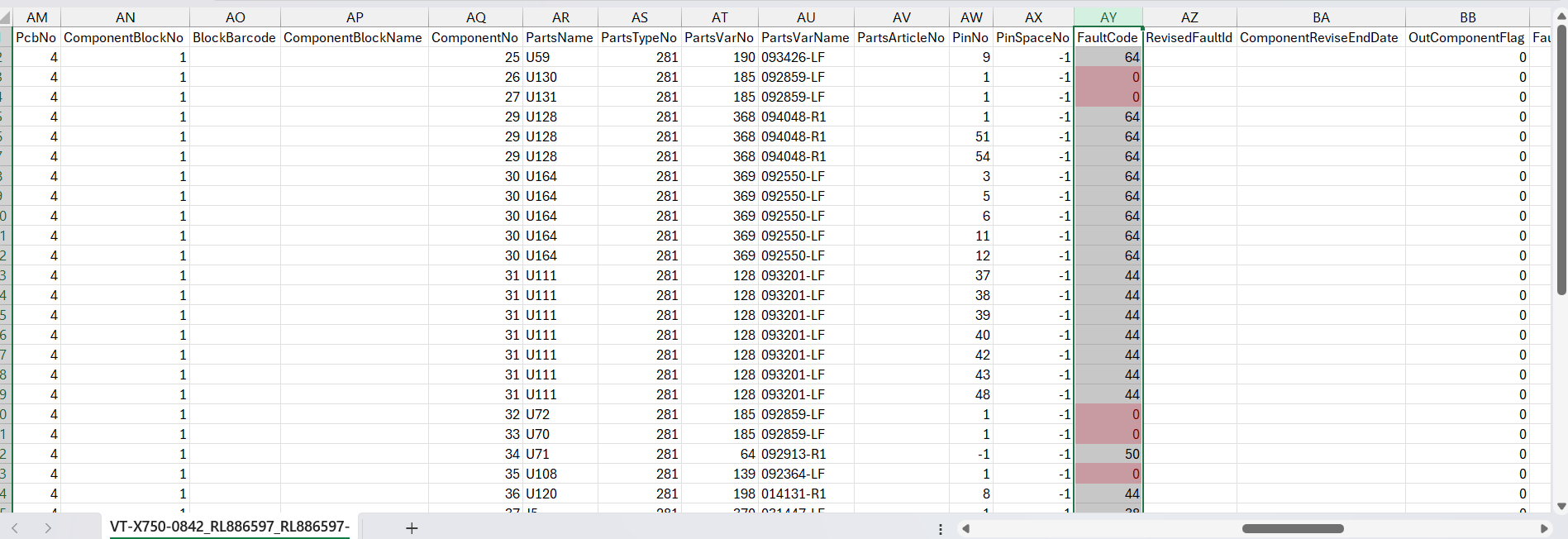
Hello Ryan, The CSV file with the machine name ("Server CSV") on it has the correct results. In the screenshot below, the Fault Code column has "0" where the part is OK. The column which shows "NG" in every row is a board-wide result, so it ignores individual components. Regards,
freshdesk-inline-150159141420.png
C
CustomerCustomer reply | Apr 27, 2026 at 4:08 PM
Thanks Brian, Thanks for the information. How would we get the revised column (column AZ) filled out with the review results? If we could get the revised results along with the original good results that would be best. From the review station file I don’t see the original OK results in the review station files as the review only shows the failure calls to the inspectors. Alternatively, What would the process be for getting a custom report created that had all of the results and revised results together in one file? Our customer wants a report, with all component pass/fails that they can reference when looking at the images from the machine. They would also like the report to have a way to cross reference the numbers on the stsliceXY_xxxxxxxxx image files. +Juan for his visibility on this effort Best regards, Ryan Burt Manufacturing Engineer [email] 3601 East University Drive Phoenix, AZ 85034 Phone: ([phone] Email: [email]
4 tiny or repeated images hidden.
BA
Brian AndersenOmron reply | Apr 27, 2026 at 4:17 PM
Hello Ryan, As you found, the Review CSV file is the only way to get operator calls. They will never update on the Machine CSV because that file is meant to be output only, no edits. There is not a clean way to get everything in one place. You would need to cross reference the Machine and Review CSV files. For reporting, the Qup-X functionality would be able to generate an excel with pictures and defect modes, but only for NG parts (at inspection). A custom application would have to run through Japan, I am not sure what the cost would be. Regards,
JS
Jeremiah SolizPrivate note | Apr 27, 2026 at 9:19 PM
Private
What this customer wants done could be achieved with AI custom made EXE file. Wish I had time to work on that. I mean, I could do this if we wanted to charge the customer. I would have to test it internally though, but this completely possible..... Just need to have a python script read the results from the CSV files, input them in excel file, and grab images from the XShareData locations, which it could query the SQL server, find the path, then look in that path and bring in the images. Man I love AI ....lol
BA
Brian AndersenPrivate note | Apr 27, 2026 at 9:20 PM
Private
I’m open to it if the customer wants to go that route.
JS
Jeremiah SolizPrivate note | Apr 28, 2026 at 12:45 AM
Private
I'm already creating a python script to do this. Once it's completed i'll convert it to EXE with proper Omron logo. I hijacked David's archive BackupAXICollector.py script, and used that as a base to get this done fast. Super easy :)
JS
Jeremiah SolizOmron reply | May 1, 2026 at 8:54 AM
Hello Ryan, Can you please review this example output from a custom tool I'm developing and see if it meets your requirements? You can unzip this file, and open the excel. Please open the excel file with the "Images/" folder in the same directory. Let me know what you think?
C
CustomerCustomer reply | May 1, 2026 at 8:56 AM
Private
I will be out of office on Friday May 1st and will be returning to work on Monday May 4th. I will respond as soon as I am able. If you need Omron SPI/AOI/AXI technical support please email [email]
OI
Omron internalPrivate note | May 1, 2026 at 9:35 AM
Private
COLAB NOTE UPDATE This case has received a Note from a Collaborator and has been TAG and Possibly Reopened. Please verify if any further action is required.
C
CustomerCustomer reply | May 1, 2026 at 12:50 PM
Hey Jeremiah, The thumbnail Gallery sheet within the report is exactly what we are looking for. How far off would you say you are from completing the tool and having it ready for customer use? Best regards, Ryan Burt Manufacturing Engineer [email] 3601 East University Drive Phoenix, AZ 85034 Phone: ([phone] Email: [email]
attachment
5 tiny or repeated images hidden.
JS
Jeremiah SolizOmron reply | May 5, 2026 at 10:03 AM
Hello Ryan, This tool is in a second phase, but the first phase is done (the report you saw is from the first phase). Second phase I'm going to add 3D volume to the report if required. This tool is undergoing internal review, and possibly could be ready by the end of this week, or next week. We'll keep you posted. Thanks!
BA
Brian AndersenOmron reply | May 7, 2026 at 12:46 PM
Hello Ryan, Sorry for the confusion. This tool is a piece of internal development software, so it will not be something we can provide to customers. However, we can definitely help you pull reports from Qup-X, which is free of charge and compatible with your current software version. If it is not already installed, we can install it remotely. Labor charges will apply if the service exceeds 4 hours. Would you like to try out Qup-X? Regards,
C
CustomerCustomer reply | May 9, 2026 at 11:55 AM
Hey Brian, That is unfortunate to hear as we could get a lot of use out of that tool, but thank you for letting me know. Is Omron dead set on not allowing customer use of this tool or is there room to negotiate? Where would I need to look to see if Qup-X is installed on the machine? Does this get installed on the server, review stations, programming station, or the X-Ray machines? Best regards, Ryan Burt Manufacturing Engineer [email] 3601 East University Drive Phoenix, AZ 85034 Phone: ([phone] Email: [email]
6 tiny or repeated images hidden.
BA
Brian AndersenOmron reply | May 11, 2026 at 6:05 PM
Hello Ryan, Yes, we cannot allow that particular solution to become a customer product, as it is demonstration only. However, we are using feedback from customers on such demonstrations to influence official development of the software down the line. Qup-X would be installed on the server and the RVS-X PC. To check on each PC, go to the Taskbar and look for a QupLauncher icon. Regards,
FV
Francisco VillalpandoOmron reply | May 18, 2026 at 8:41 AM
Hello Ryan, Could you please let us me know if Qup Navi was already installed in your server? if not let us know if today or tomorrow you could enable remote access to install it. -Francisco Francisco Villalpando Engineering Supervisor Direct: +[phone] [email]
C
CustomerCustomer reply | May 19, 2026 at 2:33 PM
Hey Francisco, I don’t see qup on either the server or the review station. For the install we can set up a Teams call and I can remote into the computers you need to do the installs on. We have a server two review stations and an offline teach station. Best regards, Ryan Burt Manufacturing Engineer [email] 3601 East University Drive Phoenix, AZ 85034 Phone: ([phone] Email: [email]
6 tiny or repeated images hidden.
FV
Francisco VillalpandoOmron reply | May 20, 2026 at 10:40 AM
Hello Ryan, Great, we can do it by Teams. I'm available on Friday from 8:00 am to 11:00 am CTS, let me know if this time window works for you? Francisco Villalpando Engineering Supervisor Direct: +[phone] [email]
FV
Francisco VillalpandoOmron reply | Jun 8, 2026 at 1:14 PM
Hello Ryan Burt Do you still need Qup Navi to be installed? I can do it today, let m know if you are available so I can send you a link with the installers Francisco Villalpando Engineering Supervisor Direct: +[phone] [email]
C
CustomerCustomer reply | Jun 8, 2026 at 1:27 PM
Yes, I would like to get that installed. Installing it today works for me. Best regards, Ryan Burt Manufacturing Engineer [email] 3601 East University Drive Phoenix, AZ 85034 Phone: ([phone] Email: [email]