A - AOI CASE ACK EN, A - Reply Open, A - 1 Hour Delay rslv, AOI - New CSAT Sent, LOCKED
Current case
Customer issue
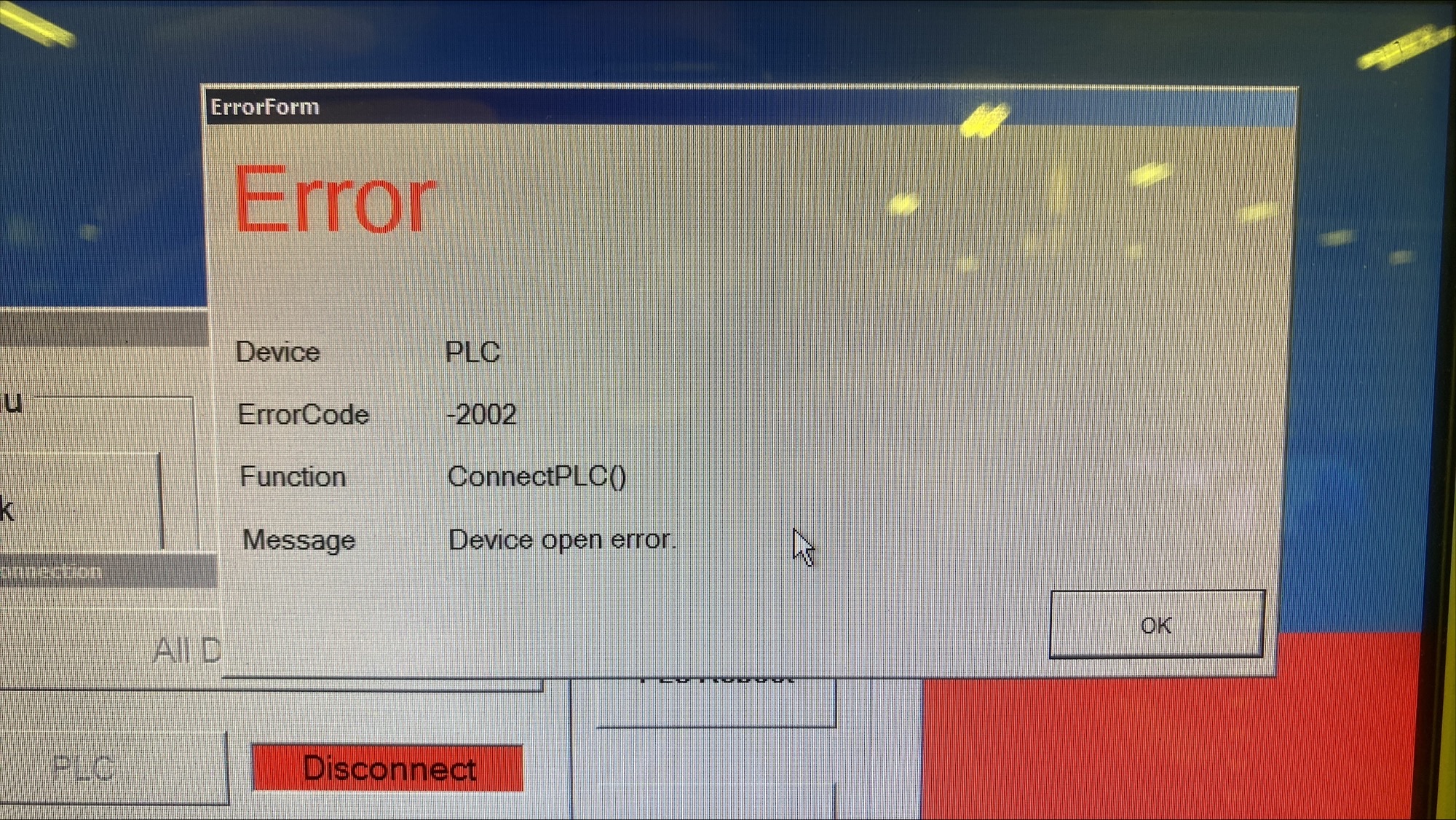
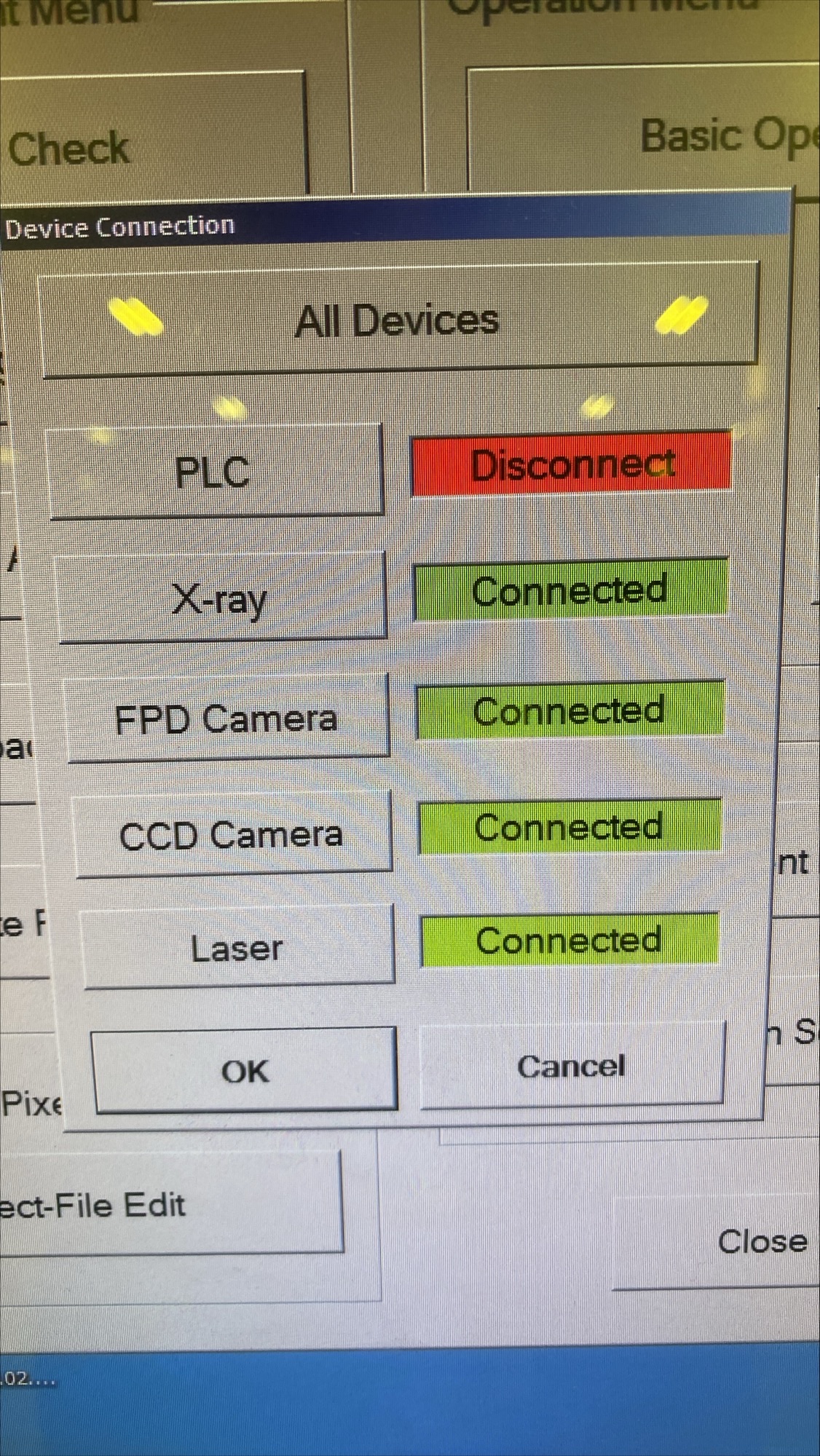
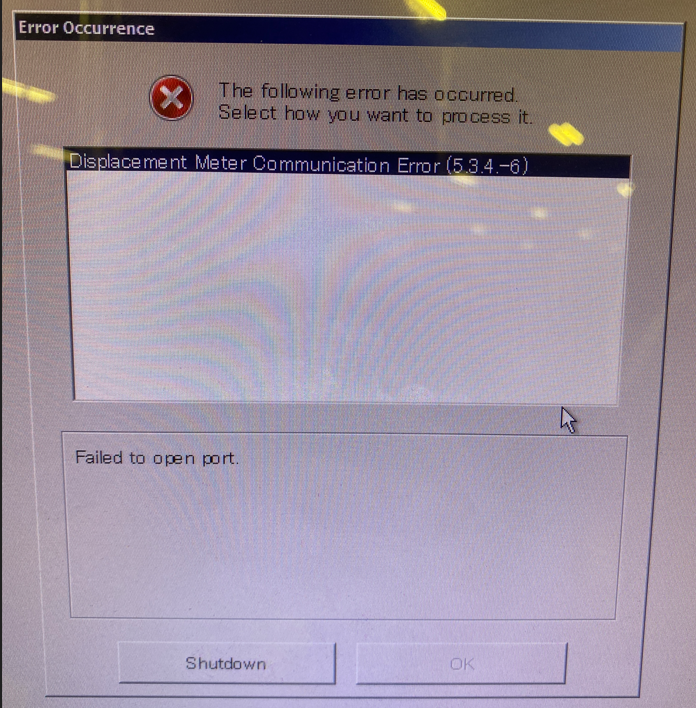
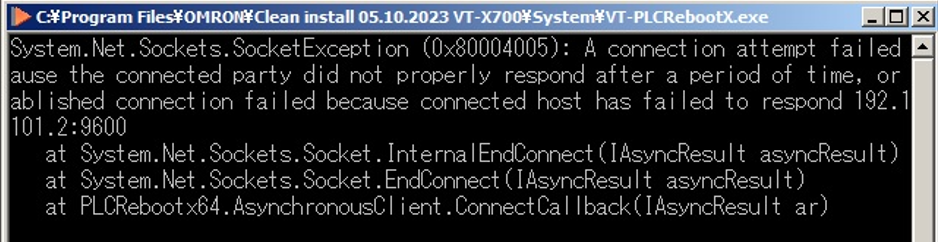
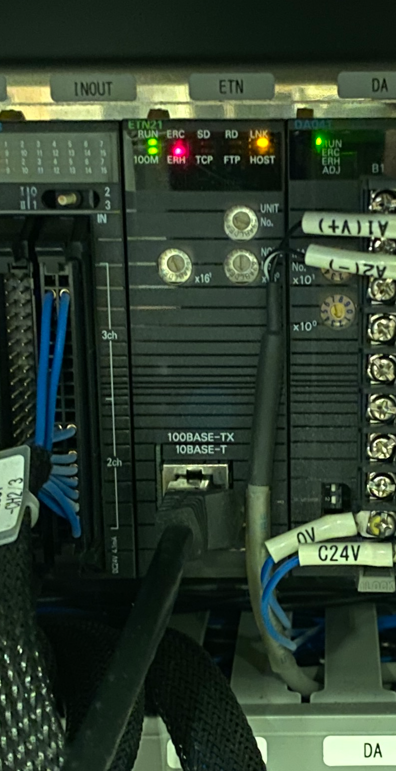
Hello, We are having an issue with the PLC for our AXI Machine. This morning when I arrived at work I was told by our operators that they could not get the machine to work. The error message being displayed: [email] I also noticed that the BIOS settings had reset again and the PC was not turning on with the machine. I set the power on setting in the BIOS again, restarted the PC, received the same error message, selected shutdown on the error message, powered back on the machine/PC and was able to get through the initialization process. IT then replaced the CMOS battery in the PC as a troubleshooting step for the BIOS settings not staying saved. I turned on the machine again. Turned on the PC manually and reset the power recovery setting in the BIOS and let the OS boot. When the OS loaded, the software tried to run with it's initial loading screen prior to the initialization screen. The progress bar moves up one set then jumps to the end and the window disappears. The application is still running though because it still shows up in task manager and the maintenance tool errors with the message the application is already running; the application has to be killed in task manager to use the maintenance tool. Checking the connected devices in the Omron menu > Basic Operation, it shows all devices as connected except for the PLC. Trying the PLC reboot button, that errors out with the following: [email] The ETN module in the back of the machine is showing an error light. [email] We have turned the breaker off and then another click past to drain any remaining power prior to turning the machine back on and we have tested with a different ethernet cable to know if it is the module that has the issue or something else. To us it currently looks like it is the ETN module that has gone bad and needs replaced. From our research, this part is CJ1W-ETN21. Is this something we are able to buy and replace ourselves? Or does it require special programming from Omron? Is there a different set of troubleshooting we need to do? Thank you, Nolan Cassoday Manufacturing Engineer BAE Systems Electronic Systems, Controls & Avionics Solutions T: [phone] | E: [email] 4250 Airport Expressway, Fort Wayne, Indiana 46809 United States
Conversation
Engineer and customer thread
13 messages
OI
Omron internalPrivate note | May 14, 2026 at 10:37 AM
Private
First thing I noticed was....this....they are rebooting the PLC, but it's running out of this directory? I'm so confused...
1 tiny or repeated image hidden.
OA
Omron Application EngineerOmron reply | May 14, 2026 at 10:52 AM
Hello Nolan, The displacement meter is the laser assembly used to measure board warpage it needs to be assigned to specific COM port, then the PLC issue a separate issue and is likely due to NIC on motherboard not communicating due to IP address issue. Can you go to CF-Maintenance, Basic Operations and tell me what subsystems work and which ones don't.
C
CustomerCustomer reply | May 14, 2026 at 10:57 AM
Clicking basic operations then all devices gives the shown plc error. Clicking OL on that error lets it go through the check. Only PLC shows disconnected. Get Outlook for iOS ________________________________
Omron Application EngineerOmron reply | May 14, 2026 at 11:26 AM
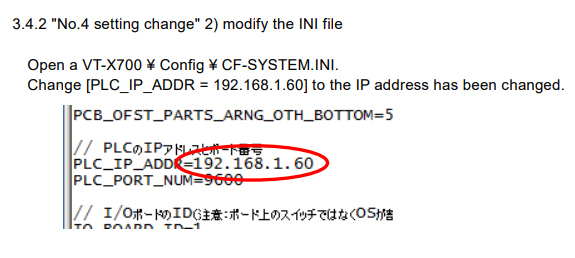
Hello Nolan, Please double check the network adapter setting on the PC, it should be anything other than 192.168.1.60 (and that it doesn't conflict with anything else), also make sure the subnet 255.255.255.0. You can also open a software backup previously made and look for \Omron\VT-X700\config\and CF-SYSTEM.ini lookup PLC_IP line to make sure it is that same for you current omron folder you are running main software out of. Default is 192.168.1.60. Assuming that battery in the PLC is still good and it hasn't lost it's IP address, see if this will connect. In CF-M afterwards.
freshdesk-inline-150161782388.png
1 tiny or repeated image hidden.
C
CustomerCustomer reply | May 14, 2026 at 12:04 PM
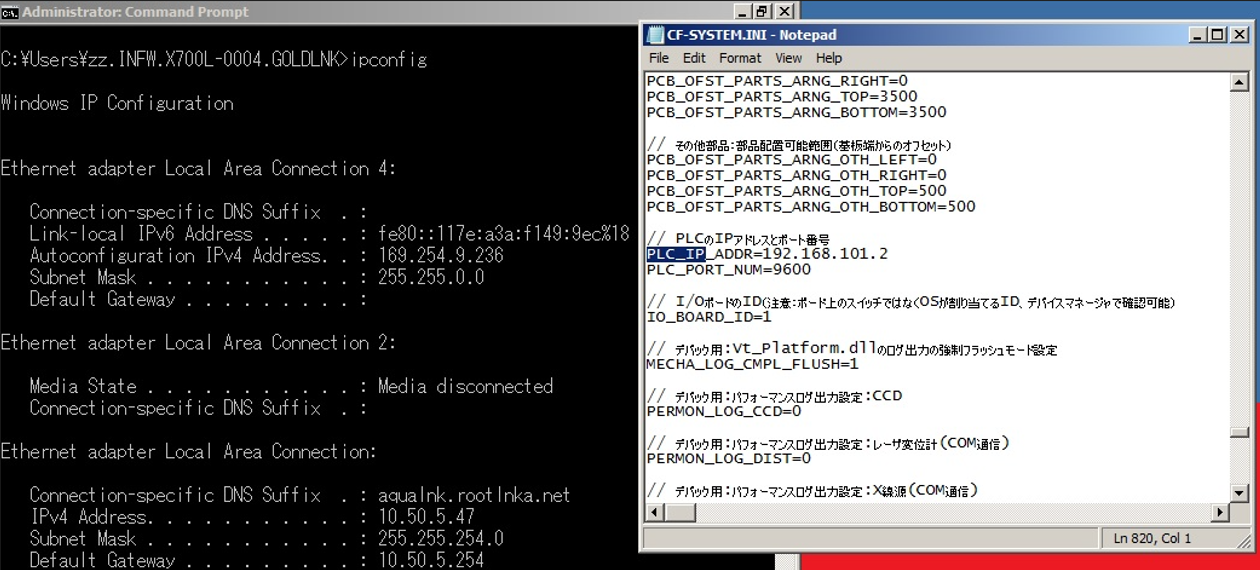
Local Area Connection 4 is the NIC for the PLC. The IP address does not match the IP address in our current CF-SYSTEM.INI config file (169.254.9.236 vs. 192.168.101.2). I confirmed with a config file from 2018 that it is the same IP address in the config that we have been using. Also the subnet that it is currently under is 255.255.0.0 and not 255.255.255.0. I tried only changing the IP Address in the config file to that which is currently shown and it did not connect. I imagine this is because of the different subnet? I’m not sure how to set the subnet on a network device off the top of my head. So this is a bad battery in the PLC device because the settings were lost? [email] Thank you, Nolan Cassoday Manufacturing Engineer BAE Systems Electronic Systems, Controls & Avionics Solutions T: [phone] | E: [email] 4250 Airport Expressway, Fort Wayne, Indiana 46809 United States
freshdesk-inline-150161791360.png
5 tiny or repeated images hidden.
OA
Omron Application EngineerOmron reply | May 14, 2026 at 12:56 PM
Hello Nolan, So the IP address in that file is referring to what should be inside the PLC, the network adapter on PC can be nearly anything IP, preferably static. I would try to adjust the subnet to match suggested. The next step would be to take out the battery and measure the voltage. Normally I do this with the machine powered on, but I will need to double check what the process is for the x700s. If it is a battery is dead someone from Omron will have to go out here and flash the PLC again.
C
CustomerCustomer reply | May 14, 2026 at 1:43 PM
Hello, I tried setting the IP Address and Subnet of the manually. That did not seem to change anything. CF-M Basic Operations and PLC Reboot still responded the same. I’m also not sure if we have a policy that prevents those settings from being manually set because I did not see a change in ipconfig for that NIC despite them being set in the Windows network adapters menu; I will ask if there is anything stopping me from setting that here. We did measure pull the battery from PLC-PS while the machine was on and it measured 3V. Is there a separate battery in the ETH module for the PLC? Checking for completionist sake. Thank you, Nolan Cassoday Manufacturing Engineer BAE Systems Electronic Systems, Controls & Avionics Solutions T: [phone] | E: [email] 4250 Airport Expressway, Fort Wayne, Indiana 46809 United States
6 tiny or repeated images hidden.
C
CustomerCustomer reply | May 14, 2026 at 2:10 PM
Okay, we have movement. IT came out to help with getting the IP Address for the NIC set statically. Through troubleshooting we set that NIC to 192.168.101.10 with subnet 255.255.255.0 and it immediately started communicating with the PLC after clicking PLC reboot. The x-ray is currently warming up. I will follow up once it is warmed up and we have processed a few boards through it.
6 tiny or repeated images hidden.
OI
Omron internalPrivate note | May 14, 2026 at 2:21 PM
Private
nice ryan!!!
OA
Omron Application EngineerOmron reply | May 14, 2026 at 2:42 PM
That is awesome Nolan!!! We were internally starting to think the worst case on our end, be a hardware issue. I also found out that the displacement sensor (laser) is also communicating via network protocols, unlike the newer machines, so that other error makes sense. By the way the battery voltage is fine. Should be max. 3.6V nominal 3.0V and bad at 2.6V
OI
Omron internalPrivate note | May 14, 2026 at 2:44 PM
Private
Jeremiah I was total was thinking this was going to be a hardware fault, as the older machine PLCs have a internal ethernet switch function inside itself... According to Brian.
C
CustomerCustomer reply | May 14, 2026 at 2:51 PM
I was concerned it was going to be a hardware issue as well. The machine went through warm up and I did confirm that we are able to move product. Thank you so much for the troubleshooting steps. I’m happy that we were able to get it resolved. Thank you again, Nolan Cassoday Manufacturing Engineer BAE Systems Electronic Systems, Controls & Avionics Solutions T: [phone] | E: [email] 4250 Airport Expressway, Fort Wayne, Indiana 46809 United States
6 tiny or repeated images hidden.
OA
Omron Application EngineerOmron reply | May 15, 2026 at 10:32 AM
No sanitized conversation text indexed.
AI
Omron Application Engineer
Ticket copilot
Connecting
Ticket#1768445 AXI Production Down - PLC Error on ETN Module