RE: Tech support VT-S1040 [Case: 1743477] from locked ticket:1749501
CustomerNot indexed
CompanyNot indexed
Priority1
TypeAOI - No Action Required
UpdatedJul 4, 2026 at 5:27 PM
Thread28 messages
Ticket metadata
Group
AOI US (150000419797)
Status
Closed (5)
Created
Jun 22, 2026 at 3:28 PM
Requester
Not indexed
Company
Not indexed
Last synced
Aug 3, 2026 at 5:31 AM
Resolved
Jul 1, 2026 at 11:35 AM
Closed
Jul 2, 2026 at 4:37 PM
Tags
A - Reply Open, A - 1 Hour Delay rslv, AOI - New CSAT Sent, LOCKED
Current case
Customer issue
Please check ticket [#{ticket.id}}] for the full message before responding. Last Public comment: Kegan Petersdorff : Good Afternoon, This morning, we moved this AOI to a different line with a different model conveyor on either side of the machine (a gate conveyor still in front and a regular conveyor behind). This problem is persisting, now to the point where I cannot get any signal from the gate conveyor to tell me the Upstream is ready to transfer. Before, we could shove our way through and make it work, now we are hard stuck. Is there a service tech available we can schedule a visit with to resolve this problem? We need this machine fully functional and efficient within the next month for a large order on the horizon. Please let me know if and when this is possible. Thank you, ISO 9001:2015 Registered ITAR Registered Kegan Petersdorff Maintenance Coordinator P: [phone] | M: [phone] [email] |www.touchpadelectronics.com 101 W. Boxhorn Drive, Mukwonago, WI 53149 TouchPad Electronics will be closed July 2nd and 3rd to celebrate Independence Day. TouchPad Electronics, LLC Proprietary and Confidential. The information in this message is confidential. It is intended solely for the addressee. Access to this message by anyone else is unauthorized. If you are not the intended recipient, any disclosure, copying or distribution of the message, or any action or omission taken by you in reliance on it, is prohibited and may be unlawful. Please immediately contact the sender if you have received this message in error. Thank you. From: AOI Tech Support - US Sent: Thursday, May 14, 2026 3:30 PM To: Kegan Petersdorff Cc: Peter Vukic ; [email] Subject: Re: RE: Tech support VT-S1040 [Case: 1743477] [Case: 1749501] Hello Kegan, I wonder if you have the manual from the conveyor? specifically the section for SMEMA communication, I'm just curios if they are using Relays and not SCR. Francisco Villalpando Engineering Supervisor Direct: +[phone] [email] On Thu, 14 May at 2:31 PM, Kegan Petersdorff wrote: Hi Francisco, Thank you for checking in. We have not figured out why the conveyor is not sending the ready signal. We have tried swapping SMEMA cables, adjusting the output delay for the gate conveyor into the AOI, and are trying to get a hold of the conveyor OEM for instructions on how to access their PLC to see if anything stands out there. Currently waiting for a response from them. Thank you for your patience and assistance. Thank you, ISO 9001:2015 Registered ITAR Registered Kegan Petersdorff Maintenance Technician P: [phone] [email] |www.touchpadelectronics.com 101 W. Boxhorn Drive, Mukwonago, WI 53149 TouchPad Electronics, LLC Proprietary and Confidential. The information in this message is confidential. It is intended solely for the addressee. Access to this message by anyone else is unauthorized. If you are not the intended recipient, any disclosure, copying or distribution of the message, or any action or omission taken by you in reliance on it, is prohibited and may be unlawful. Please immediately contact the sender if you have received this message in error. Thank you. From: AOI Tech Support - US Sent: Thursday, May 14, 2026 2:18 PM To: Kegan Petersdorff Cc: Peter Vukic ; [email] Subject: Re: RE: Tech support VT-S1040 [Case: 1743477] [Case: 1749501] Hello Kegan, Were you able to figure out why the conveyor is not sending Ready signal to the AOI? Francisco Villalpando Engineering Supervisor Direct: +[phone] [email] On Fri, 8 May at 12:09 PM, AOI Tech Support - US wrote: Hello Kegan, Thanks for the screenshot. I marked in blue the output signals that the AOI is sending to the downstream conveyor, and in red the input signals the machine expects to receive in order to release the board. As shown, the AOI is not receiving any input signals. It’s possible that the third‑party conveyor is somehow losing the sequence and is not sending theReady signal (Pins 1 & 2) to the AOI. Francisco Villalpando Engineering Supervisor Direct: +[phone] [email] On Tue, 5 May at 1:14 PM, Kegan Petersdorff wrote: Good Afternoon, This is a screenshot of the IO status when there is a board upstream, a board in the machine (scan completed), and NO board downstream. Please help me understand a few things: -Why are 2 different DnResult ports active at the same time? I saw by observing that DnResultA is indicative of a ‘good’ board. -What are the K ports? (K3, K4, and K2) -Why is it when we pause our upstream conveyor (while our downstream conveyor is empty), DnReady goes high? If there is anything else you can tell me from this screenshot, I would love to hear about it. Please let me know if I can provide any more information. Thank you, ISO 9001:2015 Registered ITAR Registered Kegan Petersdorff Maintenance Technician P: [phone] [email] |www.touchpadelectronics.com 101 W. Boxhorn Drive, Mukwonago, WI 53149 TouchPad Electronics, LLC Proprietary and Confidential. The information in this message is confidential. It is intended solely for the addressee. Access to this message by anyone else is unauthorized. If you are not the intended recipient, any disclosure, copying or distribution of the message, or any action or omission taken by you in reliance on it, is prohibited and may be unlawful. Please immediately contact the sender if you have received this message in error. Thank you. From: AOI Tech Support - US Sent: Monday, May 4, 2026 11:30 AM To: Kegan Petersdorff Cc: Peter Vukic Subject: Re: RE: Tech support VT-S1040 [Case: 1743477] [Case: 1749501] Hello Kegan, Thank you for the clarification. Most of the time, this type of issue occurs when the AOI is not receiving theSMEMA signal. The only way to confirm this is by checking the machineI/O status. Please follow the instructions below to access the I/O, reproduce the issue, and send us a screenshot so we can verify that the AOI and conveyor are sending and receiving the correct signals: Select the program inInspection Mode, as you normally do. Go to the AOI desktop and launchVT‑S1000.Adjustment. Click on the Omron Menu and enterAdminas the password. It may take approximately one minute. A UPS error message may appear—please clickOK. Click on Manufacture Mode. In the bottom-left corner, click onI/O Status. The software will continue running in the background. Inspect boards as you normally would to reproduce the issue, then send us ascreenshot of the I/O Status screen. Francisco Villalpando Engineering Supervisor Direct: +[phone] [email] On Mon, 4 May at 10:36 AM, Kegan Petersdorff wrote: Hello Francisco, This ticket is not yet resolved. Last we spoke, Tony mentioned speaking with his team about this issue. We went over the basics of what could be wrong, checked variables against a known good machine, and performed very basic troubleshooting. I have been waiting for word back for the last couple weeks. Thank you, ISO 9001:2015 Registered ITAR Registered Kegan Petersdorff Maintenance Technician P: [phone] [email] |www.touchpadelectronics.com 101 W. Boxhorn Drive, Mukwonago, WI 53149 TouchPad Electronics, LLC Proprietary and Confidential. The information in this message is confidential. It is intended solely for the addressee. Access to this message by anyone else is unauthorized. If you are not the intended recipient, any disclosure, copying or distribution of the message, or any action or omission taken by you in reliance on it, is prohibited and may be unlawful. Please immediately contact the sender if you have received this message in error. Thank you. From: AOI Tech Support - US Sent: Monday, May 4, 2026 9:58 AM To: Kegan Petersdorff Cc: Peter Vukic Subject: Re: RE: Tech support VT-S1040 [Case: 1743477] [Case: 1749501] Hello Kegan, Could you please provide an update on this ticket? Was Tony able to resolve the issue with you over the phone? Francisco Villalpando Engineering Supervisor Direct: +[phone] [email] On Wed, 22 Apr at 11:05 AM, AOI Tech Support - US wrote: Hello Kegan, Are you familiar on how to use the AOI machine's Maintenance /Adjustment software? It can be used to set and verify SMEMA settings. If you have used this before, can you compare SMEMA settings on this AOI to the 'good' machine. If not familiar with this please call me at number below and I can walk you through checking this setting. Thanks, On Wed, 22 Apr at 10:00 AM, Kegan Petersdorff wrote: Good Morning, After some testing, we can see the problem may be within the Omron. When our line is stacked, meaning a board sitting on the exit conveyor, a board inside the Omron, and a board waiting on the input conveyor, this is only time we’re experiencing problems. When we took the board off the exit conveyor, the Omron did not send its board out. After unplugging the SMEMA cable between the Omron and the exit conveyor (downstream) and plugging it back in, the board still does not convey. When we reset the Omron (close the program, take the board out, reopen the program), the board on the input conveyor travels into the Omron. When we unplug and re-plug in the upstream SMEMA, the board will transfer into the Omron when waiting for input. The exit conveyor is telling the Omron it’s ready for a board, and the Omron is telling me that it’s unloading the PCB, however the board is staying still at the inspection location. This is the case even after resetting the SMEMA connection between the two. It should be noted that this VT-S1040 had issues earlier this month, after installation but while the technician was on site for training. The machine failed to initialize because one of the servo controllers was throwing an error. Whether this has any effect on these transfer errors, I do not know, but our other VT-S1040 is not experiencing any of these issues. Please advise on next steps. Thank you, ISO 9001:2015 Registered ITAR Registered Kegan Petersdorff Maintenance Technician P: [phone] [email] |www.touchpadelectronics.com 101 W. Boxhorn Drive, Mukwonago, WI 53149 TouchPad Electronics, LLC Proprietary and Confidential. The information in this message is confidential. It is intended solely for the addressee. Access to this message by anyone else is unauthorized. If you are not the intended recipient, any disclosure, copying or distribution of the message, or any action or omission taken by you in reliance on it, is prohibited and may be unlawful. Please immediately contact the sender if you have received this message in error. Thank you. From: Peter Vukic Sent: Wednesday, April 15, 2026 12:04 PM To: Kegan Petersdorff Subject: FW: Tech support VT-S1040 [Case: 1743477] FYI From: AOI Tech Support - US Sent: Monday, April 13, 2026 2:16 PM To: Peter Vukic Subject: Re: Tech support VT-S1040 [Case: 1743477] You don't often get email [email] Learn why this is important Hello Peter, Please check the SMEMA connection on the Down Stream conveyor side. If the first board is transferred and the second board waits in the machine then there maybe problem on the conveyor side. The downstream ready signal from the conveyor to AOI must reset after each board is transferred from the AOI to the conveyor. You can simply test that by unplugging the SMEMA cable after one board is transferred. If the 2nd board is transferred, then problem maybe on the conveyor side. Please let us know if this helps. Best Regards On Mon, 13 Apr at 1:49 PM, Peter Vukic wrote: Hi, VT-S1040 S/N 1033925-40A/ AOI was installed recently. During the installation we ran one board at a time through the machine with no smema problems. Now when the line is stacked with boards the AOI will not unload the board to the next conveyor. The input side of the aoi is a gate conveyor and output a standard conveyor but not a reject conveyor. It’s displaying “unloading pcb” but will not unload. I believe that the smema cable is the correct pin layout. Why does it work with one pcb and not when the line is stacked with boards. Is it a smema setting on the machine? Thank you Peter Vukic Maintenance Department Touchpad Electronics LLC .
Conversation
Engineer and customer thread
28 messages
OA
Omron Application EngineerOmron reply | Jun 23, 2026 at 9:21 AM
Hello Kegan, What happens when you unplug the upstream SMEMA cable? Does the board transfer to machine? I read through all the response and but I have not seen any information about the conveyor manufacturer. Could you please tell us conveyor manufacturer and model number. There is possibility of circuit mismatch between Omron and Conveyor (PNP vs NPN circuit). I believe both Omron and conveyor company support engineer have to be on-site to resolve this issue.
OA
Omron Application EngineerOmron reply | Jun 23, 2026 at 10:51 AM
Hello Touchpad Team, It is important that there is co-support from the conveyor maker(s) or at least we need to be provided with documentation of their SMEMA specifications (pinout and timing chart). This issue may be 100% Omron; but without knowing what we're working with and knowing if it should work okay, we may be just continuing to re-troubleshoot what has already been done; and end-up back at this point. Are you able to provide this information? On-site support from Omron is something that could be considered for next week; but being able to review SMEMA details first is an important next step; and you/we need supportive participation from the conveyor maker. We cannot troubleshoot or make any changes on the conveyor side if part of the problem. Thank you.
C
CustomerCustomer reply | Jun 23, 2026 at 11:32 AM
Omron Team, Unplugging the upstream SMEMA cable does not trigger the board transfer, neither does unplugging the downstream. Any combination of resetting signals has not worked for me. The conveyor is a YJLink AG1-60 X, but prior to the move it was a YJLink YGC-0X00. Support has not been helpful thus far on their end, but we will continue to seek answers from them, especially SMEMA information. I will let you know asap when we have the pin layout, timing chart, or other relevant information so we can consider on-site support. Thank you, [Text Description automatically generated] ISO 9001:2015 Registered ITAR Registered Kegan Petersdorff Maintenance Coordinator P: [phone] | M: [phone] [email] | www.touchpadelectronics.com 101 W. Boxhorn Drive, Mukwonago, WI 53149 TouchPad Electronics will be closed July 2nd and 3rd to celebrate Independence Day. [email] TouchPad Electronics, LLC Proprietary and Confidential. The information in this message is confidential. It is intended solely for the addressee. Access to this message by anyone else is unauthorized. If you are not the intended recipient, any disclosure, copying or distribution of the message, or any action or omission taken by you in reliance on it, is prohibited and may be unlawful. Please immediately contact the sender if you have received this message in error. Thank you.
attachment
6 tiny or repeated images hidden.
C
CustomerCustomer reply | Jun 23, 2026 at 11:47 AM
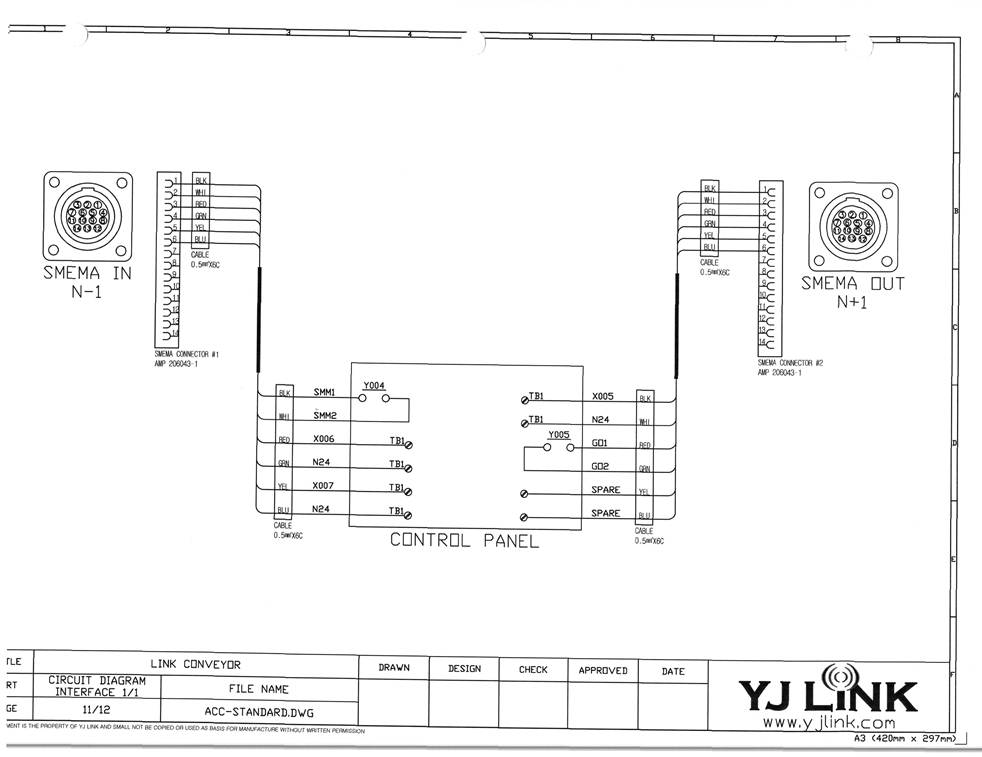
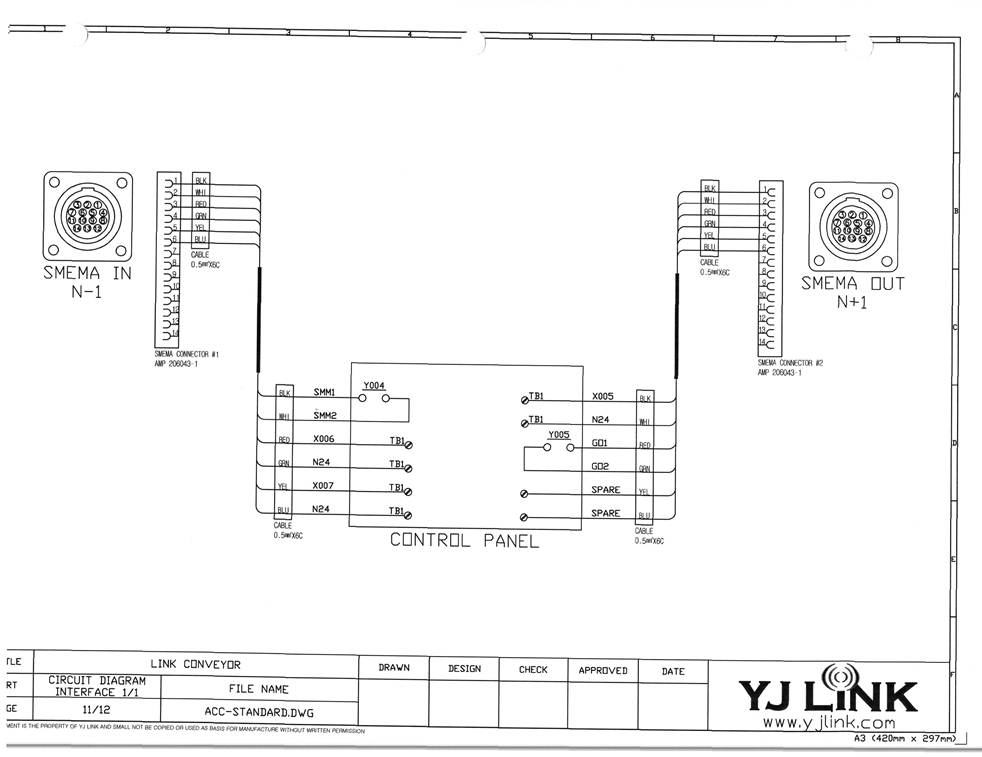
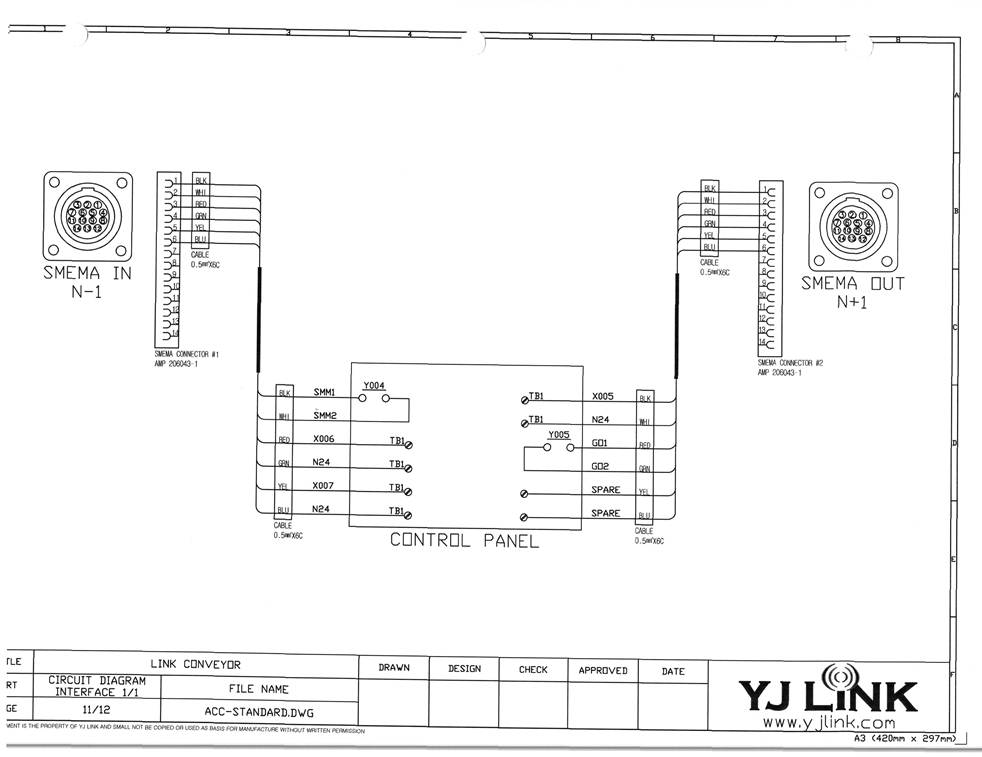
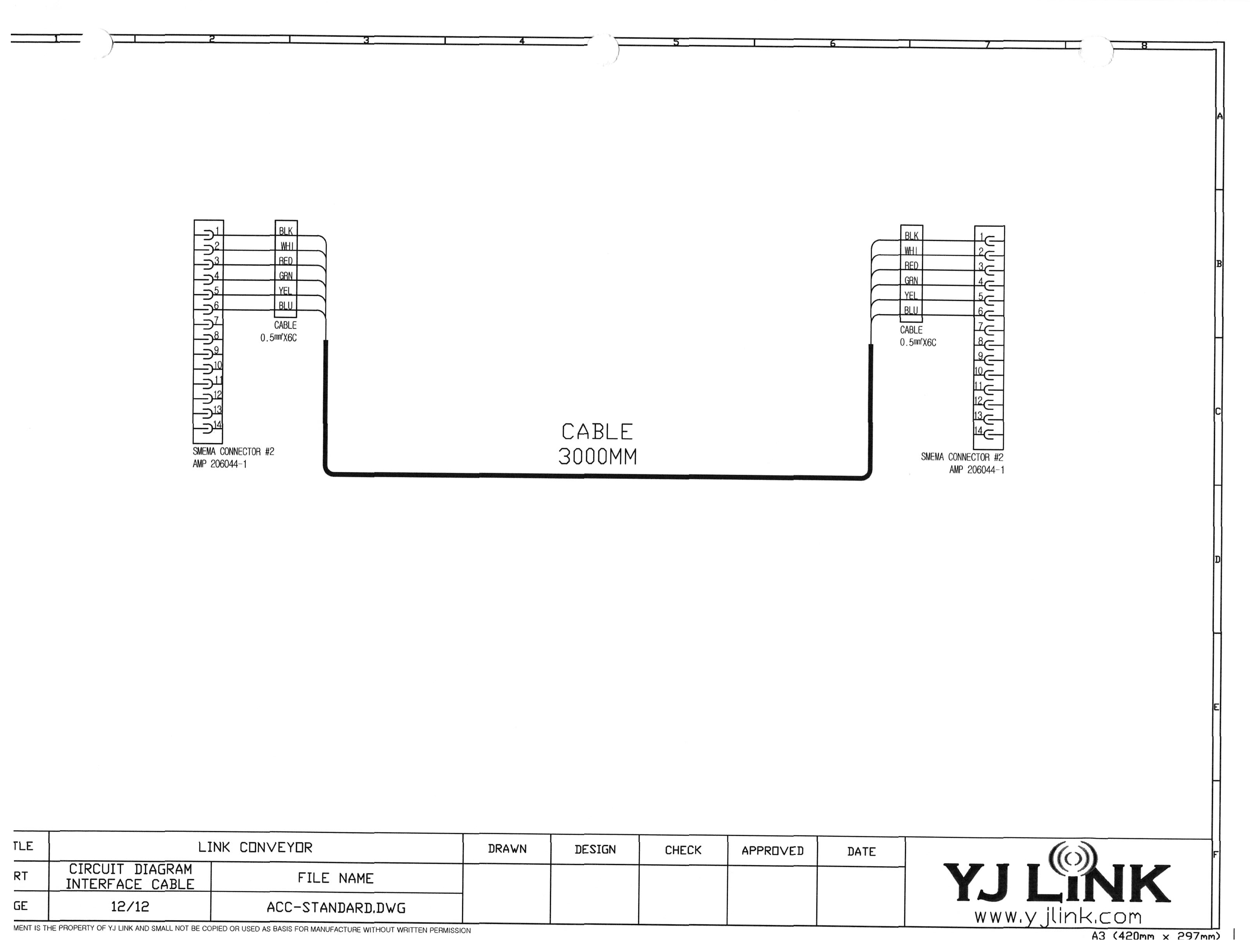
All, After some searching, I found these. [email] [email] Thank you, [Text Description automatically generated] ISO 9001:2015 Registered ITAR Registered Kegan Petersdorff Maintenance Coordinator P: [phone] | M: [phone] [email] | www.touchpadelectronics.com 101 W. Boxhorn Drive, Mukwonago, WI 53149 TouchPad Electronics will be closed July 2nd and 3rd to celebrate Independence Day. [email] TouchPad Electronics, LLC Proprietary and Confidential. The information in this message is confidential. It is intended solely for the addressee. Access to this message by anyone else is unauthorized. If you are not the intended recipient, any disclosure, copying or distribution of the message, or any action or omission taken by you in reliance on it, is prohibited and may be unlawful. Please immediately contact the sender if you have received this message in error. Thank you.
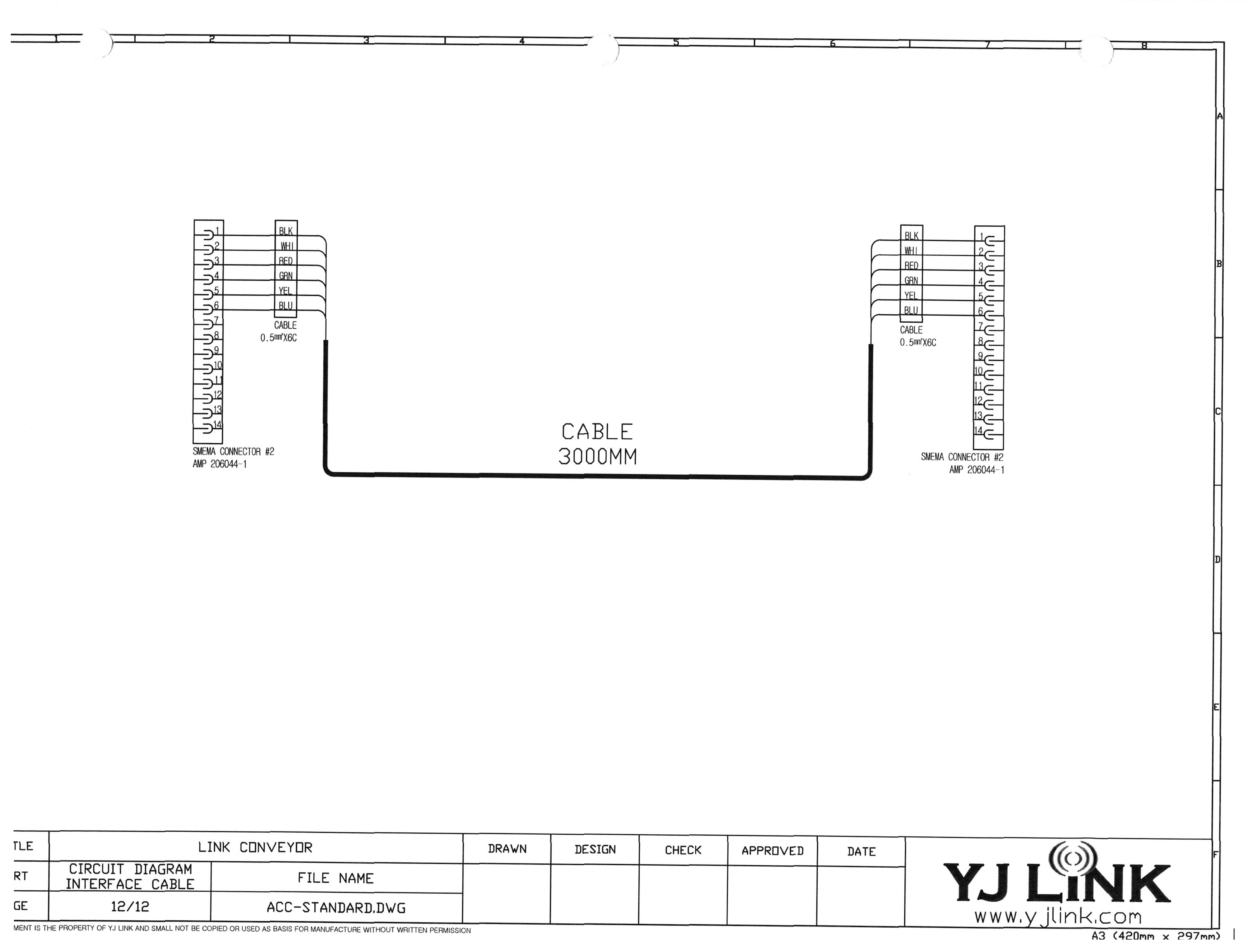
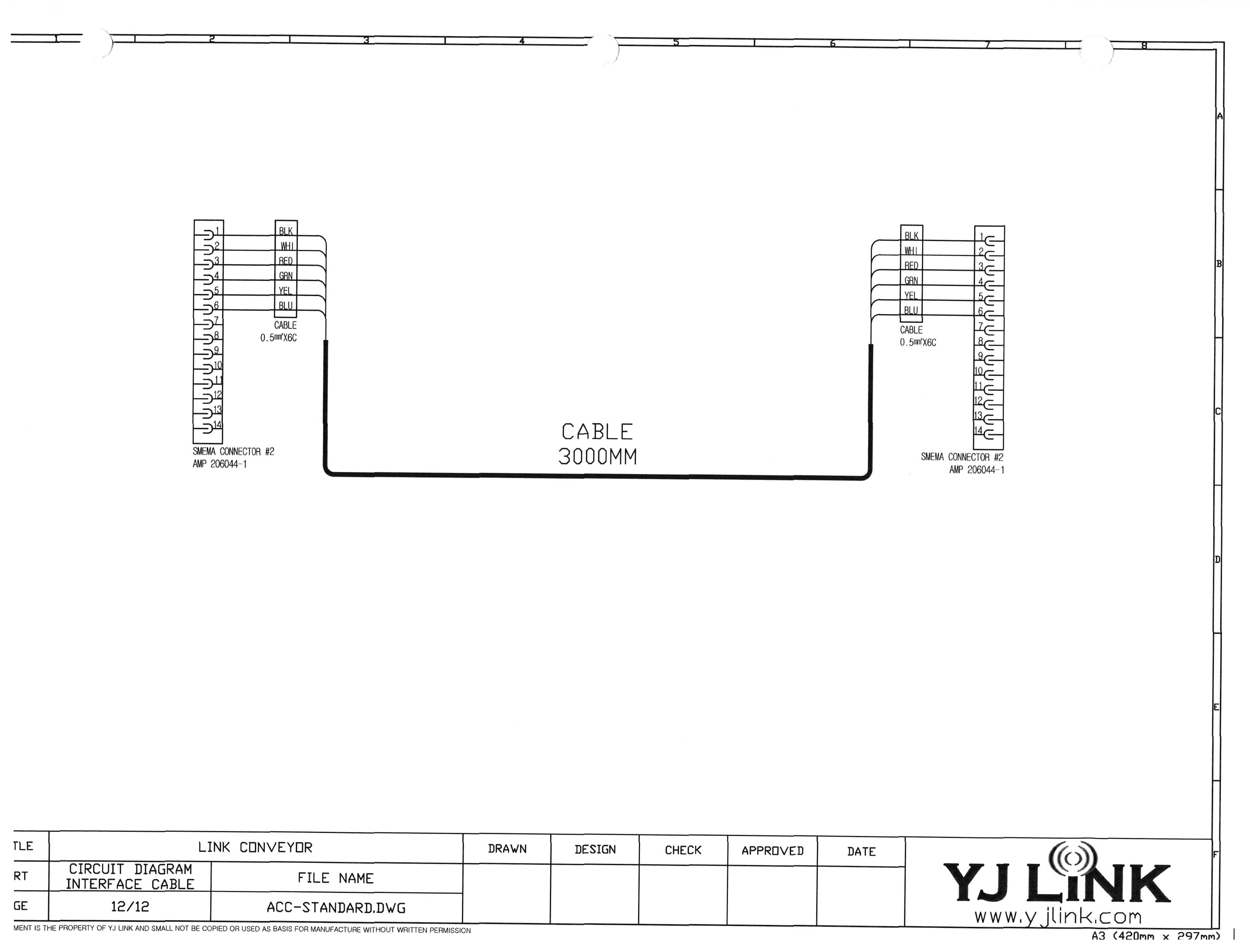
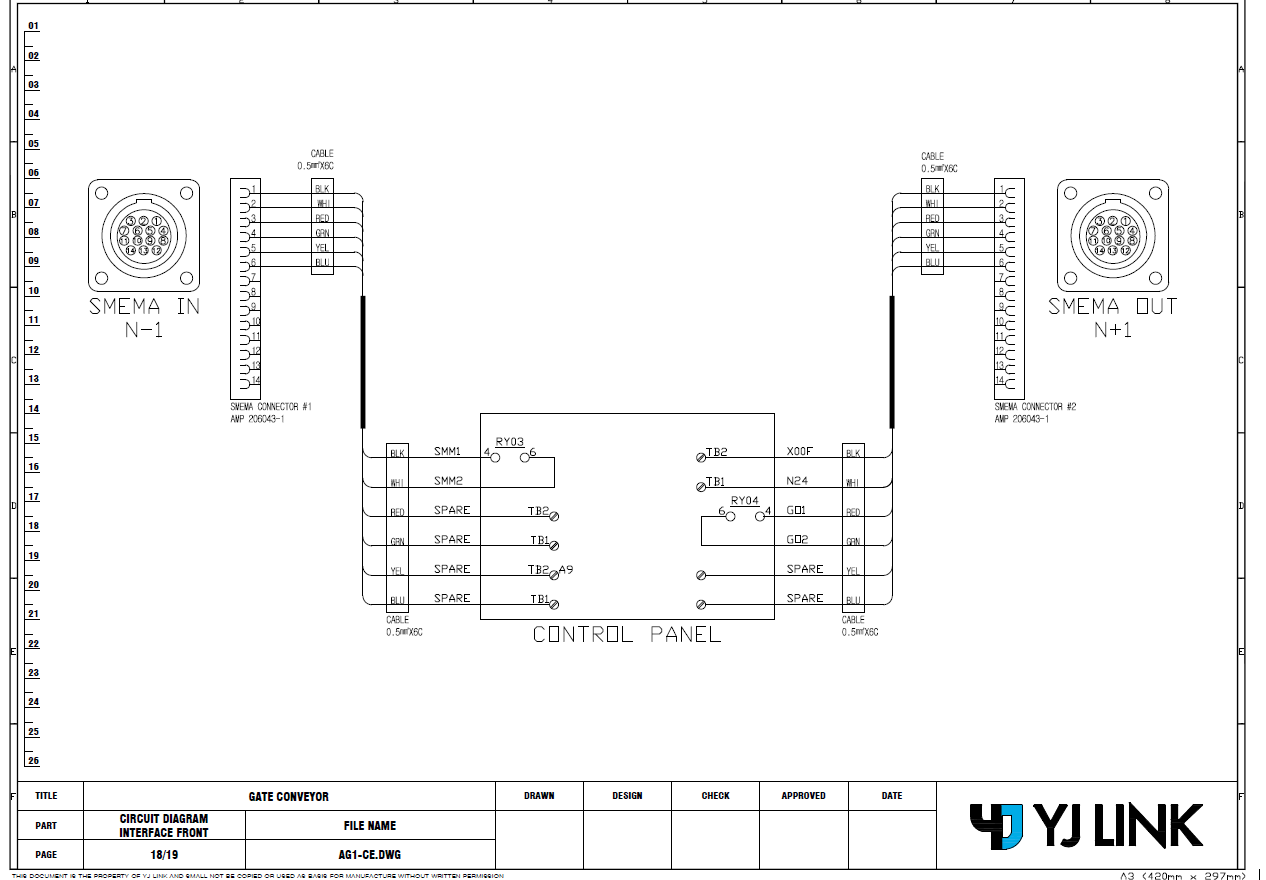
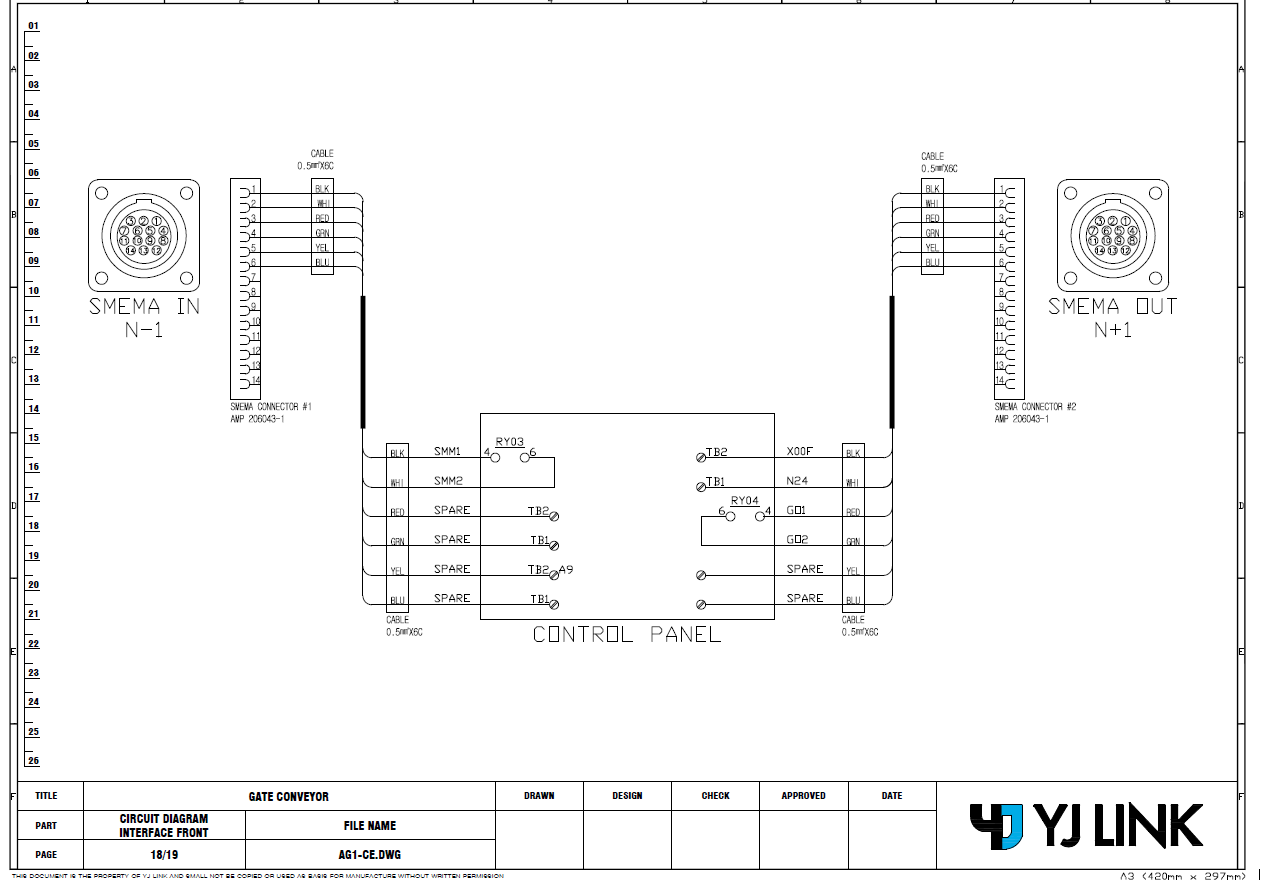
All, My apologies, the previous pictures were for the incorrect model. These are for the AG1 gate conveyors. Thank you, [Text Description automatically generated] ISO 9001:2015 Registered ITAR Registered Kegan Petersdorff Maintenance Coordinator P: [phone] | M: [phone] [email] | www.touchpadelectronics.com 101 W. Boxhorn Drive, Mukwonago, WI 53149 TouchPad Electronics will be closed July 2nd and 3rd to celebrate Independence Day. [email] TouchPad Electronics, LLC Proprietary and Confidential. The information in this message is confidential. It is intended solely for the addressee. Access to this message by anyone else is unauthorized. If you are not the intended recipient, any disclosure, copying or distribution of the message, or any action or omission taken by you in reliance on it, is prohibited and may be unlawful. Please immediately contact the sender if you have received this message in error. Thank you.
Omron internalPrivate note | Jun 23, 2026 at 3:23 PM
Private
Tickets with IDs 1797055 is merged into this ticket.
OI
Omron internalPrivate note | Jun 23, 2026 at 3:23 PM
Private
Merged from ticket 1797055 Subject: RE: Tech support VT-S1040 [Case: 1743477] from locked ticket:1749501 Description: Please check ticket [#{ticket.id}}] for the full message before responding. Last Public comment: Kegan Petersdorff : All, Just to understand urgency: The technician running the line is forced to tab into the VT1000 Adjustment Menu, in the manufacturing tab, and manually turn on and off the UpstreamReady signal for the machine to work right now. The sooner someone is available to visit and support, the better. I appreciate the fast response, thank you Eric! Thank you, ISO 9001:2015 Registered ITAR Registered Kegan Petersdorff Maintenance Coordinator P: [phone] | M: [phone] [email] |www.touchpadelectronics.com 101 W. Boxhorn Drive, Mukwonago, WI 53149 TouchPad Electronics will be closed July 2nd and 3rd to celebrate Independence Day. TouchPad Electronics, LLC Proprietary and Confidential. The information in this message is confidential. It is intended solely for the addressee. Access to this message by anyone else is unauthorized. If you are not the intended recipient, any disclosure, copying or distribution of the message, or any action or omission taken by you in reliance on it, is prohibited and may be unlawful. Please immediately contact the sender if you have received this message in error. Thank you. From: [email] Sent: Monday, June 22, 2026 3:24 PM To: Justin Kernen ; Kegan Petersdorff ; [email] Cc: Peter Vukic Subject: Re: RE: Tech support VT-S1040 [Case: 1743477] [Case: 1749501] Hi Justin, No problem. Let me get the very latest status from the support team, and we'll put a plan together. Best Regards, Eric McElmurry From: Justin Kernen Sent: Monday, June 22, 2026 4:18 PM To: Kegan Petersdorff ; AOISupport-US-A Cc: Peter Vukic ; Eric McElmurry / OEI Subject: RE: RE: Tech support VT-S1040 [Case: 1743477] [Case: 1749501] Hi Eric, Can we support addressing this ticket in addition to some advance software programming and reporting training this week or next? Thanks, May the force be with you ISO 9001:2015 Registered ITAR Registered Justin Kernen Business Leader of Technology Certified SMTA Process Engineer P: [phone] [email] |www.touchpadelectronics.com 101 W. Boxhorn Drive, Mukwonago, WI 53149 TouchPad Electronics, LLC Proprietary and Confidential. The information in this message is confidential. It is intended solely for the addressee. Access to this message by anyone else is unauthorized. If you are not the intended recipient, any disclosure, copying or distribution of the message, or any action or omission taken by you in reliance on it, is prohibited and may be unlawful. Please immediately contact the sender if you have received this message in error. Thank you. From: Kegan Petersdorff Sent: Monday, June 22, 2026 2:28 PM To: AOI Tech Support - US Cc: Peter Vukic [email] Justin Kernen Subject: RE: RE: Tech support VT-S1040 [Case: 1743477] [Case: 1749501] Good Afternoon, This morning, we moved this AOI to a different line with a different model conveyor on either side of the machine (a gate conveyor still in front and a regular conveyor behind). This problem is persisting, now to the point where I cannot get any signal from the gate conveyor to tell me the Upstream is ready to transfer. Before, we could shove our way through and make it work, now we are hard stuck. Is there a service tech available we can schedule a visit with to resolve this problem? We need this machine fully functional and efficient within the next month for a large order on the horizon. Please let me know if and when this is possible. Thank you, ISO 9001:2015 Registered ITAR Registered Kegan Petersdorff Maintenance Coordinator P: [phone] | M: [phone] [email] |www.touchpadelectronics.com 101 W. Boxhorn Drive, Mukwonago, WI 53149 TouchPad Electronics will be closed July 2nd and 3rd to celebrate Independence Day. TouchPad Electronics, LLC Proprietary and Confidential. The information in this message is confidential. It is intended solely for the addressee. Access to this message by anyone else is unauthorized. If you are not the intended recipient, any disclosure, copying or distribution of the message, or any action or omission taken by you in reliance on it, is prohibited and may be unlawful. Please immediately contact the sender if you have received this message in error. Thank you. From: AOI Tech Support - US Sent: Thursday, May 14, 2026 3:30 PM To: Kegan Petersdorff Cc: Peter Vukic [email] Subject: Re: RE: Tech support VT-S1040 [Case: 1743477] [Case: 1749501] Hello Kegan, I wonder if you have the manual from the conveyor? specifically the section for SMEMA communication, I'm just curios if they are using Relays and not SCR. Francisco Villalpando Engineering Supervisor Direct: +[phone] [email] On Thu, 14 May at 2:31 PM, Kegan Petersdorff wrote: Hi Francisco, Thank you for checking in. We have not figured out why the conveyor is not sending the ready signal. We have tried swapping SMEMA cables, adjusting the output delay for the gate conveyor into the AOI, and are trying to get a hold of the conveyor OEM for instructions on how to access their PLC to see if anything stands out there. Currently waiting for a response from them. Thank you for your patience and assistance. Thank you, ISO 9001:2015 Registered ITAR Registered Kegan Petersdorff Maintenance Technician P: [phone] [email] |www.touchpadelectronics.com 101 W. Boxhorn Drive, Mukwonago, WI 53149 TouchPad Electronics, LLC Proprietary and Confidential. The information in this message is confidential. It is intended solely for the addressee. Access to this message by anyone else is unauthorized. If you are not the intended recipient, any disclosure, copying or distribution of the message, or any action or omission taken by you in reliance on it, is prohibited and may be unlawful. Please immediately contact the sender if you have received this message in error. Thank you. From: AOI Tech Support - US Sent: Thursday, May 14, 2026 2:18 PM To: Kegan Petersdorff Cc: Peter Vukic [email] Subject: Re: RE: Tech support VT-S1040 [Case: 1743477] [Case: 1749501] Hello Kegan, Were you able to figure out why the conveyor is not sending Ready signal to the AOI? Francisco Villalpando Engineering Supervisor Direct: +[phone] [email] On Fri, 8 May at 12:09 PM, AOI Tech Support - US wrote: Hello Kegan, Thanks for the screenshot. I marked in blue the output signals that the AOI is sending to the downstream conveyor, and in red the input signals the machine expects to receive in order to release the board. As shown, the AOI is not receiving any input signals. It’s possible that the third‑party conveyor is somehow losing the sequence and is not sending theReady signal (Pins 1 & 2) to the AOI. Francisco Villalpando Engineering Supervisor Direct: +[phone] [email] On Tue, 5 May at 1:14 PM, Kegan Petersdorff wrote: Good Afternoon, This is a screenshot of the IO status when there is a board upstream, a board in the machine (scan completed), and NO board downstream. Please help me understand a few things: -Why are 2 different DnResult ports active at the same time? I saw by observing that DnResultA is indicative of a ‘good’ board. -What are the K ports? (K3, K4, and K2) -Why is it when we pause our upstream conveyor (while our downstream conveyor is empty), DnReady goes high? If there is anything else you can tell me from this screenshot, I would love to hear about it. Please let me know if I can provide any more information. Thank you, ISO 9001:2015 Registered ITAR Registered Kegan Petersdorff Maintenance Technician P: [phone] [email] |www.touchpadelectronics.com 101 W. Boxhorn Drive, Mukwonago, WI 53149 TouchPad Electronics, LLC Proprietary and Confidential. The information in this message is confidential. It is intended solely for the addressee. Access to this message by anyone else is unauthorized. If you are not the intended recipient, any disclosure, copying or distribution of the message, or any action or omission taken by you in reliance on it, is prohibited and may be unlawful. Please immediately contact the sender if you have received this message in error. Thank you. From: AOI Tech Support - US Sent: Monday, May 4, 2026 11:30 AM To: Kegan Petersdorff Cc: Peter Vukic Subject: Re: RE: Tech support VT-S1040 [Case: 1743477] [Case: 1749501] Hello Kegan, Thank you for the clarification. Most of the time, this type of issue occurs when the AOI is not receiving theSMEMA signal. The only way to confirm this is by checking the machineI/O status. Please follow the instructions below to access the I/O, reproduce the issue, and send us a screenshot so we can verify that the AOI and conveyor are sending and receiving the correct signals: Select the program inInspection Mode, as you normally do. Go to theAOI desktop and launchVT‑S1000.Adjustment. Click on theOmron Menu and enterAdminas the password. It may take approximately one minute. A UPS error message may appear—please clickOK. Click onManufacture Mode. In the bottom-left corner, click onI/O Status. The software will continue running in the background. Inspect boards as you normally would to reproduce the issue, then send us a screenshot of the I/O Status screen. Francisco Villalpando Engineering Supervisor Direct: +[phone] [email] On Mon, 4 May at 10:36 AM, Kegan Petersdorff wrote: Hello Francisco, This ticket is not yet resolved. Last we spoke, Tony mentioned speaking with his team about this issue. We went over the basics of what could be wrong, checked variables against a known good machine, and performed very basic troubleshooting. I have been waiting for word back for the last couple weeks. Thank you, ISO 9001:2015 Registered ITAR Registered Kegan Petersdorff Maintenance Technician P: [phone] [email] |www.touchpadelectronics.com 101 W. Boxhorn Drive, Mukwonago, WI 53149 TouchPad Electronics, LLC Proprietary and Confidential. The information in this message is confidential. It is intended solely for the addressee. Access to this message by anyone else is unauthorized. If you are not the intended recipient, any disclosure, copying or distribution of the message, or any action or omission taken by you in reliance on it, is prohibited and may be unlawful. Please immediately contact the sender if you have received this message in error. Thank you. From: AOI Tech Support - US Sent: Monday, May 4, 2026 9:58 AM To: Kegan Petersdorff Cc: Peter Vukic Subject: Re: RE: Tech support VT-S1040 [Case: 1743477] [Case: 1749501] Hello Kegan, Could you please provide an update on this ticket? Was Tony able to resolve the issue with you over the phone? Francisco Villalpando Engineering Supervisor Direct: +[phone] [email] On Wed, 22 Apr at 11:05 AM, AOI Tech Support - US wrote: Hello Kegan, Are you familiar on how to use the AOI machine's Maintenance /Adjustment software? It can be used to set and verify SMEMA settings. If you have used this before, can you compare SMEMA settings on this AOI to the 'good' machine. If not familiar with this please call me at number below and I can walk you through checking this setting. Thanks, On Wed, 22 Apr at 10:00 AM, Kegan Petersdorff wrote: Good Morning, After some testing, we can see the problem may be within the Omron. When our line is stacked, meaning a board sitting on the exit conveyor, a board inside the Omron, and a board waiting on the input conveyor, this is only time we’re experiencing problems. When we took the board off the exit conveyor, the Omron did not send its board out. After unplugging the SMEMA cable between the Omron and the exit conveyor (downstream) and plugging it back in, the board still does not convey. When we reset the Omron (close the program, take the board out, reopen the program), the board on the input conveyor travels into the Omron. When we unplug and re-plug in the upstream SMEMA, the board will transfer into the Omron when waiting for input. The exit conveyor is telling the Omron it’s ready for a board, and the Omron is telling me that it’s unloading the PCB, however the board is staying still at the inspection location. This is the case even after resetting the SMEMA connection between the two. It should be noted that this VT-S1040 had issues earlier this month, after installation but while the technician was on site for training. The machine failed to initialize because one of the servo controllers was throwing an error. Whether this has any effect on these transfer errors, I do not know, but our other VT-S1040 is not experiencing any of these issues. Please advise on next steps. Thank you, ISO 9001:2015 Registered ITAR Registered Kegan Petersdorff Maintenance Technician P: [phone] [email] |www.touchpadelectronics.com 101 W. Boxhorn Drive, Mukwonago, WI 53149 TouchPad Electronics, LLC Proprietary and Confidential. The information in this message is confidential. It is intended solely for the addressee. Access to this message by anyone else is unauthorized. If you are not the intended recipient, any disclosure, copying or distribution of the message, or any action or omission taken by you in reliance on it, is prohibited and may be unlawful. Please immediately contact the sender if you have received this message in error. Thank you. From: Peter Vukic Sent: Wednesday, April 15, 2026 12:04 PM To: Kegan Petersdorff Subject: FW: Tech support VT-S1040 [Case: 1743477] FYI From: AOI Tech Support - US Sent: Monday, April 13, 2026 2:16 PM To: Peter Vukic Subject: Re: Tech support VT-S1040 [Case: 1743477] You don't often get email [email] Learn why this is important Hello Peter, Please check the SMEMA connection on the Down Stream conveyor side. If the first board is transferred and the second board waits in the machine then there maybe problem on the conveyor side. The downstream ready signal from the conveyor to AOI must reset after each board is transferred from the AOI to the conveyor. You can simply test that by unplugging the SMEMA cable after one board is transferred. If the 2nd board is transferred, then problem maybe on the conveyor side. Please let us know if this helps. Best Regards On Mon, 13 Apr at 1:49 PM, Peter Vukic wrote: Hi, VT-S1040 S/N 1033925-40A/ AOI was installed recently. During the installation we ran one board at a time through the machine with no smema problems. Now when the line is stacked with boards the AOI will not unload the board to the next conveyor. The input side of the aoi is a gate conveyor and output a standard conveyor but not a reject conveyor. It’s displaying “unloading pcb” but will not unload. I believe that the smema cable is the correct pin layout. Why does it work with one pcb and not when the line is stacked with boards. Is it a smema setting on the machine? Thank you Peter Vukic Maintenance Department Touchpad Electronics LLC WARNING!This is an email from an external party. Do not click on any link or open any attachment if you cannot ascertain that it is safe. .
5 tiny or repeated images hidden.
C
CustomerCustomer reply | Jun 25, 2026 at 10:48 AM
Hi, Please update us on the next steps. Hopefully, the additional information on the YJLink conveyor was helpful. We are currently working on getting more technical support from YJLink. Thank you Peter Vukic Maintenance Department Touchpad Electronics LLC
Omron Application EngineerOmron reply | Jun 25, 2026 at 12:04 PM
Hello Kegan, he best course of action would be to have a conveyor support engineer onsite. During troubleshooting, we typically disconnect all SMEMA cables to isolate the machine. I understand you have likely already verified all connections, but below is the recommended troubleshooting approach from the Omron side. Standard Mode Verification Disconnect all SMEMA cables and exit the AOI application. Launch the Adjustment Software from the desktop. Select the Standard option for upstream. Save and exit the Adjustment Software. Start the AOI Inspection Software. Select Inspection Mode and load an inspection program. Insert a board into the machine. The machine should accept the board and begin inspection. Once inspection is complete, short Pin 1 & Pin 2on the downstream connector. The board should exit the machine. SMEMA Mode Verification Disconnect all SMEMA cables and exit the AOI application. Launch the Adjustment Software. Select one of the SMEMA options for upstream. Save and exit the Adjustment Software. Start the AOI Inspection Software. Select Inspection Mode and load an inspection program. Short Pin 3 & Pin 4on the upstream connector. The belts should begin rotating. Insert a board into the machine. The machine should accept and inspect the board. Once inspection is complete, short Pin 1 & Pin 2on the downstream connector. The board should exit the machine. Conclusion If both tests pass: The machine is operating correctly. If either test fails: There is likely a hardware or software issue within the AOI system. If both tests pass but the issue persists: The problem is likely related to communication between the AOI and the conveyor, and support from a YJLink engineer will be required.
C
CustomerCustomer reply | Jun 25, 2026 at 2:48 PM
Hi, We completed the SMEMA troubleshooting and both tests passed. Conclusion * If both tests pass → The machine is working correctly. * If either test fails → There is likely a hardware or software issue within the AOI system. * If both tests pass but the original issue persists → The problem is likely with AOI-to-conveyor communication, and support from a YJLink engineer will be required. The next step for us is to troubleshoot the YJLink conveyor SMEMA cable pin layout. Thank you for your help. Peter Vukic Maintenance Department Touchpad Electronics LLC
9 tiny or repeated images hidden.
OI
Omron internalPrivate note | Jun 25, 2026 at 2:51 PM
Private
nice saqib! hahahah, just use that prompt i gave you to fix the responses to make the look more normal lol
OA
Omron Application EngineerOmron reply | Jun 25, 2026 at 3:00 PM
Hello Peter, You can use same the process to test the conveyors as well. The MR (Machine Ready) signal for upstream is always pin 1 & 2. The BA (board available) signal for downstream varies and depends on manufacturer. The BA is pin 3 & 4. The good and not good signals also varies, it could pin 3 & 4 or 7 & 8. There is a possibility of mismatched pins or mismatched circuitry between AOI and conveyor.
C
CustomerCustomer reply | Jun 30, 2026 at 3:11 PM
The following is copied from our correspondence with YJ Link. “ I would like to explain our standard I/O configuration. All of our inputs and outputs are negative logic, meaning that we switch/control the negative side of the signal. The standard pin assignments are as follows: * Pins 1 and 2: Board Available * Pins 3 and 4: Ready to Machine This is the standard configuration for YJ Link equipment. The only exception is for models that use an NG signal, where pins 5 and 6 or pins 7 and 8 are assigned to the NG output, depending on the equipment model. I will attach an example of the SMEMA wiring diagram along with the equipment manuals for your reference. Additionally, we provide technical support in the United States, so we will be happy to assist you whenever you need support. Please let me know if you have any questions. [email] “ According to their response, my thought is that our pins are mismatched. What is your suggestion as to pin layout for the upstream connecting to the gate conveyor (assuming to the AOI stays the same as your standard config)? Thank you, [Text Description automatically generated] ISO 9001:2015 Registered ITAR Registered Kegan Petersdorff Maintenance Coordinator P: [phone] | M: [phone] [email] | www.touchpadelectronics.com 101 W. Boxhorn Drive, Mukwonago, WI 53149 TouchPad Electronics will be closed July 2nd and 3rd to celebrate Independence Day. [email] TouchPad Electronics, LLC Proprietary and Confidential. The information in this message is confidential. It is intended solely for the addressee. Access to this message by anyone else is unauthorized. If you are not the intended recipient, any disclosure, copying or distribution of the message, or any action or omission taken by you in reliance on it, is prohibited and may be unlawful. Please immediately contact the sender if you have received this message in error. Thank you.
freshdesk-inline-150168023992.png
3 tiny or repeated images hidden.
C
CustomerCustomer reply | Jun 30, 2026 at 4:05 PM
Following my previous response, These gate conveyors have been in line for 3 years with no prior communication issues between it and several different models of Yamaha PnP machines. If the SMEMA standard is applied, I see no reason why we should have these communication issues now other than the Omron isn’t following suit. Thank you, [Text Description automatically generated] ISO 9001:2015 Registered ITAR Registered Kegan Petersdorff Maintenance Coordinator P: [phone] | M: [phone] [email] | www.touchpadelectronics.com 101 W. Boxhorn Drive, Mukwonago, WI 53149 TouchPad Electronics will be closed July 2nd and 3rd to celebrate Independence Day. [email] TouchPad Electronics, LLC Proprietary and Confidential. The information in this message is confidential. It is intended solely for the addressee. Access to this message by anyone else is unauthorized. If you are not the intended recipient, any disclosure, copying or distribution of the message, or any action or omission taken by you in reliance on it, is prohibited and may be unlawful. Please immediately contact the sender if you have received this message in error. Thank you.
freshdesk-inline-150168033842.png
3 tiny or repeated images hidden.
OA
Omron Application EngineerOmron reply | Jun 30, 2026 at 4:25 PM
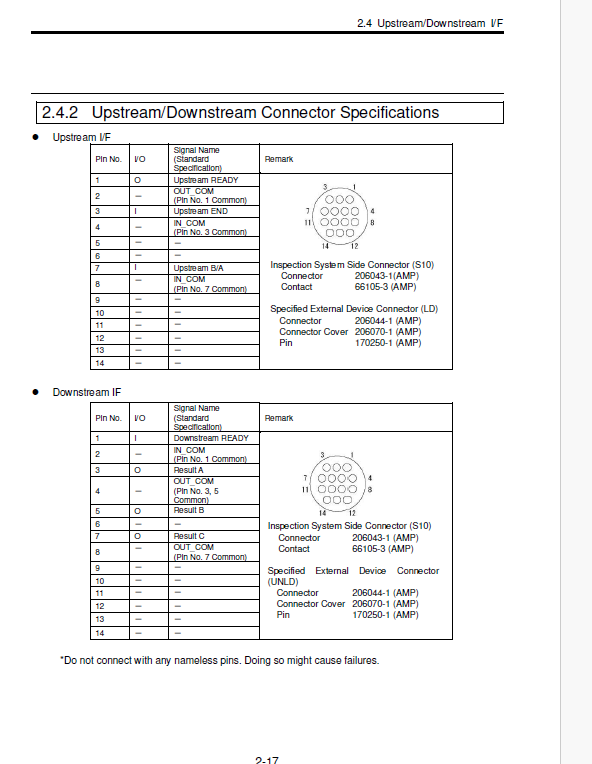
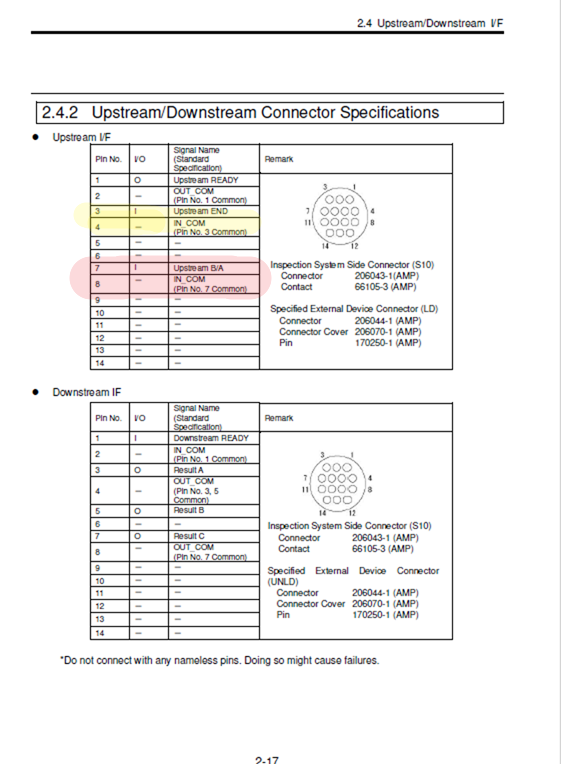
Hello Kegan, If the YJ Link conveyor pin assignment is as stated in the email (Pins 1 and 2 = BA, and Pins 3 and 4 = MR), then the interface wiring does not match the standard Omron AOI pin assignment. Per the Omron AOI maintenance manual: Pins 1 and 2: Machine Ready (MR) Pins 3 and 4: Board Available (BA) – this signal is typically always ON In addition, the NG signal is configurable as: Pins 3 and 5: Signal B Pins 7 and 8: Signal C It seems like there is a mismatch between the YJ Link conveyor pin assignment and the standard Omron AOI interface. This can be corrected by reconfiguring the SMEMA connector pin assignments so that the BA and MR signals match the Omron standard. Once the pin mapping is aligned, communication between the conveyor and AOI should operate correctly. Please verify the conveyor I/O pinout and wiring configuration to ensure the signals are connected properly. Please see the screenshot from previous email: Here is the screenshot from the S10 Maintenance manual:
Hello Saqib, Thank you for your quick response. Per the Omron maintenance manual, it says that Pins 7 and 8, not pins 3 and 4 are the Board Available (BA) form the upstream. Can you confirm? Can you please also elaborate on what “Upstream END” means (Pins 3 and 4)? [email] Thank you, [Text Description automatically generated] ISO 9001:2015 Registered ITAR Registered Kegan Petersdorff Maintenance Coordinator P: [phone] | M: [phone] [email] | www.touchpadelectronics.com 101 W. Boxhorn Drive, Mukwonago, WI 53149 TouchPad Electronics will be closed July 2nd and 3rd to celebrate Independence Day. [email] TouchPad Electronics, LLC Proprietary and Confidential. The information in this message is confidential. It is intended solely for the addressee. Access to this message by anyone else is unauthorized. If you are not the intended recipient, any disclosure, copying or distribution of the message, or any action or omission taken by you in reliance on it, is prohibited and may be unlawful. Please immediately contact the sender if you have received this message in error. Thank you.
freshdesk-inline-150168038903.png
8 tiny or repeated images hidden.
OA
Omron Application EngineerOmron reply | Jun 30, 2026 at 5:14 PM
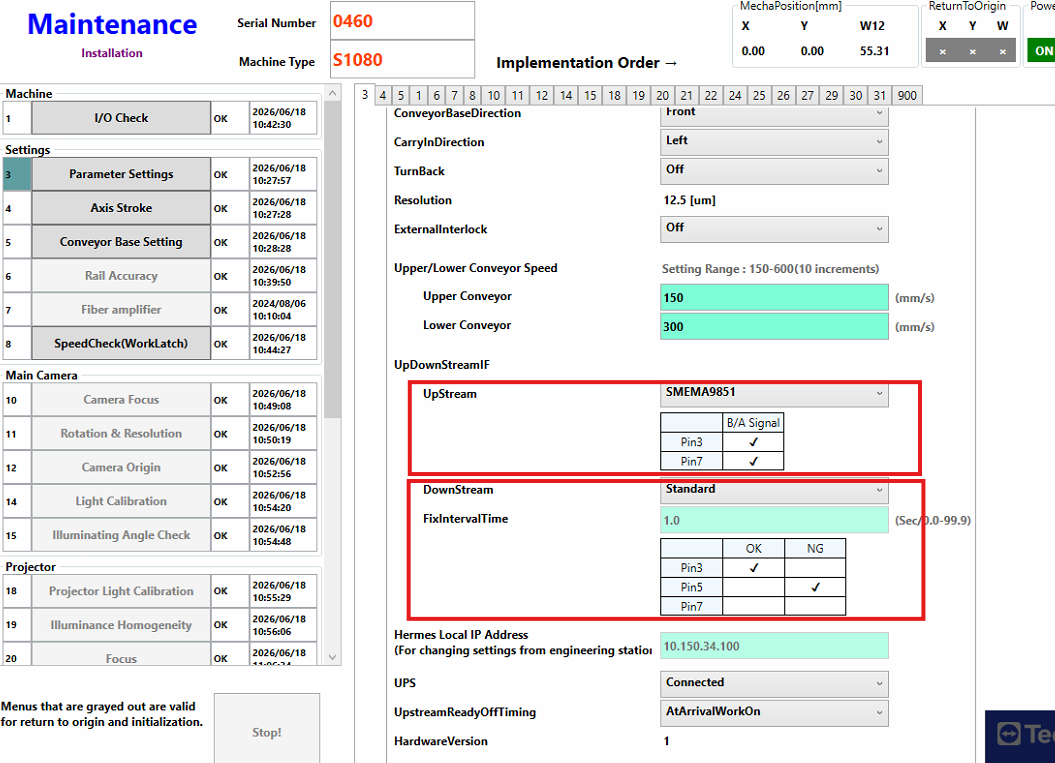
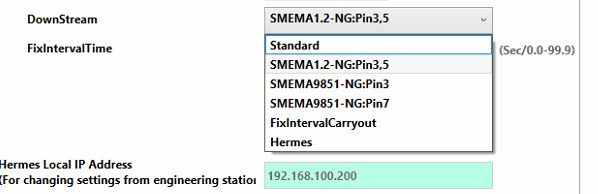
Hello Kegan, You are correct; This all depends on the configuration from the VT-S10 adjustment software. Please check the section 2.4 of the manual. There are 3 different option available for upstream and downstream. The PINOUT is different for each option. If YJLink has only 4 pin configuration then I would use SMEMA 1.2 or Standard option for upstream from the adjustment software. If you select SMEMA 1.2 then AOI will not send MR signal unless it sees the signal on pin 3 and 4. If you select Standard option from adjustment software then AOI will send MR on PIN 1 and 2 when it is in inspection mode regardless of BA signal. If you select SMEMA9851 then AOI will look for BA signal at pin 7 and 8. I hope this clarify confusion and make sense. The screenshot below configuration will activate PIN 7 and 8 as BA signal.
freshdesk-inline-150168042921.png
C
CustomerCustomer reply | Jun 30, 2026 at 5:18 PM
Hi Saqib, Thank you for clarifying. I will try this tomorrow morning and follow up with any questions! Thank you, [Text Description automatically generated] ISO 9001:2015 Registered ITAR Registered Kegan Petersdorff Maintenance Coordinator P: [phone] | M: [phone] [email] | www.touchpadelectronics.com 101 W. Boxhorn Drive, Mukwonago, WI 53149 TouchPad Electronics will be closed July 2nd and 3rd to celebrate Independence Day. [email] TouchPad Electronics, LLC Proprietary and Confidential. The information in this message is confidential. It is intended solely for the addressee. Access to this message by anyone else is unauthorized. If you are not the intended recipient, any disclosure, copying or distribution of the message, or any action or omission taken by you in reliance on it, is prohibited and may be unlawful. Please immediately contact the sender if you have received this message in error. Thank you.
12 tiny or repeated images hidden.
C
CustomerCustomer reply | Jul 1, 2026 at 7:45 AM
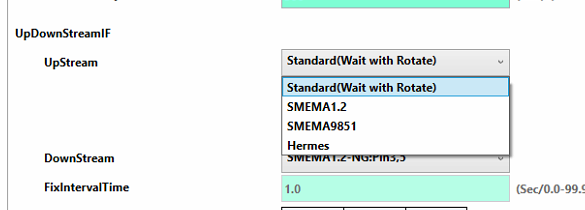
Good Morning Saqib, I’m looking at my options for upstream connection, and I don’t see the options you mentioned yesterday. I have the following: Standard(Wait with Rotate) SMEMA(Wait without ReadyOutput) SMEMA(Wait with ReadyOutput) Based on context clues, I believe the ‘Wait without ReadyOutput’ is similar to or the same as the SMEMA 1.2 you mentioned, the option I want to use if YJ only has 4 active pins, but I wanted to verify that’s correct. Can you confirm? Thank you, [Text Description automatically generated] ISO 9001:2015 Registered ITAR Registered Kegan Petersdorff Maintenance Coordinator P: [phone] | M: [phone] [email] | www.touchpadelectronics.com 101 W. Boxhorn Drive, Mukwonago, WI 53149 TouchPad Electronics will be closed July 2nd and 3rd to celebrate Independence Day. [email] TouchPad Electronics, LLC Proprietary and Confidential. The information in this message is confidential. It is intended solely for the addressee. Access to this message by anyone else is unauthorized. If you are not the intended recipient, any disclosure, copying or distribution of the message, or any action or omission taken by you in reliance on it, is prohibited and may be unlawful. Please immediately contact the sender if you have received this message in error. Thank you.
12 tiny or repeated images hidden.
OA
Omron Application EngineerOmron reply | Jul 1, 2026 at 8:11 AM
Hello Kegan, Yes that is correct, or you can use SMEMA(Wait without ReadyOutput). I would test both methods.
OA
Omron Application EngineerOmron reply | Jul 1, 2026 at 8:40 AM
Good morning Kegan, What is the software version of the system? It is probably caused by different software version. Standard(Wait with Rotate) This option will start rotating the belts as soon as the inspection program is selected send MR signal (PIN 1 and 2) SMEMA(Wait without ReadyOutput) This option would require BA signal from the upstream conveyor (Pin 7 and 8) before sending MR signal (Pin 1 and 2) SMEMA(Wait with ReadyOutput) This option would send the MR signal (pin 1 and 2) and would not require BA signal This option could be easily verified before connecting to the conveyor. My suggestion to use either (Standard) or (SMEMA with ReadyOutput), please make sure to take the pins out and match the configuration of conveyor on either AOI side or Conveyor side. Please use the output with pin 7 on the downstream signal and match the pinout require by the downstream conveyor. The SMEMA pin extractor is available on the Amazon or the web and fairly inexpensive. Please let us know if you have any questions. These are the option on out Lab machine.
Saqib, The adjustment software is versioned VT-S1040V2 4.05.00C r.163577 Regardless of what the upstream connection is set at (Standard, with or without ReadyOutput), I cannot get a board to pass from the gate conveyor to the AOI using this Pin layout in the connector. I have it set this way to line up Mach.Ready and B/A on each side. Please let me know if I’m doing something wrong here. Omron Side Pin Color 1 White 2 Black 3 Red 4 Green 5 - 6 - 7 Yellow 8 Blue YJ Side Pin Color 1 Red 2 Green 3 White 4 Black 5 Yellow 6 Blue 7 - 8 - Thank you, [Text Description automatically generated] ISO 9001:2015 Registered ITAR Registered Kegan Petersdorff Maintenance Coordinator P: [phone] | M: [phone] [email] | www.touchpadelectronics.com 101 W. Boxhorn Drive, Mukwonago, WI 53149 TouchPad Electronics will be closed July 2nd and 3rd to celebrate Independence Day. [email] TouchPad Electronics, LLC Proprietary and Confidential. The information in this message is confidential. It is intended solely for the addressee. Access to this message by anyone else is unauthorized. If you are not the intended recipient, any disclosure, copying or distribution of the message, or any action or omission taken by you in reliance on it, is prohibited and may be unlawful. Please immediately contact the sender if you have received this message in error. Thank you.
16 tiny or repeated images hidden.
OA
Omron Application EngineerOmron reply | Jul 1, 2026 at 9:10 AM
Hello Kegan, Please perform the following checks: Disconnect the SMEMA cable. Set the AOI to Standard with Rotate mode. Short the MR (pin 3 and 4) signal on the conveyor side. Verify whether the board transfers. Results: If the board transfers, the issue may be related to a circuitry mismatch. Omron uses an isolated relay output with an NPN circuit. If the board does not transfer, either the conveyor is not detecting the MR signal or there is another issue within the transfer interface/circuitry. Please let me know results of the test.
C
CustomerCustomer reply | Jul 1, 2026 at 9:22 AM
Saqib, Please explain these instructions further, I am slightly confused. Thank you, [Text Description automatically generated] ISO 9001:2015 Registered ITAR Registered Kegan Petersdorff Maintenance Coordinator P: [phone] | M: [phone] [email] | www.touchpadelectronics.com 101 W. Boxhorn Drive, Mukwonago, WI 53149 TouchPad Electronics will be closed July 2nd and 3rd to celebrate Independence Day. [email] TouchPad Electronics, LLC Proprietary and Confidential. The information in this message is confidential. It is intended solely for the addressee. Access to this message by anyone else is unauthorized. If you are not the intended recipient, any disclosure, copying or distribution of the message, or any action or omission taken by you in reliance on it, is prohibited and may be unlawful. Please immediately contact the sender if you have received this message in error. Thank you.
3 tiny or repeated images hidden.
OA
Omron Application EngineerOmron reply | Jul 1, 2026 at 9:39 AM
Hello Kegan, Let me try to make it clearer: Disconnect the SMEMA cable between the AOI and entrance conveyor. Exit out of AOI application, start the VT-S10_adjustment mode and set the AOI to Standard with Rotate and click save on the bottom. Start AOI application and select an inspection program, the belts will be rotating once the AOI is ready. Short the MR (pin 3 and 4) signal on the conveyor side. Please observe if the board transfer If the board transfers, the issue may be related to a circuitry mismatch. Omron uses an isolated relay output with an NPN circuit. If the board does not transfer, either the conveyor is not detecting the MR signal or there is another issue within the transfer interface/circuitry. I hope this make sense. Please feel free to call me, I have a meeting at 10:00 am est and will be available after 11:00 am.
C
CustomerCustomer reply | Jul 1, 2026 at 10:36 AM
Saqib, The test failed but showed me what the solution was. I followed your instructions and shorted pins 3 and 4 on the conveyor side, but the board did not transfer. I shorted pins 1 and 2 to see what would happen, and the board did transfer. I then matched the cables according to the new findings, and the two machines are now talking to each other the way they should. The board transfers when there is no board in the AOI, and the board waits on the GC when there is a board in the AOI. I have the upstream setting on Standard, I have pins 1 and 2 on the Omron side connected to pins 1 and 2 on the YJ side now, likewise with pins 3 and 4. I believe there was a mix-up in either how each pinout was communicated, or how I read the communication. Either way, the conveyors are conveying in properly as of right now. If this changes, I will let you know. Thank you very much for your help, Saqib. Thank you, [Text Description automatically generated] ISO 9001:2015 Registered ITAR Registered Kegan Petersdorff Maintenance Coordinator P: [phone] | M: [phone] [email] | www.touchpadelectronics.com 101 W. Boxhorn Drive, Mukwonago, WI 53149 TouchPad Electronics will be closed July 2nd and 3rd to celebrate Independence Day. [email] TouchPad Electronics, LLC Proprietary and Confidential. The information in this message is confidential. It is intended solely for the addressee. Access to this message by anyone else is unauthorized. If you are not the intended recipient, any disclosure, copying or distribution of the message, or any action or omission taken by you in reliance on it, is prohibited and may be unlawful. Please immediately contact the sender if you have received this message in error. Thank you.
5 tiny or repeated images hidden.
OA
Omron Application EngineerOmron reply | Jul 1, 2026 at 11:35 AM
Hello Kegan, Thank you for the update, and great job resolving the issue. I'm glad to hear that everything is working properly now. Please let us know if there any other issue or concerns. I will go ahead and close this ticket.