A - AOI CASE ACK EN, A - Reply Open, A - 1 Hour Delay rslv, LOCKED, NEW from LOCKED
Current case
Customer issue
AOI Support Team, Please contact Tyler regarding calibration procedure for exit sensor on his S1080 or possible troubleshooting if this doesn't resolve the intermittent issue he is having. Thank you, [This is Max Fabiano's card. Their email is [email] Their phone number is +[phone].]
Conversation
Engineer and customer thread
4 messages
OA
Omron Application EngineerOmron reply | Oct 24, 2025 at 11:26 AM
Hello Tyler, The S1080 has a built-in calibration for the fiber sensors you can run that till adjust and re tune them, or if it cannot, in turn it will tell us they need to be replaced.' First off before doing the calibration please make sure there are no frays on the belt and the fiber sensors are dust free, as either one of these could be causing a misreading. You will want to perform step 7 in the attached replacement documentation. To get there you will need to exit the main software and get into the adjustment/maintenance software. Choose the Omron menu and login (Password is Admin) Once in, choose maintenance mode and select fiber amplifier replacement, hit return to origin in the bottom left of the screen. Then hit the fiber amplifier test in the top left, which will open the screen down below, once there go down the list hitting each of the listed tests until they are done and hit save, then exit the maintenance software and open the main back up. Let me know the results of this and if it resolves your issue, thanks.
C
CustomerCustomer reply | Oct 24, 2025 at 2:36 PM
Max and Omron Team, Thank you so much for the support. I will attempt this calibration in the next week or so and will respond with any questions or issues. I appreciate the rapid response. Best Regards, Tyler Lovell Senior Manufacturing Engineer - SMT Quality Electrodynamics 6655 Beta Drive, Suite 100 Mayfield Village, OH 44143 USA [phone] (Direct) https://qedinnovations.com/ CONFIDENTIALITY NOTICE: This message, including attachments, is for of the intended recipient(s) and may contain confidential and privileged information or otherwise be protected by law. Access, use, disclosure or distribution of this message by anyone other than the intended recipient(s) is unauthorized and prohibited. If you are not an intended recipient (or an agent acting on an intended recipient’s behalf), contact the sender and destroy all copies of this message. ________________________________
OI
Omron internalPrivate note | Oct 27, 2025 at 11:24 PM
Private
Subject: RE: S1080 Exit sensor calibration [ AOI Case# 1622732] has been resolved. Description: Hello Max, Thank you for your recent inquiry. We’re pleased to inform you that your case 1622732 has been resolved. As always, we're here to support you. If you need assistance in the future, please don’t hesitate to reach out to us via our support email: [email] If you believe further support is needed regarding this case, simply reply to this message with a brief status update, and we’ll be happy to assist you. Adam Stanley Your Omron AOI Technical Support Group
C
CustomerCustomer reply | Nov 21, 2025 at 9:32 AM
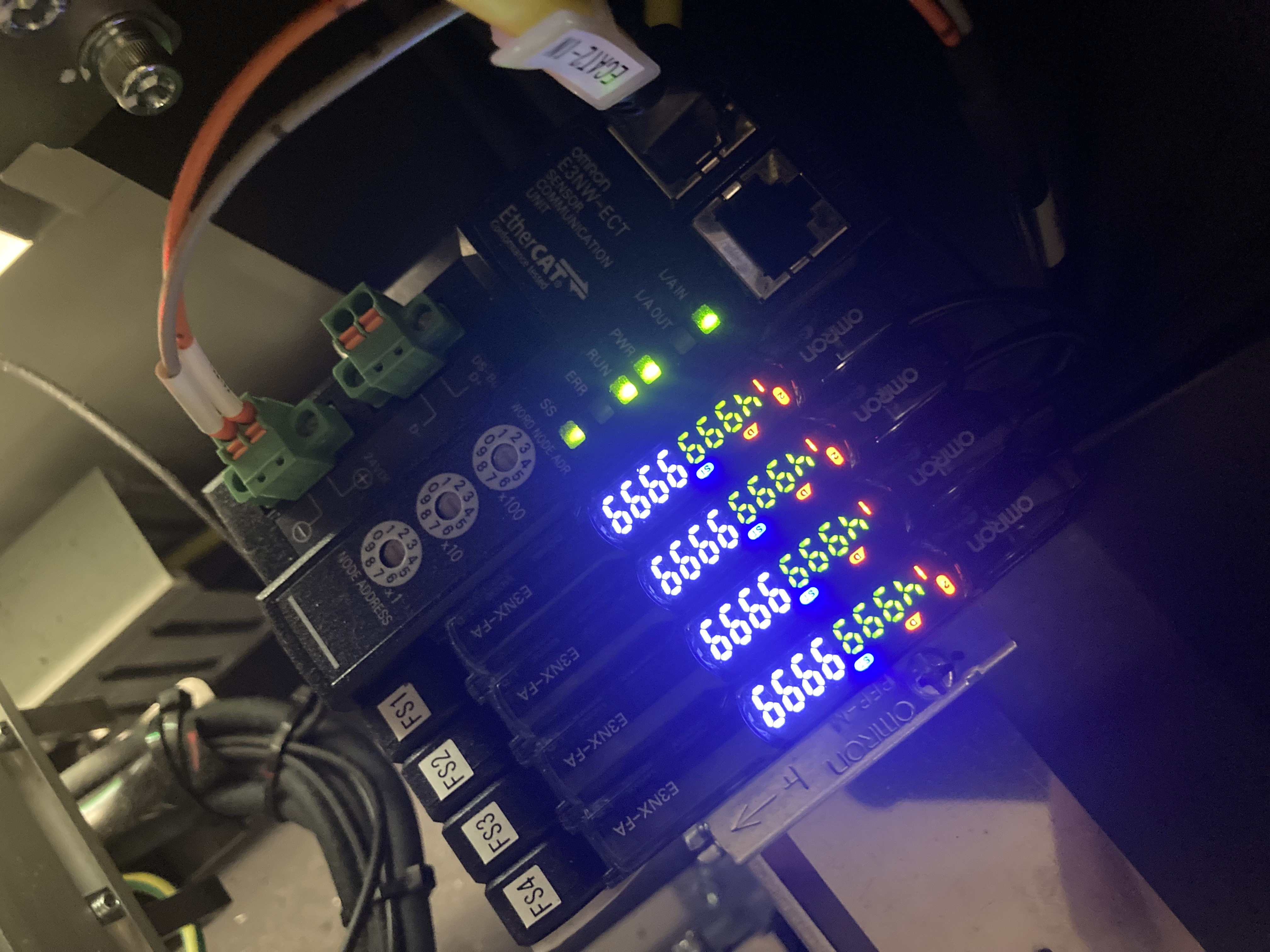
Good Morning, I performed the calibration for the fiber sensors, during which I may have inadvertently set the FS3 sensor incorrectly. The machine is operating but I cannot seem to get the Output 2 light to turn on, can you please review the attached image and confirm if it is set properly? Also, I was unable to resolve the feed issues we are having. My objective is to decrease the FS1 sensitivity so that boards with large cutouts do not prematurely trigger the sensor. What is the best approach to reduce the FS1 sensitivity to PCB cutouts? Thanks, Tyler Lovell Senior Manufacturing Engineer - SMT Quality Electrodynamics 6655 Beta Drive, Suite 100 Mayfield Village, OH 44143 USA [phone] (Direct) https://qedinnovations.com/ CONFIDENTIALITY NOTICE: This message, including attachments, is for of the intended recipient(s) and may contain confidential and privileged information or otherwise be protected by law. Access, use, disclosure or distribution of this message by anyone other than the intended recipient(s) is unauthorized and prohibited. If you are not an intended recipient (or an agent acting on an intended recipient’s behalf), contact the sender and destroy all copies of this message. ________________________________