FW: QL data collection Reporting for SPI, 2D-AOI and 3D-AOI and
CustomerNot indexed
CompanyNot indexed
Priority1
TypeAOI - No Action Required
UpdatedMay 4, 2026 at 2:26 PM
Thread16 messages
Ticket metadata
Group
AOI US (150000419797)
Status
Closed (5)
Created
Jan 29, 2026 at 8:08 AM
Requester
Not indexed
Company
Not indexed
Last synced
Aug 3, 2026 at 12:06 AM
Resolved
Apr 24, 2026 at 10:25 AM
Closed
May 2, 2026 at 1:32 PM
Tags
A - AOI CASE ACK EN, A - Reply Open, A - 1 Hour Delay rslv, A-REOPEN, AOI - New CSAT Sent, LOCKED
Current case
Customer issue
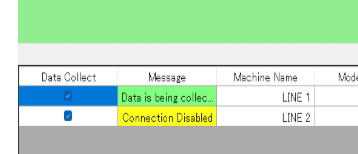
[This is Jeremiah Soliz's card. Their email is [email] Their phone number is +[phone].] From: Antonio Hightower Sent: Wednesday, January 28, 2026 1:16 PM To: Saqib Toor / OEI ; Jeremiah Soliz / OEI Subject: QL data collection Reporting for SPI, 2D-AOI and 3D-AOI and Good afternoon Saqib/Jeremiah. Hope All is well with you both Question from New Quality Data Collection Project Guys that Orlando Martinez (Managing Director) wants to incorporate. Their Questions: (Quality Line technology) For SPI: - How to match data across the sheets/tabs in the Excel file? - How to get test names for SPI? For AOI: - How to get total numbers of components in the PCB? As you both already knows this is OMRON - Q-Up NAVI Application that's being used to generate the Data Output for Reports : SPI, 2D-AOI (After Mount) and 3D-AOI (After Reflow): Example is for 3D-AOI (After Reflow): [email] My Question: For the SPI Report in the Tab: FAULT_COMPONENT_LIST , why is there's no information being inputted. SPI - Data Output For Report: (Tab: FAULT_COMPONENT_LIST)) [email] 2D-AOI (After Mount) - Data Output For Report: : (Tab: FAULT_COMPONENT_LIST)) has information being inputted. [email] Error Message related to SPI Line 2: Line 2 SPI Machine Message is saying Connection Disabled. [email] SPI Machine Line 1: Can Display Model Names and Access the Aggregation Report [email] SPI Machine Line 1 Aggregation Report: [email] Issue: SPI Machine Line 2: Can't Display Models nor Access Aggregation Report [email] Your help and support are greatly appreciated. Thanks, Antono Hightower WARNING! This is an email from an external party. Do not click on any link or open any attachment if you cannot ascertain that it is safe.
Conversation
Engineer and customer thread
16 messages
OA
Omron Application EngineerOmron reply | Jan 30, 2026 at 8:22 AM
Hello Antonio, Sorry for the delay here on this response. I just wanted to ask if you allow teamviewer access? We will need to fix that connection to the Line 2 SPI. If you want to attempt that fix yourself then please open Windows Explorer on the Line 2 SPI, and type \\VPDS\ or \\IP-ADDRESS-OF-YOUR-VPDS-STATION\ and enter in the windows credentials for that VPDS station. As far as the Q-up Navi output, I would have to do some testing to confirm that. Unless anybody else knows? Also, are you scanning PCB-ID's at the SPI machine for both sides? Or just one side of the product?
C
CustomerCustomer reply | Jan 30, 2026 at 9:43 AM
Hey Jeremiah, Thank You for your Support and Help. We are just scanning one side of the PCB. Thanks, Antonio Hightower
Omron Application EngineerOmron reply | Jan 30, 2026 at 2:31 PM
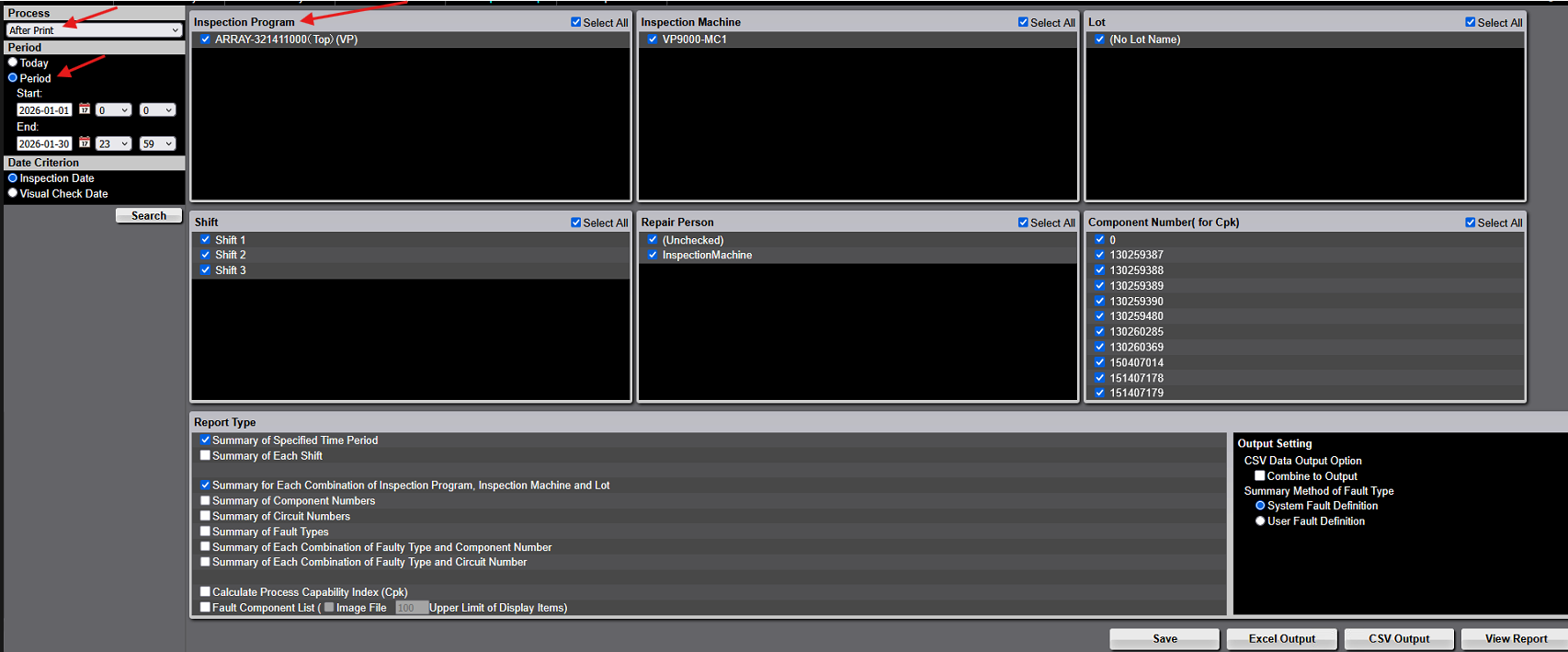
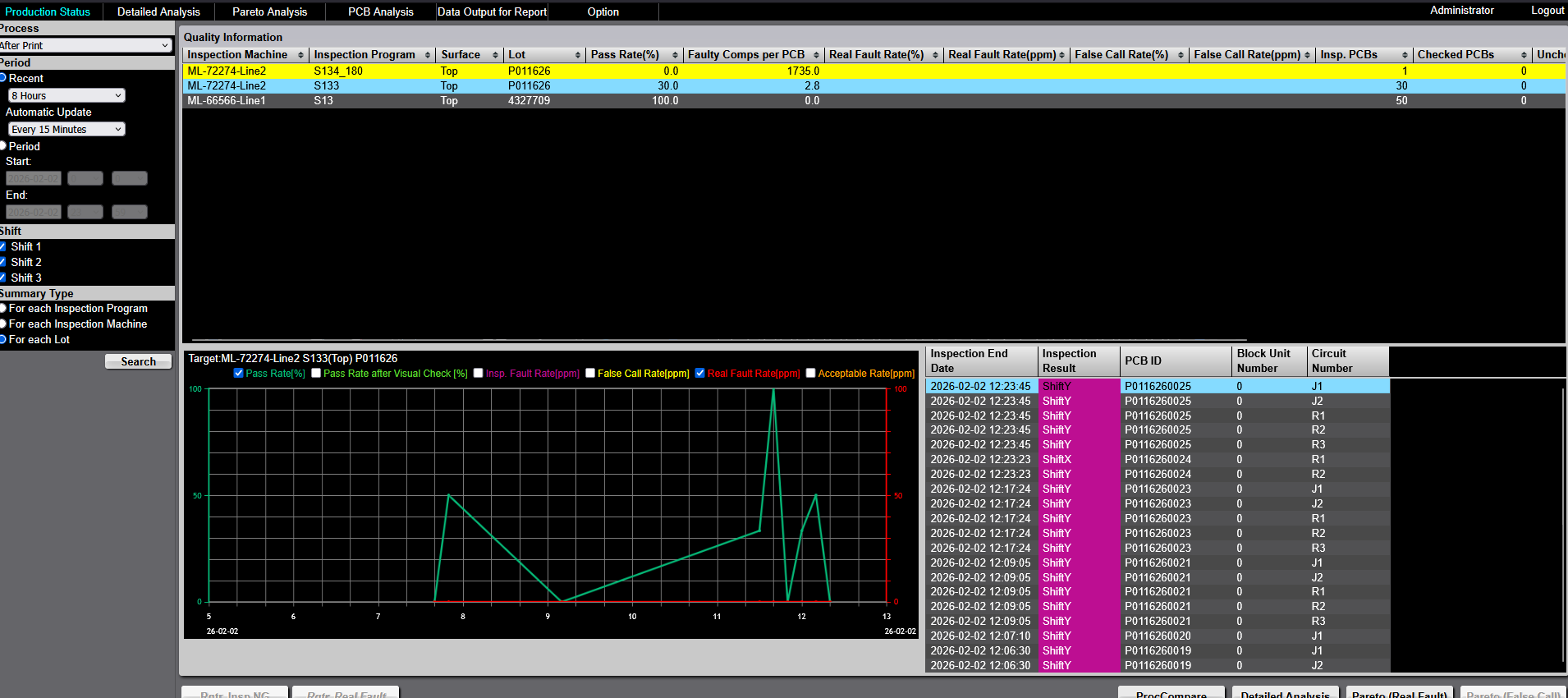
Hello Antonio, As far as "Their questions" for SPI: Below graphic shows that you change After Mount to After Print. Then Select the period you want, and you can clearly see the SPI program names up at the top. As far as your questions, I believe it's just that your SPI is not properly linked up with Q-up Navi. Are you able to provide teamviewer access to that SPI machine that is having issues? I can check the Q-up Navi connection myself. Let me know? If not we can do it next week as well. I am available Mon and Tues on remote support.
freshdesk-inline-150148013529.png
C
CustomerCustomer reply | Jan 30, 2026 at 4:07 PM
Hey Jeremiah, Thanks again. Yes, I understand about the output Data reporting. Just this one particular question, is why the PCB ID isn’t being recorded. TeamViewer application isn’t installed on this SPI Machine (New Line 2). It will be installed next week. Once it’s installed, I will contact you. Thanks, and have a great weekend. Thanks, Antonio Hightower
9 tiny or repeated images hidden.
OA
Omron Application EngineerOmron reply | Jan 30, 2026 at 4:13 PM
Hello Antonio, I believe because of this issue: We need to fix Line 2 so it can communicate with VPDS properly. I assume that PCB ID's show up on Line 1 just fine? Or is it not showing up on either line?
freshdesk-inline-150148030344.png
C
CustomerCustomer reply | Feb 2, 2026 at 7:51 AM
Good Morning Jeremiah, Thank You. The PCB ID doesn’t show up on Both Line 1 and Line 2. Also can the Output Report for Report be automatically reported daily for SPI, 2D-AOI and 3D-AOI? Thanks, Tony H.
2 tiny or repeated images hidden.
OA
Omron Application EngineerOmron reply | Feb 2, 2026 at 8:29 AM
Hello Antonio, Unfortunately the Q-up Navi report can't be output automatically. As far as the PCB ID not being recorded, I can investigate when I can remote access to one of the machines. Can you confirm that the date/time are accurate on both machines? They aren't off by 1 hr or more? Seems like the files that are being output from the SPI machine to the _postMessage* folder on your AOI server isn't processing. Once this is fixed, data will show up in that report for Q-upNavi Can you login to the AOI server and verify that CKDConvertServices is running? Let me know anytime you get that teamviewer going and we'll check it out. Thanks sir
C
CustomerCustomer reply | Feb 2, 2026 at 8:52 AM
Hey! Here is the TeamViewer Login Is 9:00am (EST) a good time for you to review? Thanks, Antonio Hightower [email]
freshdesk-inline-150148197037.png
2 tiny or repeated images hidden.
OI
Omron internalPrivate note | Feb 2, 2026 at 12:23 PM
Private
Subject: RE: FW: QL data collection Reporting for SPI, 2D-AOI and 3D-AOI and [ AOI Case# 1688096] has been resolved. Description: Hello Antonio, Thank you for your recent inquiry. We’re pleased to inform you that your case 1688096 has been resolved. As always, we're here to support you. If you need assistance in the future, please don’t hesitate to reach out to us via our support email: [email] If you believe further support is needed regarding this case, simply reply to this message with a brief status update, and we’ll be happy to assist you. Jeremiah Soliz Your Omron AOI Technical Support Group
C
CustomerCustomer reply | Feb 2, 2026 at 1:20 PM
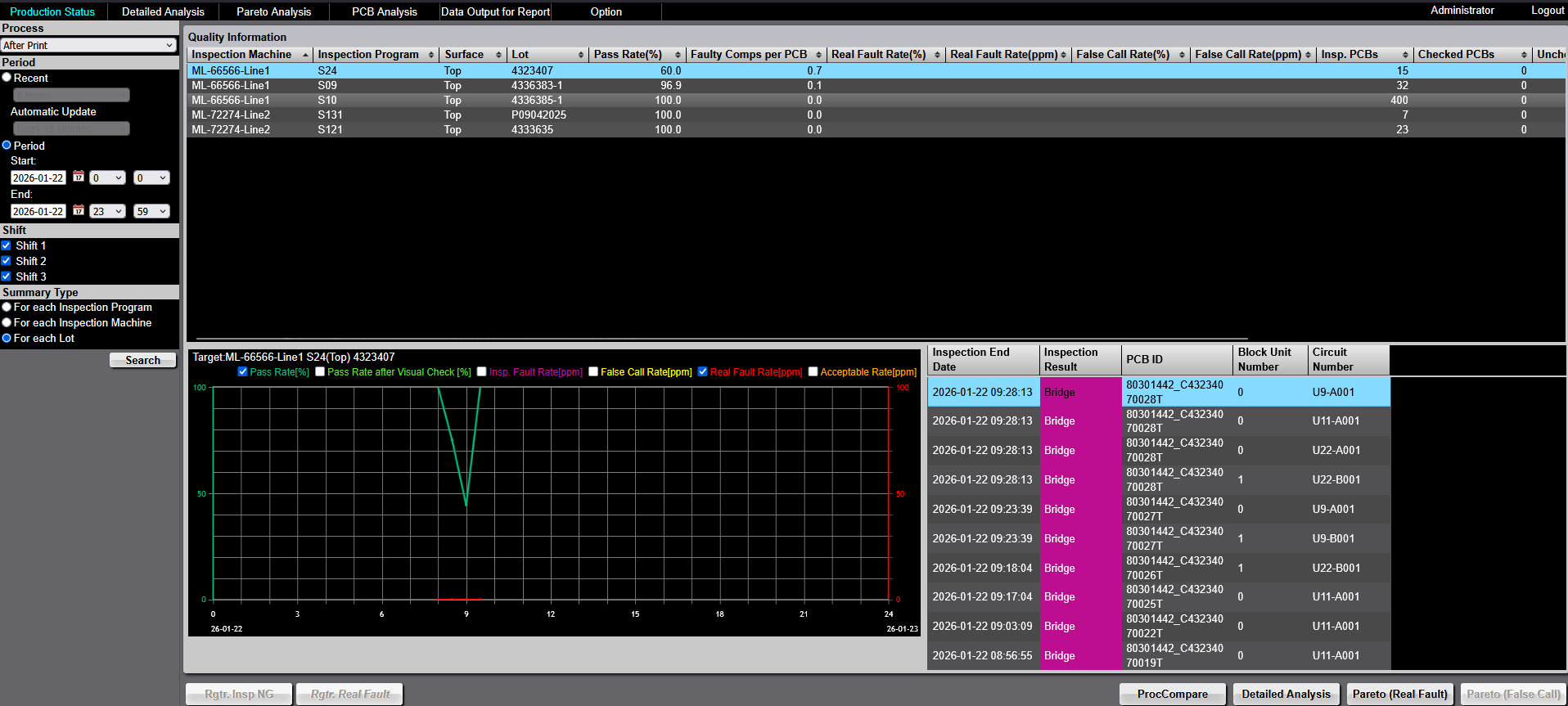
Hey Jeremiah, Thank You again for you help and support this morning. From SPI Machine Line 1 Shows the PCB ID for each Failed Panel and Circuit Number detected with issues. [email] From SPI Machine Line 2 Shows the PCB ID for each Failed Panel and Circuit Number detected with issues. (New Line) [email] However, after confirming, I'm still having issues with the Data Collection in the Data Output For Report related to both and SPI Machine Line 1 and Line 2. From the Q-Up NAVI Production Status Monitoring the PCB ID details are displayed and other details. The PCB ID and other details aren't displayed in the Data Output For Report Tab - FAULT_COMPONENT_LIST. (See the attached SPI Line 1 and Line 2 Data Output for REPORT) The PCB ID and other details are displayed in the Data Output For Report Tab - FAULT_COMPONENT_LIST for both 2D-AOI and 3D-AOI. (See the attached 2D-AOI Line 1 and Line 2 Data Output for REPORT and 3D-AOI Line 1 and Line 2 Data Output for REPORT. The Reporting Formats are the same for ALL Three Machines. (SPI, 2D-AOI and 3D-AOI). Why the SPI Reporting isn't inputting information in the Data Output For Report Tab - FAULT_COMPONENT_LIST? Your help and support is greatly appreciated and needed. Thanks, Antonio Hightower
Hey Jeremiah, I may have asked my question wrong. Try again. Can the Data Output For Report be Automatically Reported? Thanks, Antonio Hightower [https://attachment.freshdesk.com/inline/attachment?token=eyJ0eXAiOiJKV1QiLCJhbGciOiJIUzI1NiJ9.eyJpZCI6MTUwMTQ3NzYzNDgxLCJkb21haW4iOiJvbXJvbmVsZWN0cm9uaWNzbGxjLmZyZXNoZGVzay5jb20iLCJhY2NvdW50X2lkIjoyNTQ5ODMyfQ.0Ot9HOd_NzA9sf4PYKoT6Yo4kC0w_pGRRHX-GlAEKcw]
9 tiny or repeated images hidden.
OA
Omron Application EngineerOmron reply | Feb 2, 2026 at 5:37 PM
Hello Antonio, There isn’t currently a built‑in way for the software to automatically generate the report, but there are two possible alternatives: Software customization: We can customize the system to automatically output the required CSV or Excel file on a daily basis and save it to a specified location. Task‑automation tools: Some customers use task‑automation software to simulate keyboard and mouse actions in order to perform manual steps automatically, such as downloading reports. There are several tools available online—one example is SikuliX, which can automate repetitive on‑screen actions. Francisco Villalpando Engineering Supervisor Direct: +[phone] [email]
C
CustomerCustomer reply | Feb 3, 2026 at 7:05 AM
Good Morning Francisco, Thank you for your response. Can we look into option: 1. Software customization: We can customize the system to automatically output the required CSV or Excel file on a daily basis and save it to a specified location. Can you provide us the necessary information to get this started. (ex. Quotation and etc.) Thank you for your Support and Help. Thanks, Antonio Hightower
2 tiny or repeated images hidden.
OA
Omron Application EngineerOmron reply | Feb 5, 2026 at 4:06 PM
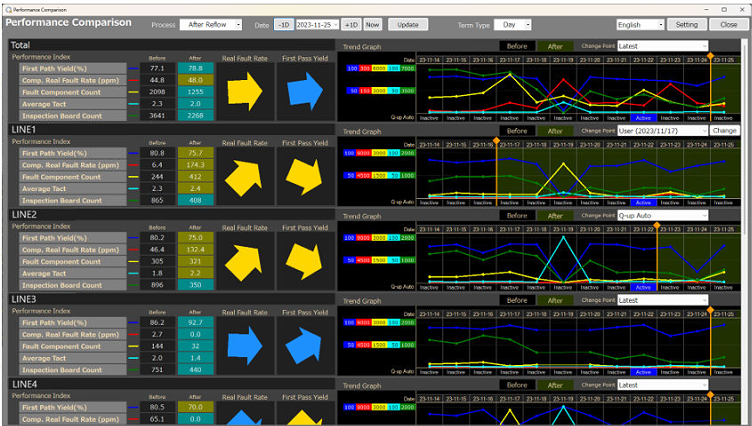
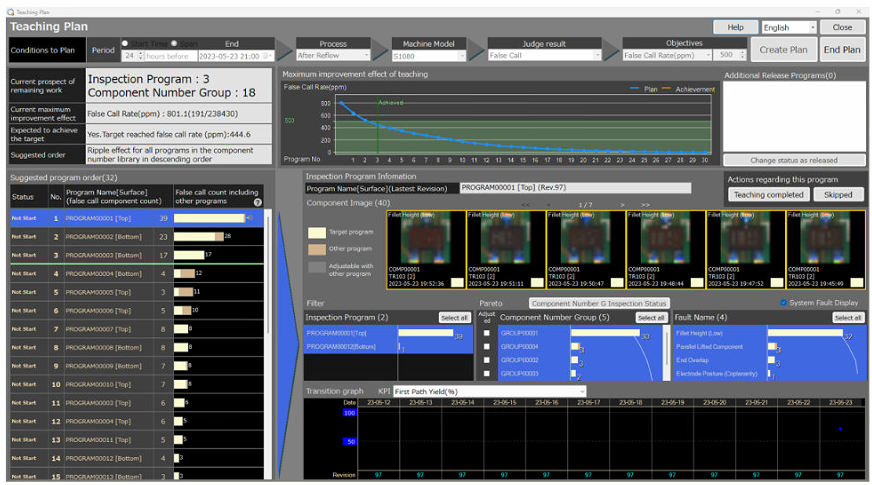
Hello Antonio, As discussed over the phone, I’m currently working with the Omron development team to obtain a quote for automatically generating reports on a daily, weekly, or monthly basis. Once I receive that information, Max will prepare and provide the quote to you. I’d like to mention that there is a software called Qup Navi Auto (different from the version you currently have). This version includes a feature that can automatically export an HTML report on a daily basis. I’m attaching an example for your review. I’m bringing this up because this functionality is already developed and can be delivered quickly; however, it does require a separate license. The main purpose of this software is to generate visual graphs that help evaluate the impact of program adjustments over time. It also provides a teaching plan, meaning it offers suggestions on which components would most effectively improve the yield rate if adjusted. Francisco Villalpando Engineering Supervisor Direct: +[phone] [email]