A - AOI CASE ACK EN, A - Reply Open, A-REOPEN, A - 1 Hour Delay rslv, LOCKED
Current case
Customer issue
Hello, I am trying to map the output CSV from a V9000 and two VT-S1080 systems to a different file server for FactoryLogix integration. Using the vDB application I can point the destination to the new folders and use the TEST button to check the path. I keep getting "Illegal Folder Specified" error. How can I remap the destination locations for these files or is it not possible??? Thanks in advance for your support! Richard MacCutcheon Senior SMT Process Engineer Ensign-Bickford Aerospace & Defense Company Desk phone: [phone] Email: [email] Web: www.ebad.com [email] [A picture containing text, clipart Description automatically generated] [A picture containing text, sign, tableware Description automatically generated] [A picture containing text, sign, clipart Description automatically generated] [Logo Description automatically generated] ________________________________ DISCLAIMER: This e-mail may contain ITAR controlled technical data as defined by 22 CFR 120.33 and/or EAR controlled technology as defined by 15 CFR 772.1 and may not be forwarded or disclosed to any Foreign Person, as defined under the regulations, without the prior written consent of Ensign-Bickford Aerospace & Defense and the United States Department of State or United States Department of Commerce.
Conversation
Engineer and customer thread
14 messages
OA
Omron Application EngineerOmron reply | Mar 17, 2026 at 3:00 PM
Hello Richard, Please make sure that the current AOI server has read/write permissions to new server location, also verify output paths are correct. Thanks,
freshdesk-inline-150153985115.png
C
CustomerCustomer reply | Mar 17, 2026 at 3:10 PM
Thanks, I have IT working that now. Do the actual inspection machines need permissions to the new server location or is all of the data traffic going directly from the server in all cases for the CSV exchange? Richard
6 tiny or repeated images hidden.
OA
Omron Application EngineerOmron reply | Mar 17, 2026 at 3:13 PM
Hello Richard, The AOI machines do not need access to the new server location, the AOI server must have write permission to new server. The SPI machine requires write permissions to the new server folders. Please let us know if you have any questions. Best Regards
C
CustomerCustomer reply | Mar 17, 2026 at 3:24 PM
Excellent. I will get that set up and tested.
5 tiny or repeated images hidden.
C
CustomerCustomer reply | Mar 17, 2026 at 3:26 PM
Sounded too easy. IT is telling me that they need credentials to log onto the Omron server to set up the connection to the new File Server. Can you advise how I can achieve this?
5 tiny or repeated images hidden.
OA
Omron Application EngineerOmron reply | Mar 17, 2026 at 3:31 PM
Hello Richard, The default username and passwords are lower case prism/prism unless changed by your IT department. Best Regards
C
CustomerCustomer reply | Mar 17, 2026 at 4:15 PM
Thank you.
5 tiny or repeated images hidden.
OA
Omron Application EngineerOmron reply | Mar 17, 2026 at 4:18 PM
Hello Richard, Np Problem, please let us know if you have any other questions or issues. Best Regards
C
CustomerCustomer reply | Mar 18, 2026 at 5:04 PM
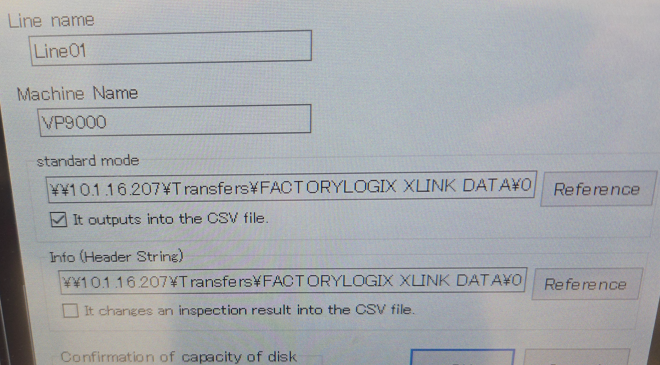
So I have set up the folders and at this point I have these settings. Both paths are the same, no data is written. If I check the box marked (It changes an inspection result to the CSV file) and use a subfolder of the standard mode folder I get the header file but no inspection data CSV. In this case my sample is a bare board so I get all NG results for the inspection. Since someone has been on this machine I had it set to the Omron server with both boxes checked and the Info(Header string) path as a subfolder of the standard mode folder. That would save the data to the parent folder for the total inspection results. Can you advise if there is a simple way to resolve this? [email]
freshdesk-inline-150154179484.png
5 tiny or repeated images hidden.
OA
Omron Application EngineerOmron reply | Mar 19, 2026 at 10:54 AM
Hello Richard, There is no way to modify the format of current output files. I would keep the location of header file and result on a separate folder. Also, the files would have to be deleted manually since there is not deletion utility to delete these files. Please let us know if you have any questions. Best Regards
C
CustomerCustomer reply | Mar 19, 2026 at 11:27 AM
I found out that the reason the file was not being written is the folder naming in the path contained spaces in the name. Once I removed the space characters the data was passing.
6 tiny or repeated images hidden.
OA
Omron Application EngineerOmron reply | Mar 19, 2026 at 2:27 PM
Hello Richard, Thanks for the update, please let us know if there is anything we can do to help. Best Regards
C
CustomerCustomer reply | Mar 19, 2026 at 2:40 PM
Our IT group had to create user access directly between the Omron server to the file server. This is a sketchy way to do it from their perspective. They are reviewing if this is acceptable for security since both servers are on the same subnet.
1 tiny or repeated image hidden.
OI
Omron internalPrivate note | Mar 20, 2026 at 10:27 AM
Private
Subject: RE: Output files from SPI and AOI [ AOI Case# 1723972] has been resolved. Description: Hello Richard, Thank you for your recent inquiry. We’re pleased to inform you that your case 1723972 has been resolved. As always, we're here to support you. If you need assistance in the future, please don’t hesitate to reach out to us via our support email: [email] If you believe further support is needed regarding this case, simply reply to this message with a brief status update, and we’ll be happy to assist you. Saqib Toor Your Omron AOI Technical Support Group