RE: general dynamics x ray move questions. [Case: 1782005]
CustomerNot indexed
CompanyNot indexed
Priority2
TypeFYI-No Action Required
UpdatedJun 20, 2026 at 2:31 PM
Thread9 messages
Ticket metadata
Group
AOI US (150000419797)
Status
Closed (5)
Created
Jun 8, 2026 at 12:59 PM
Requester
Not indexed
Company
Not indexed
Last synced
Aug 3, 2026 at 4:16 AM
Resolved
Jun 10, 2026 at 11:23 AM
Closed
Jun 18, 2026 at 2:25 PM
Tags
A - AOI CASE ACK EN, A - Reply Open, A-REOPEN, A - 1 Hour Delay rslv, AOI - New CSAT Sent, LOCKED
Current case
Customer issue
Hello We have a mis-match on step 3. We do not have the option “Basic Operation” I do see an option for “Customer Menu” and “Omron Menu”. Both of which require a non-blank password. Thad Larson Staff Manufacturing Engineer From: Hartig, Shawn Sent: June 2, 2026 2:32 PM To: Larson, Thad Cc: Chasteen, Charles D Subject: FW: general dynamics x ray move questions. [Case: 1782005] This is the list of operations needed to set up the Xray for its new position. Thad I hope we do not need to recalibrate the machine, we won’t know until its up and running in the new position. From: AOI Tech Support - US > Sent: Tuesday, June 2, 2026 2:14 PM To: Hartig, Shawn > Subject: Re: general dynamics x ray move questions. [Case: 1782005] Hi Shawn, For moving the VT-X750 from standalone operation to inline operation, please see the notes below. For keeping the track/conveyor open during alignment, you can use the CF-Maintenance tool. General procedure: Close the AXI software. Hi Shawn, For moving the VT-X750 from standalone operation to inline operation, please see the notes below. For keeping the track/conveyor open during alignment, you can use the CF-Maintenance tool. General procedure: 1. Close the AXI software. * Hold down the Shift key. * While holding Shift, click the Shutdown button in the AXI software. * Continue holding Shift until the software fully closes. 1. Open the CF-Maintenance.exe tool. 2. Go to Basic Operation. 3. In the upper-right area, there should be tabs/options related to the conveyor shutter operation. * These can be used to open/close or enable/disable shutter movement for alignment. * This should allow the track system to remain open while aligning with the existing upstream/downstream conveyor equipment. For required connections, the main items are: * LAN/network connection * Air supply * Main power * SMEMA connections to the upstream and downstream conveyors Also, you will need to tell the machine it's "Inline" now. Goto Service mode on the AXI machine in the software (normal software), and change this option as well: [https://attachment.freshdesk.com/inline/attachment?token=eyJ0eXAiOiJKV1QiLCJhbGciOiJIUzI1NiJ9.eyJpZCI6MTUwMTY0MjA0MjgyLCJkb21haW4iOiJvbXJvbmVsZWN0cm9uaWNzbGxjLmZyZXNoZGVzay5jb20iLCJhY2NvdW50X2lkIjoyNTQ5ODMyfQ.4eJb9OyNkUwURanu2u4L_BPiHTHi8eO2JQPiZH3hDxU] Regarding calibration, if the machine is moved a significant distance, especially around 50–100 ft or more, we normally recommend recalibration. The main concern is that the machine level may change after relocation, which can affect the 3D/X-ray alignment and measurement accuracy. Calibration also helps confirm that the hardware is responding correctly after the move. So yes, if the unit is being moved from standalone to inline at the end of the SMT line, we would recommend planning for calibration after the move and mechanical alignment are complete. Best regards, [This is Jeremiah Soliz's card. Their email is [email] Their phone number is +[phone].][hihello.com] On Tue, 2 Jun at 8:08 AM , Hartig, Shawn > wrote: We are moving our Xray from a standalone unit to inline at the end of our SMT line. X-Ray Model VT-X750, SN 0624Z22-0624. We have a few questions 1. Do I need to set a specific program to keep the track system open for proper alignment with the existing equipment? It is in a normally closed position. 2. What connections are required 3. Will it need to be re calibrated by the factory. Thanks for the help. ________________________________ This is an e-mail from General Dynamics Land Systems. It is for the intended recipient only and may contain confidential and privileged information. No one else may read, print, store, copy, forward or act in reliance on it or its attachments. If you are not the intended recipient, please return this message to the sender and delete the message and any attachments from your computer. Your cooperation is appreciated. 1782005:2549832 ---------------------------------------------------------------------- This is an e-mail from General Dynamics Land Systems. It is for the intended recipient only and may contain confidential and privileged information. No one else may read, print, store, copy, forward or act in reliance on it or its attachments. If you are not the intended recipient, please return this message to the sender and delete the message and any attachments from your computer. Your cooperation is appreciated.
Conversation
Engineer and customer thread
9 messages
C
CustomerCustomer reply | Jun 8, 2026 at 1:05 PM
So, what does that mean? Will this hamper getting the unit ready for production once we move the Xray to new location? Is this going to be a headache to get it back online? Will someone on the CCA line, if needed, be available to come in to help us to ensure proper operation during shutdown week? Chuck
attachment
OA
Omron Application EngineerOmron reply | Jun 8, 2026 at 1:09 PM
Hello Thad, Please go to Omron Menu and the passwords should be lower case admin and the Basic operation should be on top right side of screen. Do you have TeamViewer access available on the machine? Please let me know I will be able to help. Saqib Toor Sr. Application Engineer Mobile: [phone] Emai: [email] Omron Automation Americas 2895 Greenspoint Parkway, Suite 200, Hoffman Estates, IL 60169 automation.omron.com [email]
C
CustomerCustomer reply | Jun 8, 2026 at 1:50 PM
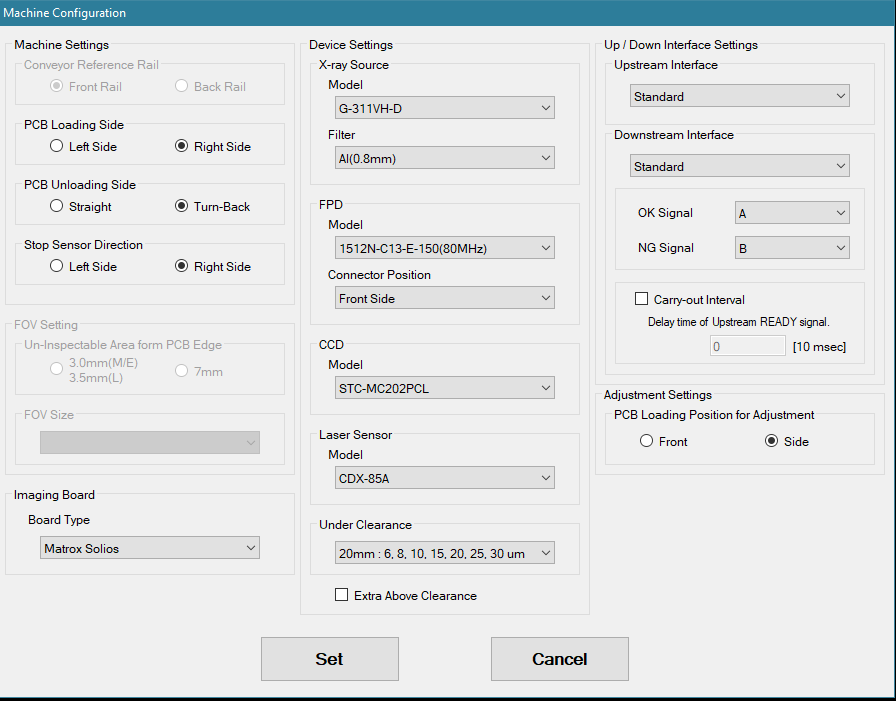
No TeamViewer. We will need to trudge through this with screenshots. Seems to be a software version difference between what we have and what Omron may be using. Here is 7 screenshots from my differing attempts to open the side doors. Every description with underline and bold matches an attached picture. After I log in through Omron Menu it immediately goes to Machine Configuration. I change my settings from RIGHT LOAD UNLOAD SETTING to PASS THRU SETTING When I click SET, it goes to the OMRON MAIN MENU When I click BASIC OPERATION, then the Device Connection menu pops up. If I click OK, it opens a window with PLC SETTING FAILED in red If I click OK, it opens a window with XRAY STATUS OFFLINE ^^ There is probably a “Start PLC button” that I needed to press ? I exit back to the main menu and click the OMRON INSTALLATION ADJUSTMENT This shows me the shudder status, but no control method Thad Larson Staff Manufacturing Engineer
PASS THRU SETTING.PNGOMRON INSTALLATION ADJUSTMENT.PNGXRAY STATUS OFFLINE.PNGPLC SETTING FAILED.PNGBASIC OPERATION.PNGOMRON MAIN MENU.PNGRIGHT LOAD UNLOAD SETTING.PNG
1 tiny or repeated image hidden.
OA
Omron Application EngineerOmron reply | Jun 8, 2026 at 2:24 PM
Hello Thad, The best way to align the AXI with conveyors is to use the inspection mode. I noticed that you have changed the direction of machine to match your configuration. Here are the steps: Please follow the steps below for conveyor alignment and setup: Enter Service Mode and set the Conveyance setting to Inline. Open a program in Inspection Mode—the stage will move to the entrance side. Align the entrance conveyor. Load a board into the machine. After inspection, the conveyor will move to the exit side. Align the exit conveyor. For normal operation, ensure that SMEMA cables are connected to both upstream and downstream interfaces. Please note that if the machine has been moved more than a few feet, recalibration may be required. After completing the alignment, kindly verify operation and let us know if you encounter any issues. Please let me know if this helps or if you need further assistance. Saqib Toor Sr. Application Engineer Mobile: [phone] Emai: [email] Omron Automation Americas 2895 Greenspoint Parkway, Suite 200, Hoffman Estates, IL 60169 automation.omron.com [email]
freshdesk-inline-150164969801.png
C
CustomerCustomer reply | Jun 8, 2026 at 3:29 PM
Making progress. I was able to make the inline process work where it loads on the left and exits on the right. This will assist with our move. I was able to change back to to offline process from Inline Inspect, but I had to change the Conveyance Setting and the Machine Configuration with CF-Maintenance. If these are the three states that I want, is there a more direct way to switch from Inline Inspect to Offline without closing the app? Pass-Through Enter from Left Exit to Right No Xray Inline Inspect Same as Pass-Through, but with Xray Inspection Offline Enter from Right Exit to Right Xray in Teaching Mode How do I set up Pass-Through ? Since we are moving this to the line, I need to be able to give it a width and the Xray essentially become an expensive conveyor for the first half of the run when only one side of the CCA is complete. Thad Larson Staff Manufacturing Engineer
2 tiny or repeated images hidden.
OA
Omron Application EngineerOmron reply | Jun 8, 2026 at 3:34 PM
Hello Thad, The inspection mode has regular inspection and passthrough mode. Please select a program in inspection mode and select pass mode and you have an expensive conveyor. Please let me know if you have any questions. Saqib Toor Sr. Application Engineer Mobile: [phone] Emai: [email] Omron Automation Americas 2895 Greenspoint Parkway, Suite 200, Hoffman Estates, IL 60169 automation.omron.com [email]
freshdesk-inline-150164984065.png
C
CustomerCustomer reply | Jun 9, 2026 at 8:38 AM
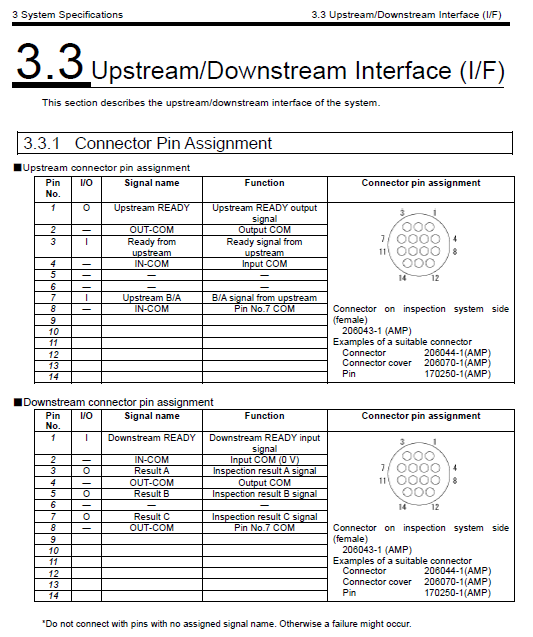
I am looking at purchasing a SMEMA cable but before I do, could you tell us what pin configuration is required? I was thinking I could buy one with all the pins because the unused ones should not affect anything. I want to verify with you first. Thanks.
3 tiny or repeated images hidden.
OA
Omron Application EngineerOmron reply | Jun 9, 2026 at 8:51 AM
Hello Thad, The screenshot shared in the earlier email shows a standard SMEMA configuration. In this setup, a 4-pin connector is required for proper operation. For more details on the SMEMA pinout and configuration, please feel free to refer to Section 3.3 of the attached manual. If you have any questions or need further assistance, I’d be happy to help. Saqib Toor Sr. Application Engineer Mobile: [phone] Emai: [email] Omron Automation Americas 2895 Greenspoint Parkway, Suite 200, Hoffman Estates, IL 60169 automation.omron.com [email]