Good afternoon, We are experiencing some issues with our exterior bottom side camera. I’ve attached two examples; one is the clear image we normally see and the other is a whiteout blurry image that we are experiencing every hour or so. Sometimes it will happen more often, but it doesn’t seem to be getting any better or worse. If I cover the camera with my hand sometimes it will reset and focus properly. I have tried to reseat the cable to make sure there wasn’t an issue there. The camera itself does feel hot to the touch, but I imagine this is the heat from the lighting. Any ideas what could be causing these issues? Hardware or software? Thank you! Nick Moorman BT Manufacturing Maintenance Technician office 800‑637‑2645 x3158 email [email] Watchfire Headquarters | watchfire.com sales [phone] service [phone] [Instagram] [Facebook] [LinkedIn] [email] This e-mail message, including any attachments and previous email messages sent with it, contains CONFIDENTIAL and PROPRIETARY information of Watchfire Signs, LLC or its subsidiaries and may be legally PRIVILEGED. You may not use, disclose, reproduce or distribute such information without Watchfire’s authorization. If you have received this message in error, please notify the sender immediately and permanently delete the original message, its attachments and any copies thereof.
Conversation
Engineer and customer thread
13 messages
ST
Saqib ToorOmron reply | Jul 20, 2026 at 8:17 AM
Hello Nick, Based on your description, it sounds more like a hardware issue, especially since covering the camera with your hand sometimes causes the image to return to normal. A few things to check: Please check if the ambient lighting is causing this random issue? Is the scanner lens clean and free of any dust or residue? Are the lights staying consistent when the issue occurs? Is it possible to swap the scanner from a different line to see if the problem transfer?
C
CustomerCustomer reply | Jul 20, 2026 at 10:11 AM
We have not changed anything with our lighting recently so I don't think the ambient lighting would be an issue now. The camera itself is clean, and the flash seems to be functioning as intended. We are just having issues with the auto focus. We may be able to swap the camera later, but both lines are constantly running so it's not an easy task. Thanks, Nick Moorman BT Manufacturing Maintenance Technician office 800‑637‑2645 x3158 email [email] ________________________________
ST
Saqib ToorOmron reply | Jul 23, 2026 at 8:54 AM
Hello Nick, Please let us know if you are able to swap the scanner. This will eliminate and communication or lighting issue and easier to troubleshoot.
C
CustomerCustomer reply | Jul 23, 2026 at 9:14 AM
I talked to David Enyeart about this now that I'm back in the office. We do have a spare camera, but it uses a different controller. Our current cameras were an early prototype version. Is it possible to try and get some onsite support to install the new controller and camera? Thanks, Nick Moorman BT Manufacturing Maintenance Technician office 800‑637‑2645 x3158 email [email] ________________________________
ST
Saqib ToorOmron reply | Jul 23, 2026 at 9:31 AM
Hello Nick, Eric McElmurry can provide a quotation for on-site support. What are the make and model of the scanners? Is this provided by Omron with monitor and all the hardware? Please let me know.
C
CustomerCustomer reply | Jul 23, 2026 at 9:37 AM
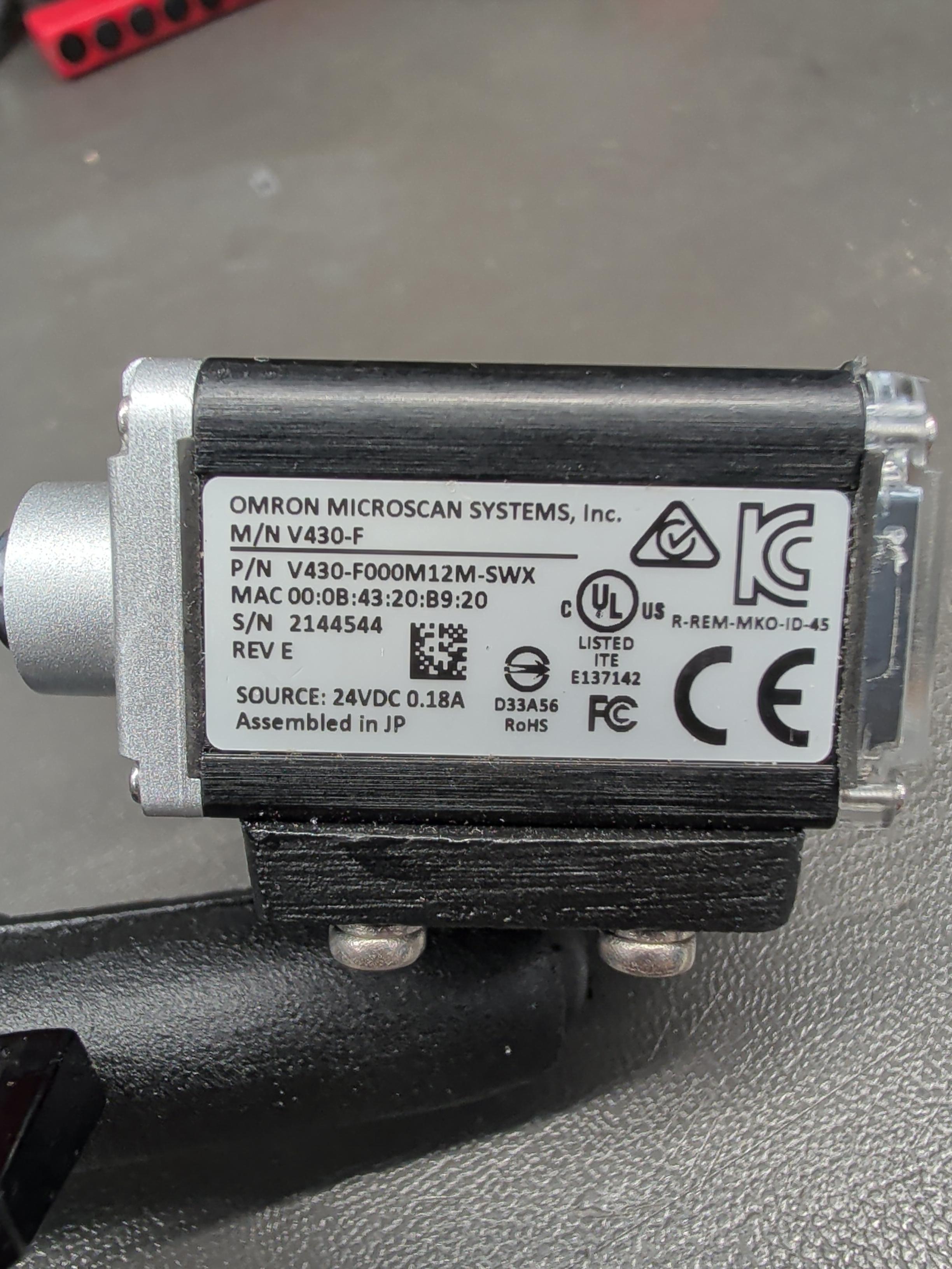
The first controller we have is in a custom 3D printed box. The new controller is in a metal box now. Neither controller have any identification numbers on them. There is already a monitor at the station for this, everything came from Omron. I've attached a picture of the new camera. Nick Moorman BT Manufacturing Maintenance Technician office 800‑637‑2645 x3158 email [email] ________________________________
pro-V9yU6m20.jpeg
8 tiny or repeated images hidden.
ST
Saqib ToorOmron reply | Jul 23, 2026 at 10:33 AM
Hello Nick, Here is the setup manual for new Omron provided barcode scanner setup. Eric can provide quotation from on-site support to setup the new camera.
C
CustomerCustomer reply | Jul 31, 2026 at 11:36 AM
Hello, I still have not received a quote for on site support, or anything else for over a week. Where do we stand on this? Nick Moorman BT Manufacturing Maintenance Technician office 800‑637‑2645 x3158 email [email]
8 tiny or repeated images hidden.
FV
Francisco VillalpandoOmron reply | Jul 31, 2026 at 12:12 PM
Hello Nick, Apologies for the delay in our response. I consulted with colleagues from our Advanced Sensing Division, which supports scanner products. Based on their experience, the external scanner itself is most likely defective and will need to be repaired or replaced. An onsite visit would likely result in unnecessary expense, as the issue appears to be related to the scanner’s internal autofocus hardware. To explore the repair option, please follow the instructions provided in the link below. https://share.synthesia.io/8338cb31-fd77-4ca8-9dfa-3525af53deb2 Francisco Villalpando Engineering Supervisor Direct: +[phone] [email]
C
CustomerCustomer reply | Aug 4, 2026 at 10:36 AM
Francisco, Nick tried to replace this scanner this morning, and it wouldn’t connect to the control box. Also tagging Brad and Tim on here – these ‘control boxes’ that we have on our two AOI machines are not the ‘standard’. They were early protos that Karl Long had created. I’m pretty sure the boxes are 3D printed. Would there be any documentation on them? Honestly not even sure what you think we have would be what we actually have? And if there isn’t any good info about these – can you send us replacements? Thanks, David Enyeart Electronics Process Engineer Supervisor office 800‑637‑2645 x6023 email [email]
9 tiny or repeated images hidden.
FV
Francisco VillalpandoOmron reply | Aug 4, 2026 at 2:35 PM
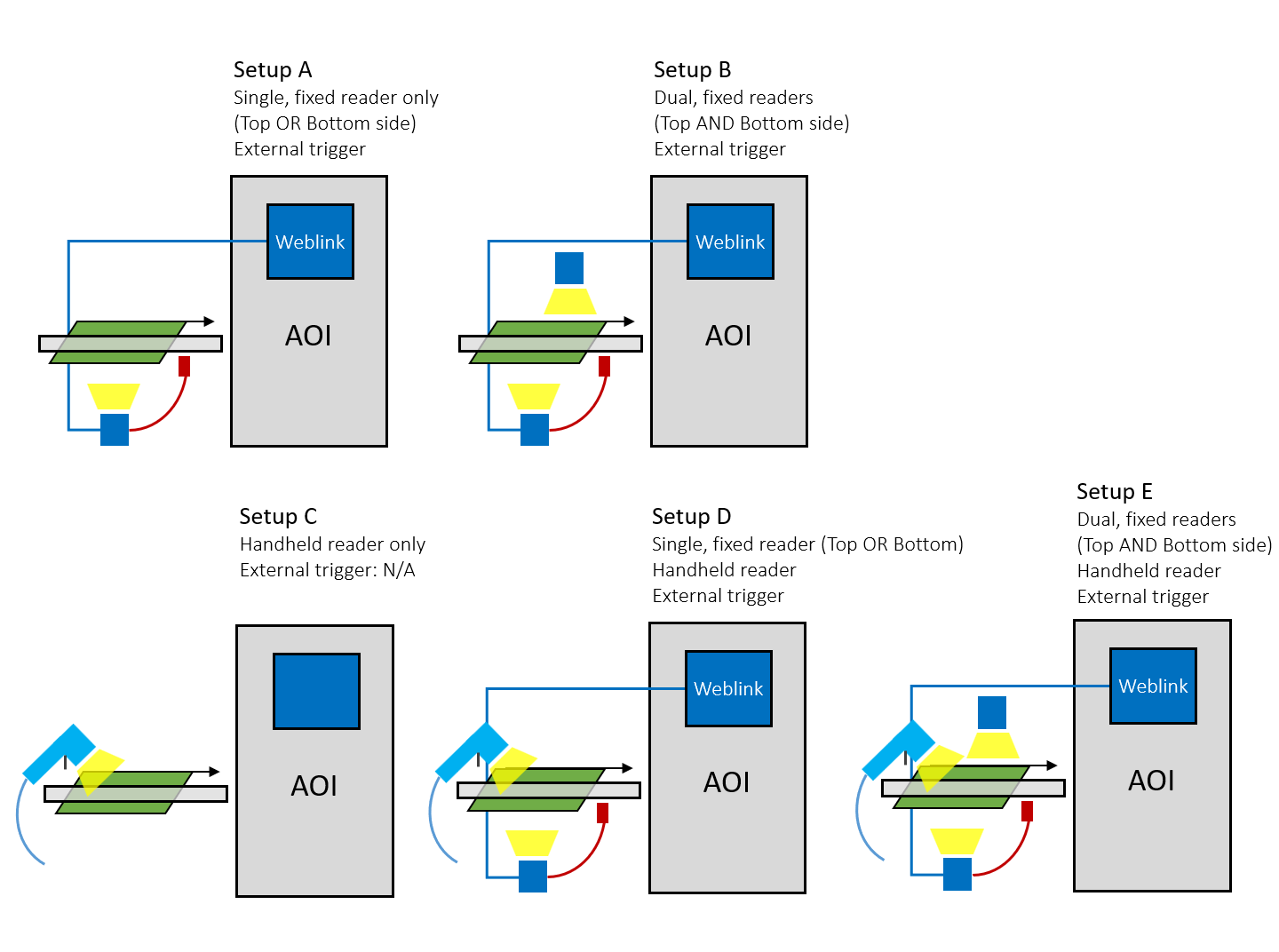
Hello David, Attached is the documentation we currently have for these boxes. At this time, we do not have the capability to manufacture new boxes or repair the existing ones. However, if you can confirm which of the following setups matches your current configuration, we may be able to provide a solution by replacing only certain cables. Francisco Villalpando Engineering Supervisor Direct: +[phone] [email]
freshdesk-inline-150172758645.png
C
CustomerCustomer reply | Aug 4, 2026 at 2:48 PM
Hi Francisco, We will review the attached and get back with you. And we have Setup A. So if these boxes fail, what are our options? Thanks, David Enyeart Electronics Process Engineer Supervisor office 800‑637‑2645 x6023 email [email]
11 tiny or repeated images hidden.
BW
Brad WardOmron reply | Aug 5, 2026 at 9:42 AM
Hello Nick. David. Further detail about the updated/alternative reader solution provided via email directly. This tech support Case/Ticket can be used for conversations related to troubleshooting any ongoing issues. Regards.
AI
Omron Application Engineer
Ticket copilot
Connecting
Ticket#1816602 OMRON VT-S730 2124421-H3A Exterior camera issue