AXI VT-X700-L - No Power on Command & Displacement Meter Communication Error
CustomerNot indexed
CompanyNot indexed
Priority1
TypeAOI - No Action Required
UpdatedNov 6, 2025 at 3:33 PM
Thread6 messages
Ticket metadata
Group
AOI US (150000419797)
Status
Closed (5)
Created
Oct 24, 2025 at 11:00 AM
Requester
Not indexed
Company
Not indexed
Last synced
May 19, 2026 at 1:25 AM
Resolved
N/A
Closed
N/A
Tags
A - AOI CASE ACK EN, A - Reply Open, A - 1 Hour Delay rslv, LOCKED
Current case
Customer issue
Hello, We are seeing two issues with our AXI machine that I do not know how to resolve. For background, the computer for the AXI started crashing and turning off yesterday; we have identified the issue to be a bad stick of RAM and replaced it. During the computer crashing though and immediately after we got an error message for Displacement Meter Communication Error. What is this error and what do we need to do so we don't see it? I cannot determine a cause for it or how to stop it. Displacement Meter Communication Error (5.3.4.-6) Failed to open port. [email] Additionally after replacing the RAM, the AXI computer is not receiving a power on command when the ON button is pressed on the front of the machine. I am not sure why it is not receiving the power on command. Can you help with troubleshooting? Thank you, Nolan Cassoday Manufacturing Engineer BAE Systems Electronic Systems, Controls & Avionics Solutions T: [phone] | E: [email] 4250 Airport Expressway, Fort Wayne, Indiana 46809 United States
Conversation
Engineer and customer thread
6 messages
OA
Omron Application EngineerOmron reply | Oct 24, 2025 at 11:16 AM
Hello Nolan, The displacement meter is the Z laser sensor. It should communicate over a COM port between the PC and the sensor device. Try looking into that connection and see if it is possible for the device to communicate currently. The power ON command to the PC is controlled from the BIOS. I’m not sure why a RAM card change would affect that, but try checking the Wake On settings in the BIOS menu. Regards,
C
CustomerCustomer reply | Oct 24, 2025 at 12:14 PM
Hello, Enabling Wake On LANin the BIOS did not turn the PC on when the Power Button on the front panel was pressed. How does the UPS in the machine communicate with the computer? Is there somewhere that needs configured? Thank you, Nolan Cassoday Manufacturing Engineer BAE Systems Electronic Systems, Controls & Avionics Solutions T: [phone] | E: [email] 4250 Airport Expressway, Fort Wayne, Indiana 46809 United States
1 tiny or repeated image hidden.
OA
Omron Application EngineerOmron reply | Oct 27, 2025 at 12:06 PM
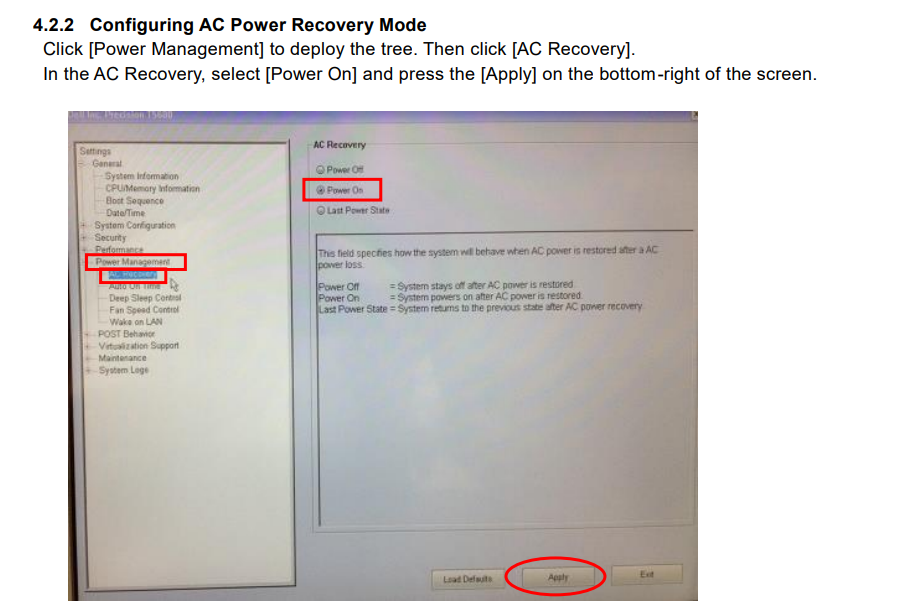
Hello Nolan, I hope you are doing well. To enable the PC to power on automatically, please access the PC BIOS settings. Under Power Management → AC Recovery, change the setting to Power On (see the screenshot below). Regarding UPS communication, it operates via RS-232. The UPS sends a power-off signal to the PC when power is lost; however, there is no direct communication from the UPS to turn the PC back on. The PC will automatically power on once it detects that power has been restored.
freshdesk-inline-150135765415.png
C
CustomerCustomer reply | Oct 27, 2025 at 12:33 PM
Francisco, Thank you very much. That fixed the PC not turning on with the ON button on the front panel. I don’t know why it’s setting would have changed though. We did not change anything in the BIOS when replacing the RAM. But it is working as expected now which is the important part. Thank you, Nolan Cassoday Manufacturing Engineer BAE Systems Electronic Systems, Controls & Avionics Solutions T: [phone] | E: [email] 4250 Airport Expressway, Fort Wayne, Indiana 46809 United States
2 tiny or repeated images hidden.
OA
Omron Application EngineerOmron reply | Oct 27, 2025 at 1:09 PM
Hello Nolan, Replacing RAM can sometimes cause the BIOS to reset or adjust memory-related settings, but it doesn’t usually affect other BIOS configurations. As long as the system is working correctly now, everything is fine .
OI
Omron internalPrivate note | Oct 27, 2025 at 2:26 PM
Private
Subject: RE: AXI VT-X700-L - No Power on Command & Displacement Meter Communication Error [ AOI Case# 1622900] has been resolved. Description: Hello Nolan, Thank you for your recent inquiry. We’re pleased to inform you that your case 1622900 has been resolved. As always, we're here to support you. If you need assistance in the future, please don’t hesitate to reach out to us via our support email: [email] If you believe further support is needed regarding this case, simply reply to this message with a brief status update, and we’ll be happy to assist you. Brian Andersen Your Omron AOI Technical Support Group
AI
Omron Application Engineer
Ticket copilot
Connecting
Ticket#1622900 AXI VT-X700-L - No Power on Command & Displacement Meter Communication Error