A - AOI CASE ACK EN, A - Reply Open, COLAB RUN, A - CN RUN, LOCKED
Current case
Customer issue
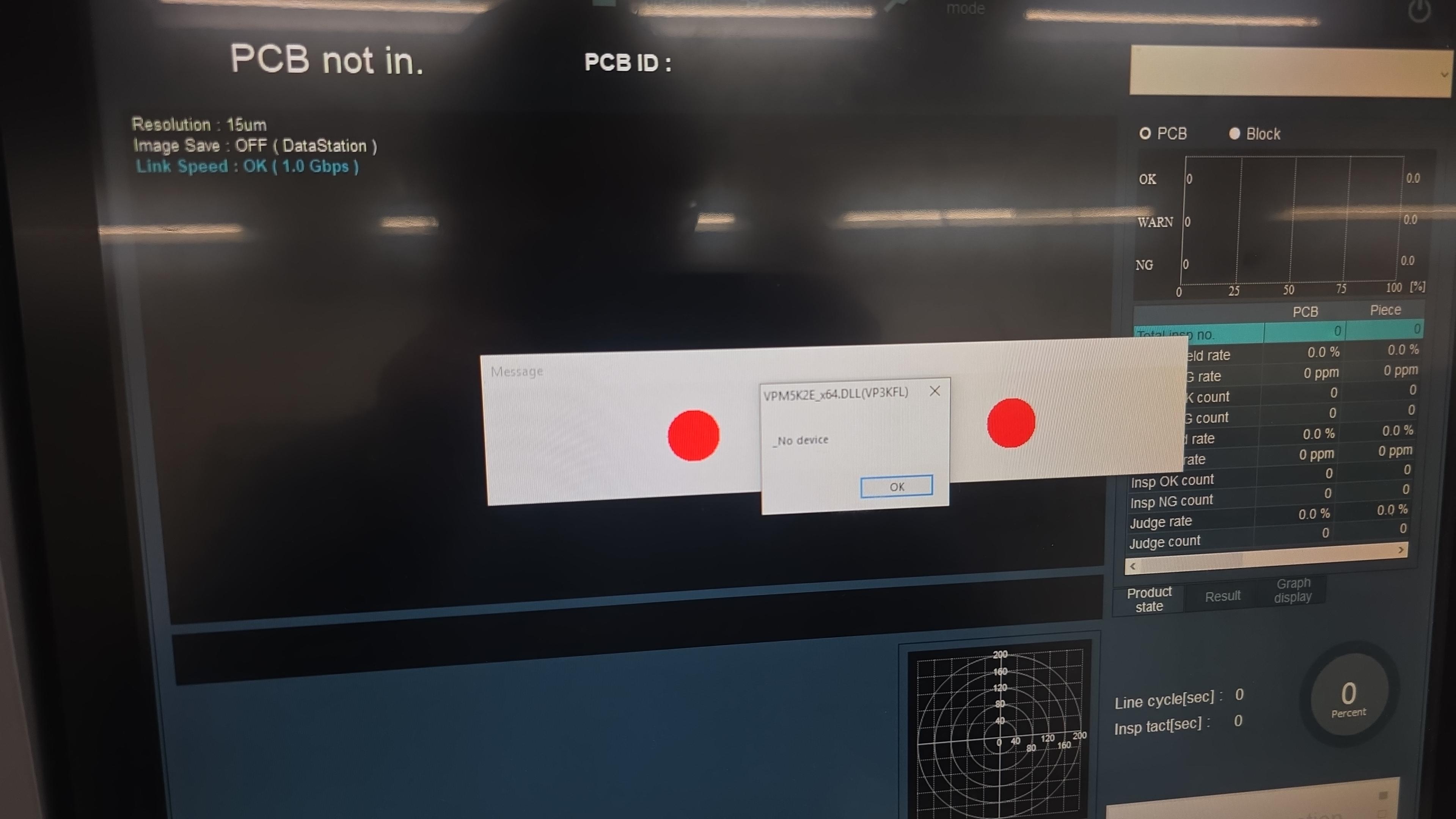
Good Morning. I'm troubleshooting our VP9000 On startup it will not connect to the machine and presents this error. I have tried cable reseating and restarts. I cannot see anything that would be causing this all of a sudden. Please call me at [phone] as soon as possible please. Andrew Shock Process Engineer P ([phone] | M [phone] ITAR Disclaimer: This message, including any attachments, is for the sole use of the intended recipient(s) and may contain confidential and privileged information. Any unauthorized review, use, disclosure or distribution is prohibited. ITAR CONTROLLED This correspondence may contain Technical Data whose export is restricted by the Arms Export Control Act (Title 22, U.S.C., Sec 2751, et seq.). Violations of these export laws are subject to severe criminal penalties. This data may not be resold, diverted, transferred, transshipped, made available to a foreign national by any means.
Conversation
Engineer and customer thread
25 messages
OA
Omron Application EngineerOmron reply | Oct 28, 2025 at 8:31 AM
Hello Andrew, Close SPI software and re-set purple usb cable, you can also try plugging it in to a different USB portz
C
CustomerCustomer reply | Oct 29, 2025 at 7:12 AM
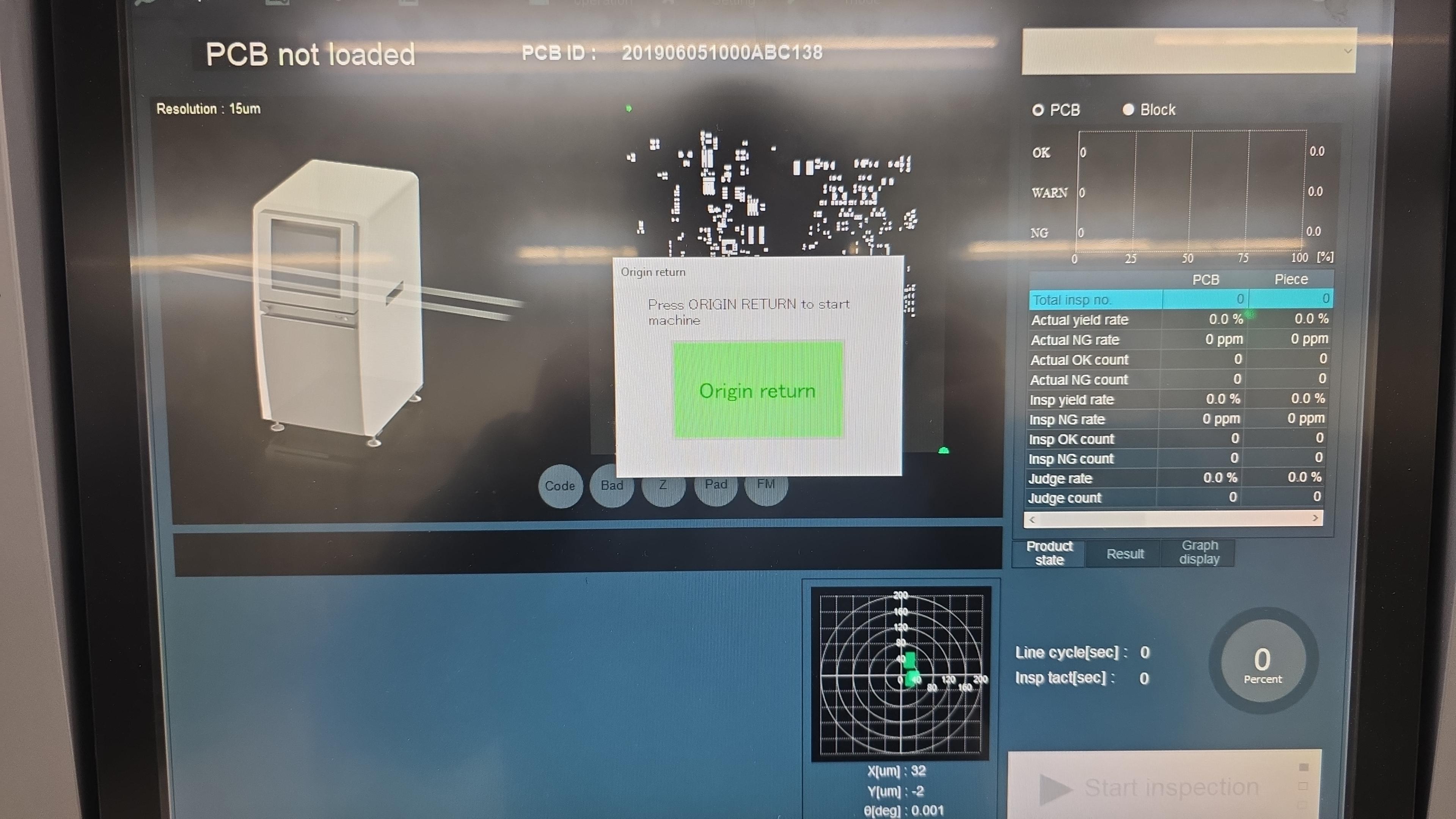
Hey Tony, I reseated the cards and that seemed to resolve the issue with the machine not connecting. I am noticing its freezing up now while starting up. For example origin is taking a long time. Still waiting for it to actually origin as i'm writing this email. I verified the terminals were clean and double checked the connections per the diagram. Andrew Shock Process Engineer P ([phone] | M [phone] ________________________________
pro-kELlaUeC.jpeg
C
CustomerCustomer reply | Oct 29, 2025 at 4:55 PM
Hey Team, I just got off the phone with Jeremy after doing additional troubleshooting. We validated that between our working machine and our non-working machine that everything in Device Manager seems to be working. We cannot find anything that's visible or at least nothing that can be shown within device manager. Resetting the cables and connections is not having an effect, but from what we can tell is that when it is connected and it's talking, it remains talking. There's persistent communication in the device and the device will continue to work as function once it does connect to the device, but when the software has been restarted and it's initializing, it won't communicate. Jeremy mentioned it's possible that it could be an issue with the video card. I requested that to see if we could get a loaner sent in order to troubleshoot that because we cannot easily see it within device manager. Reseating the cables do not seem to have much affect presently and the USB connections that are visible do disappear and re-appear on the machine when disconnected and plugged back in. This matches are working machine. The machine serial number is ML-66700 Please let me know what we can do to move forward. Best Regards, Andrew Shock Process Engineer P ([phone] | M [phone] ________________________________
OA
Omron Application EngineerOmron reply | Oct 29, 2025 at 5:13 PM
Hello Andrew, Have you tried switching to backup hard drive? If you haven't, let's try that first. You will need to copy data on current hard drive to backup drive. On current drive copy PC name/IP address, go to PC location D/VP9000 copy file vp9000.ini to an external drive or data station PC. Transfer all programs back to Data Station or another SPI machine. I am unsure of what model PC you have, some models you can access hard drives from PC front, you just swap them like server drives. Some model PC's require you to open PC and physically swap cables from current to backup. Please perform drive swap as applicable to your PC. Once drive has been swapped, power on system. Update PC name and IP scheme from previous drive and overwrite vp9000.ini file. Verify communication to current applicable output locations (Data Station, AOI server, MES, etc.). Transfer programs to back to SPI and resume Inspections. Pleas update following drive swap. Thanks, Tony Lee
C
CustomerCustomer reply | Oct 30, 2025 at 6:49 AM
Hey Tony, When switching to the backup drive the same issue persists on SPI boot. Andrew Shock Process Engineer P ([phone] | M [phone] ________________________________
pro-6RYnanjb.jpeg
C
CustomerCustomer reply | Oct 30, 2025 at 9:57 AM
Omron team, We are LINE DOWN. I need to have a path forward today. We have an extremely critical customer visit on Monday and that line has to be running. If we need to order parts, I need to do that today to have them here tomorrow. Please advise. Thanks, Paul Brown Senior Process Engineer M [phone]
C
CustomerCustomer reply | Oct 30, 2025 at 10:32 AM
If the part is not in stock, is there a demo machine or similar that we can take the part from? Thanks, Paul Brown Senior Process Engineer M [phone]
C
CustomerCustomer reply | Oct 30, 2025 at 12:08 PM
Hi Paul, Just wanted to let you know that we're currently reviewing options and will get back to you soon. Thanks. Best Regards, Eric McElmurry [This is Eric McElmurry's card. Their email is [email] Their phone number is +[phone].]
freshdesk-inline-150136295625.png
C
CustomerCustomer reply | Oct 30, 2025 at 12:40 PM
Private
Kevin-san. Emerald EMS is having an issue with no device after reboot of PC. This issue was intermittent, but today it is continuous. We need your help to troubleshoot the part that might be causing this. OEI can provide temporary replacement PC to Emerald if CKD can confirm the issue and lead time of the part that requires replacing. Based on troubleshooting, I believe the card the camera connects to may be a problem, but without further troubleshooting steps we are not sure. Please advise how we can troubleshoot this issue. See below emails. Best regards, Jeremy Orbach Application Engineer – Inspection Systems Direct: [phone] | [email] Omron Automation Americas 2895 Greenspoint Parkway, Suite 100, Hoffman Estates, IL 60169 automation.omron.com ________________________________
freshdesk-inline-150136302136.png
C
CustomerCustomer reply | Oct 30, 2025 at 1:05 PM
Good morning Andrew and Paul. Sorry to request but just want to verify some checks related to motion. Please perform the following checks on SPI machine; 1. check voltage to VP9000 machine, verify voltage is 208 +/-. 2. Power down system and once again remove and reseat motion card only. Motion card has the large ribbon cable. Verify card is properly seated into PC slot, sometimes they pop up when fastening screw. thanks, Tony Lee OEI Applications Engineer Inspections Systems 2895 Greenspoint Parkway Hoffman Estates IL 60169 [phone] [email] ________________________________
C
CustomerCustomer reply | Oct 30, 2025 at 1:17 PM
Supply voltage is 216V Please clarify which is the motion card. Pic attached Thanks, Paul Get Outlook for iOS ________________________________
IMG_2993.jpeg
C
CustomerCustomer reply | Oct 30, 2025 at 1:37 PM
Reseated the motion card / restarted and getting the same error. No device / failed in initialization. Get Outlook for iOS ________________________________
C
CustomerCustomer reply | Oct 30, 2025 at 2:48 PM
Thanks Paul. Can you please capture log file for us. While machine is in initialization state click Shift and F4, a log folder will be created. Please email us that log file. Thanks, [cid:68887c3f-48c6-41a5-af57-bfe8ed9a8cb9] ________________________________
freshdesk-inline-150136325114.png
C
CustomerCustomer reply | Oct 30, 2025 at 3:17 PM
Please see attached. Thanks, Paul Brown Senior Process Engineer M [phone]
C
CustomerCustomer reply | Oct 30, 2025 at 3:42 PM
Private
Higashi-san, Attached is log file from Saline VP9000 machine Jeremy-San mentioned. Can you also please provide the latest part numbers for PC Image capture and Motion cards. Thanks, [cid:c7520f53-1941-4488-adaa-d167176816c3] ________________________________
Omron internalPrivate note | Oct 30, 2025 at 4:35 PM
Private
COLAB NOTE UPDATE This case has received a Note from a Collaborator and has been TAG and Possibly Reopened. Please verify if any further action is required.
C
CustomerCustomer reply | Oct 31, 2025 at 2:42 AM
Private
HI Jeremy-san, Please allow me to confirm the situation. -Currently, the inspection software starts up normally after the machine is powered on. -Return to origin does not complete. Are the above two points correct? Please provide information on the following points. -What was the original error that occurred? I think there is an attached image in first email, but I can't see it. -At what screen does it currently freeze? *I would like to know whether the password entry screen appears or whether the return to origin button is displayed. -While it is frozen, press Shift+F4, and then from the Explorer screen that appears, please send me the E:\vpdata\Log folder. -If the inspection software itself is frozen, logs will not be collected. In that case, please obtain and send me the VP9000.ini and VPMInit.log files. As Tony-san mentioned, the most common reason why the inspection software can't return to the origin after a customer plugs or unplugs the PC connector is because the RS-232C cable is connected incorrectly. This causes the PC to be unable to communicate with the PLC, and it appears to freeze while waiting for a response from the PLC. Best Regards, Kevin Higashi Service Engineer - SPI E-mail: [email] CKD Europe B.V. Beechavenue 125A 1119RB Schiphol-Rijk, NL [CKD_logo_color] EUROPE
freshdesk-inline-150136383343.png
1 tiny or repeated image hidden.
C
CustomerCustomer reply | Oct 31, 2025 at 2:57 AM
Private
Tony-san, Jeremy-san, I noticed that I had received this log in a separate email from the one I received earlier. Upon checking the contents, I found that return-to-origin was not completed because communication with the light control board was not possible. Since changing to a spare HDD did not resolve the issue, I don't think it is a driver-related problem. Try changing the USB port for light control cable (CN7111) from the current port and see if that resolves the problem. *Please note that once an error is input to the light control board, the error will not be reset unless restart the PC from the main power, so please also restart the PC from the main power first. If the issue is not resolved even after restarting the PC from the main power and changing the USB port to which the CN7111 cable is connected, the light control board or light control cable (CN7111) is likely to be the cause of this problem. Best Regards, Kevin Higashi Service Engineer - SPI E-mail: [email] CKD Europe B.V. Beechavenue 125A 1119RB Schiphol-Rijk, NL [CKD_logo_color] EUROPE
Omron internalPrivate note | Oct 31, 2025 at 9:54 AM
Private
Kevin San Could you please confirm below part numbers are correct to continue troubleshooting this machine? Light source unit 2D lighting [phone] Harness 7111 Movable cable [phone]
OA
Omron Application EngineerOmron reply | Oct 31, 2025 at 10:55 AM
Hello Andrew, According to the logs the reason why machine is not able to return to origin is due communication problem with light control board, you probably already did it but they are recommending us to power cycle machine (including main breaker), exchange USB CN7111 to a different port and then power on machine. If it does not work, next step is replace CN7111 and Light Control Board. I'm working on the quotes, will share it shortly
OI
Omron internalPrivate note | Oct 31, 2025 at 11:03 AM
Private
Kevin San Could you please confirm below part numbers are correct to continue troubleshooting this machine? CCU7113 Light control unit VPFLV 036-015-4 Z1M2D1F1 Harness 7111 Movable cable [phone]
C
CustomerCustomer reply | Oct 31, 2025 at 11:43 AM
Hi Paul, Please see quote attached for parts and services. If you give me a written acceptance of the quote, I can get the parts shipped today while we wait for the PO. Best Regards, Eric McElmurry [This is Eric McElmurry's card. Their email is [email] Their phone number is +[phone].]
freshdesk-inline-150136460929.png
C
CustomerCustomer reply | Oct 31, 2025 at 11:55 AM
I moved the CN7111 cable to a different port as you suggested and the machine successfully initialized after reboot. I am going to power cycle the machine a few times to confirm that this is consistent, but that may have resolved our issue. Thanks, Paul Get Outlook for iOS ________________________________
C
CustomerCustomer reply | Oct 31, 2025 at 11:57 AM
Private
Francisco-san, Here is information you requested. [email] Best Regards, Kevin Higashi Service Engineer - SPI E-mail: [email] CKD Europe B.V. Beechavenue 125A 1119RB Schiphol-Rijk, NL [CKD_logo_color] EUROPE
freshdesk-inline-150136463364.png
4 tiny or repeated images hidden.
C
CustomerCustomer reply | Oct 31, 2025 at 12:08 PM
It has successfully originated 3x in a row now after multiple machine restarts so I think we are in the clear. Production has left for the day so our real trial will be tomorrow when they are running, and I’ll reply here if there are any further issues. Thank you, Paul Get Outlook for iOS ________________________________
freshdesk-inline-150136330279.png
AI
Omron Application Engineer
Ticket copilot
Connecting
Ticket#1624907 LINE DOWN | VP9000 will not connect