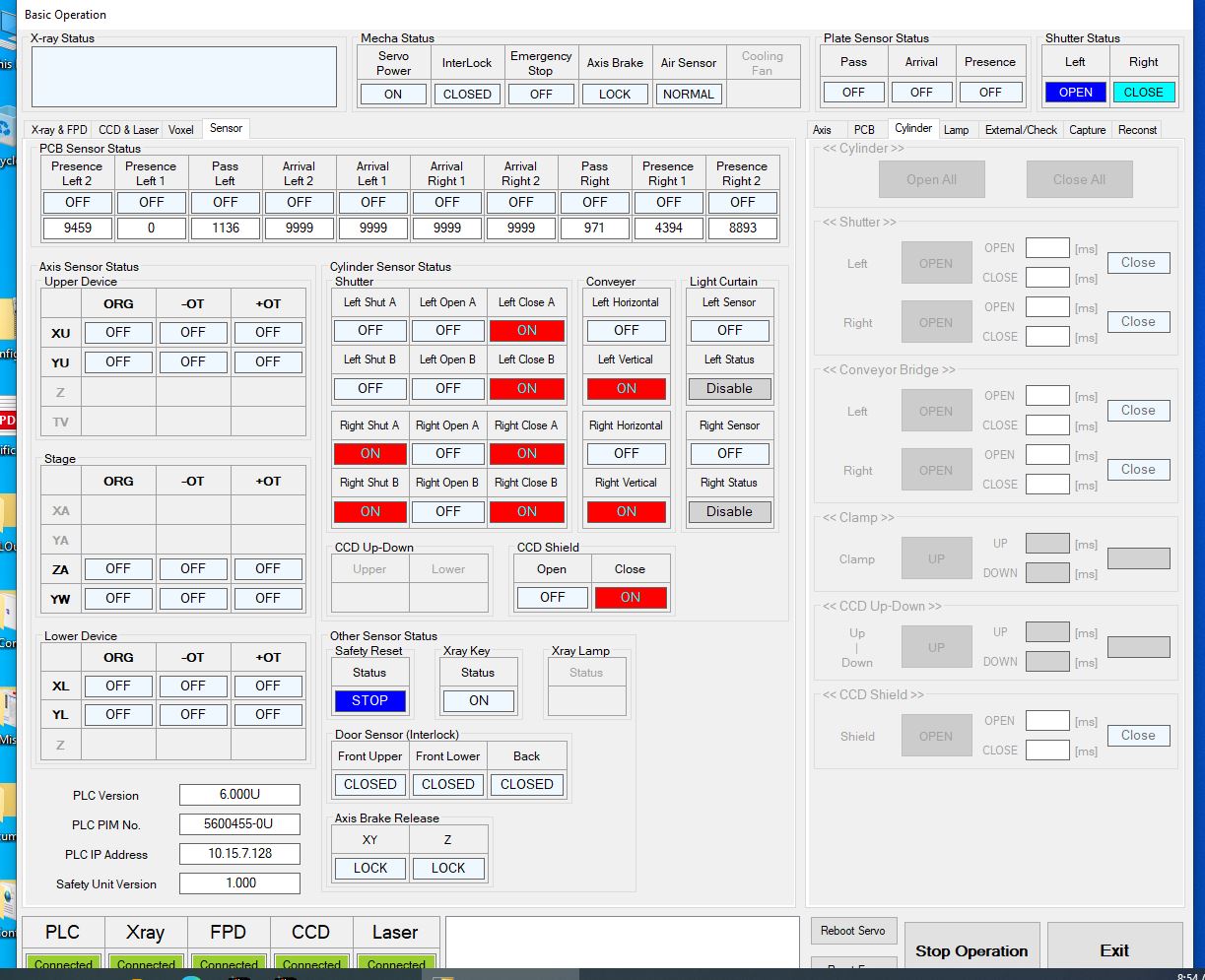
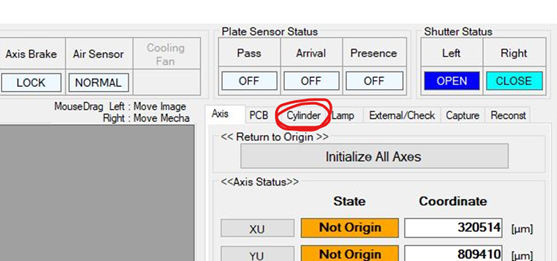
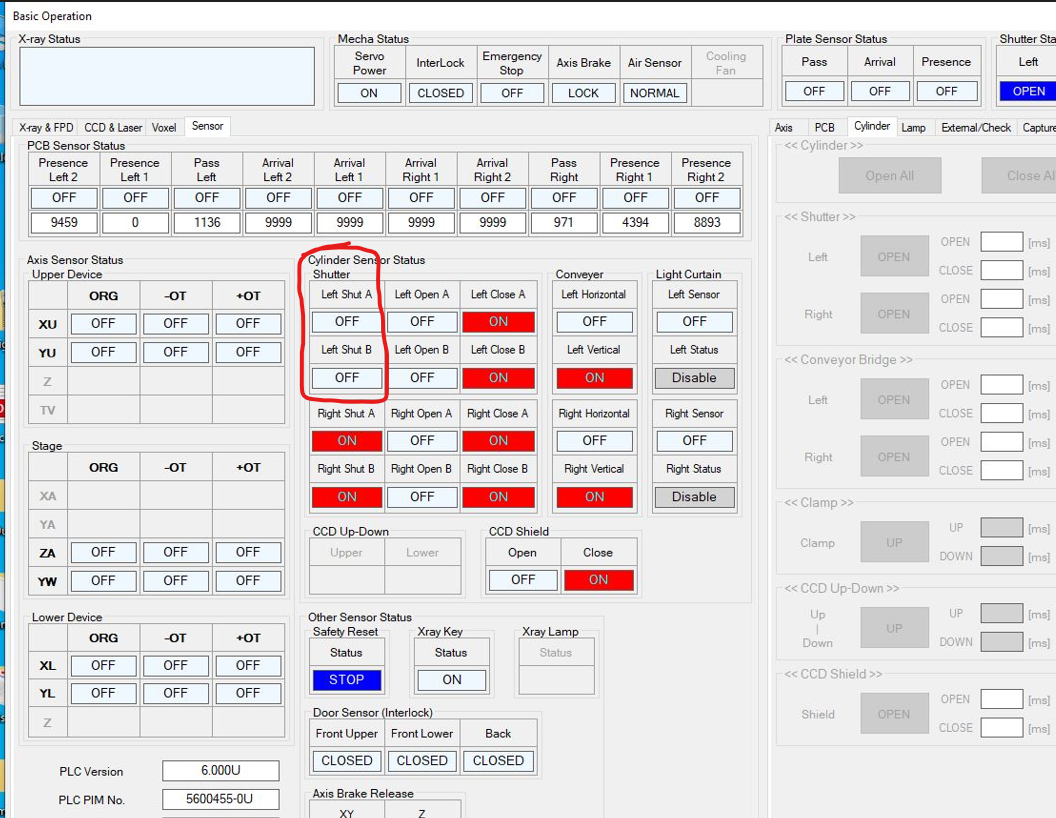
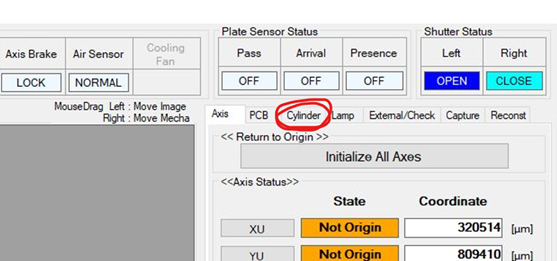
Hi Linh, I have had a slight change in my role within Omron and am no longer part of the support team. For future requests, it is best to email the entire team with [email] (I've CC'd them on this reply). While we wait for them to reply, can you please confirm which machine is experiencing the issue? Is it one of the X750s? The side doors have several sensors which determine which operations are enabled, we really need to check the status of each. Can you please share a screenshot of the following tab? [email] If I had to guess, I would - (High Probability) Check the air pressure to the machine by looking at the gauge on the back...can you share a photo? - (Lower Probability) Check the door inside the left of the machine. There are two proximity sensors which determine whether the door is in the open status. Its possible that one of them is not close enough to the receiving end to register a signal. Have you rebooted the machine (with a complete power-off)? -Nick [email] Nick Fieldhouse Product Manager - Inspection Systems Direct: [phone] | [email] Omron Automation Americas 2895 Greenspoint Parkway, Suite 200, Hoffman Estates, IL 60169 automation.omron.com [email] [email] [email] [email] This is a confidential message. If received in error, delete it and notify the sender. From: Van, Linh Sent: Wednesday, August 19, 2026 6:05 PM To: Brian Andersen / OEI Cc: Nick Fieldhouse / OEI Subject: VT-X750 shutter sensor error Hi Brian The x750 has come up interlock error that Left shutter is open. But the left shutter was close. Don't know what is going on. Can you please give me some advice on how to debug this issue. Thanks Linh Van AOI and X-Ray programmer [email] Inc | Milpitas Plant 575 Cottonwood Drive | Milpitas, CA 95035, USA email: [email] Cell: +[phone] Important note: This e-mail contains confidential information. If you received this e-mail by mistake, please inform the sender immediately and destroy this e-mail. The making of unauthorized copies, the passing on of the information and the unauthorized forwarding of the e-mail is not permitted. WARNING! This is an email from an external party. Do not click on any link or open any attachment if you cannot ascertain that it is safe.
Conversation
Engineer and customer thread
8 messages
C
CustomerCustomer reply | Aug 20, 2026 at 12:49 PM
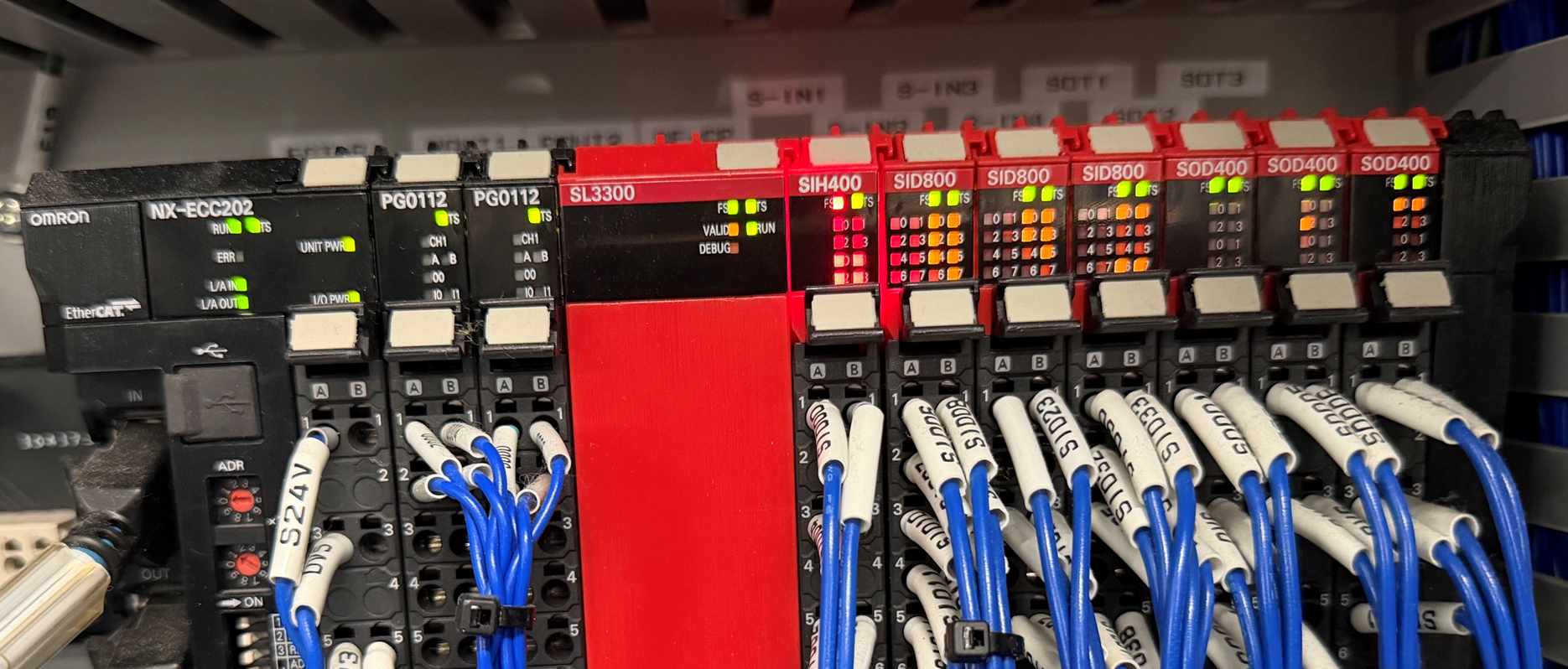
Hi Nick It is on the VT-X750, I did power off completely. I have a photo on the back, one of the SIH400 flashing red light. Linh Van AOI and X-Ray programmer [email] Inc | Milpitas Plant 575 Cottonwood Drive | Milpitas, CA 95035, USA email: [email] Cell: +[phone]
Linh, These are the sensors which are not registering that the door is closed: [email] I would try to increase the air pressure to the machine VERY SLIGHTLY. There is a small gauge in the lower right corner of the back of the machine. You do NOT need to open the doors to see this, its near the network jacks. Please take a picture of that gauge and share. [email] Nick Fieldhouse Product Manager - Inspection Systems Direct: [phone] | [email] Omron Automation Americas 2895 Greenspoint Parkway, Suite 200, Hoffman Estates, IL 60169 automation.omron.com [email] [email] [email] [email] This is a confidential message. If received in error, delete it and notify the sender.
Hello Linh, We are also looking at another sensor that could be indicating incorrectly regarding the left shutter door. There is a proximity sensor mounted on the inside left wall of machine and the shutter door itself. Over time these sensor can fail and need to be replaced. I'm going to have you test out the sensor and watch on screen that I/O indicator change. So the first items to do is close the main AXI software, be sure to hold the shift key for when clicking on the second shutdown and keeping it held for about 15 seconds. Open CF-Maintenance, press Omron button enter admin as the password, go to basic operations, connect to all subsystems press ok. Move gantries to right rear of machine by clicking on the axis moving slider to right and hit move to target, also widen the YW (rail) axis just incase it will be in the way. Open top front door, then remove the lower covers and open lower doors, Shut machine down. Using the document attached as a reference please do the following: Remove the left sensor cover Using a 5mm allen wrench placed in between sensor make sure the gap is 5mm. Without installing the cover power on machine Give machine a minute or two close door (don't force it, if it doesn't move wait longer) Close main software before it finishes opening by hitting ESC key. Reopen CF-M, press Omron button, enter password, go to basic operations connect and press ok, then on this next page go to the upper left side and press I/O tab. See what the status of the shutter door is. If it is not correct open the top door and carefully place a small (3mm) allen wrench in between these sensor and magnet while wrench is between them we normally see I/O trigger station the machine shutter is closed. You can also try shifting the gap between sensor and maybe you can find a spot where the sensor will trigger. Generally we find either the sensor is 100% dead or it just can't sense reliably enough. Please perform this test if you are comfortable with doing so and let us know the results. We can send you a quote for the sensor replacement if it is found to be the issue. If you are handy the sensor replacement is easy, while the wiring of it is a little involved. We can also quote for sensor and install if you'd like.
C
CustomerCustomer reply | Aug 20, 2026 at 5:28 PM
Private
Hi, Just test the left shutter sensor using a 5mm allen wrench in between the sensor and magnet, sensor red light on but the status still in open, removed and placed on still not thing change. Linh Van AOI and X-Ray programmer [email] Inc | Milpitas Plant 575 Cottonwood Drive | Milpitas, CA 95035, USA email: [email] Cell: +[phone]
9 tiny or repeated images hidden.
C
CustomerCustomer reply | Aug 20, 2026 at 5:31 PM
Private
Please, send me a quote for sensor and installation. Linh Van AOI and X-Ray programmer [email] Inc | Milpitas Plant 575 Cottonwood Drive | Milpitas, CA 95035, USA email: [email] Cell: +[phone]
9 tiny or repeated images hidden.
RM
Ryan MorrowOmron reply | Aug 21, 2026 at 8:45 AM
Hello Nick, I get the wheels turning on quote on part and a service visit. Can you please tell me if the machine in question is serial number 0006 or 0011? I'm going to have the quote be for 2 sets of the sensor. One for the machine currently with issue and two spares. I see you have another V750 machine of a similar age.
C
CustomerCustomer reply | Aug 21, 2026 at 9:17 AM
Linh, Can you please tell us what the serial number is for this machine? We are working to get the correct parts ready. As a reminder the serial number is on the back of the machine on the metal plate at the top. -Nick [email] Nick Fieldhouse Product Manager - Inspection Systems Direct: [phone] | [email] Omron Automation Americas 2895 Greenspoint Parkway, Suite 200, Hoffman Estates, IL 60169 automation.omron.com [email] [email] [email] [email] This is a confidential message. If received in error, delete it and notify the sender.
13 tiny or repeated images hidden.
C
CustomerCustomer reply | Aug 21, 2026 at 11:20 AM
Hi guys This is the serial No : 0011218-0011 Linh Van AOI and X-Ray programmer [email] Inc | Milpitas Plant 575 Cottonwood Drive | Milpitas, CA 95035, USA email: [email] Cell: +[phone]