A - AOI CASE ACK EN, A - Reply Open, A - 1 Hour Delay rslv, LOCKED
Current case
Customer issue
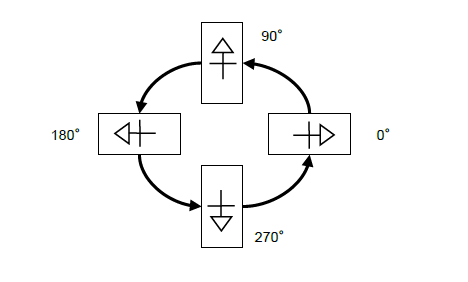
Hello! The team and I have been learning more and more about our new Omron AOI. With that said, we have a few questions. 1. Serial numbers when it comes to reporting and data. We have always used serial numbers on every board for traceability purposes, and customers often require them. They are quite important for us to have. We have noticed that in the data reports through V-CA, there isn't an option to see specific serial numbers. Would there be some way we are able to get these numbers captured in our data? We are willing to discuss the possibility of having something engineered for us in order to capture this data with full traceability. 1. Part orientation/angle convention. Our PNP machines use a different angle convention than what Omron uses. I have attached a photo of how their rotations work, with a question from one of our PNP programmers. "How important is angle convention? * Should parts be exported/(set in the software) with OMRON's angle convention to keep things consistent * Is it going to throw off the database and learning if we are to follow a different angle convention when data is exported? I attached a pic of Universals current angle convention that we export and follow. * Note: the two leaded components are incorrect." Thank you! Thank you! Alexis French Tristate Electronic Mfg. Inc. [phone]
Conversation
Engineer and customer thread
6 messages
OA
Omron Application EngineerOmron reply | Feb 2, 2026 at 5:26 PM
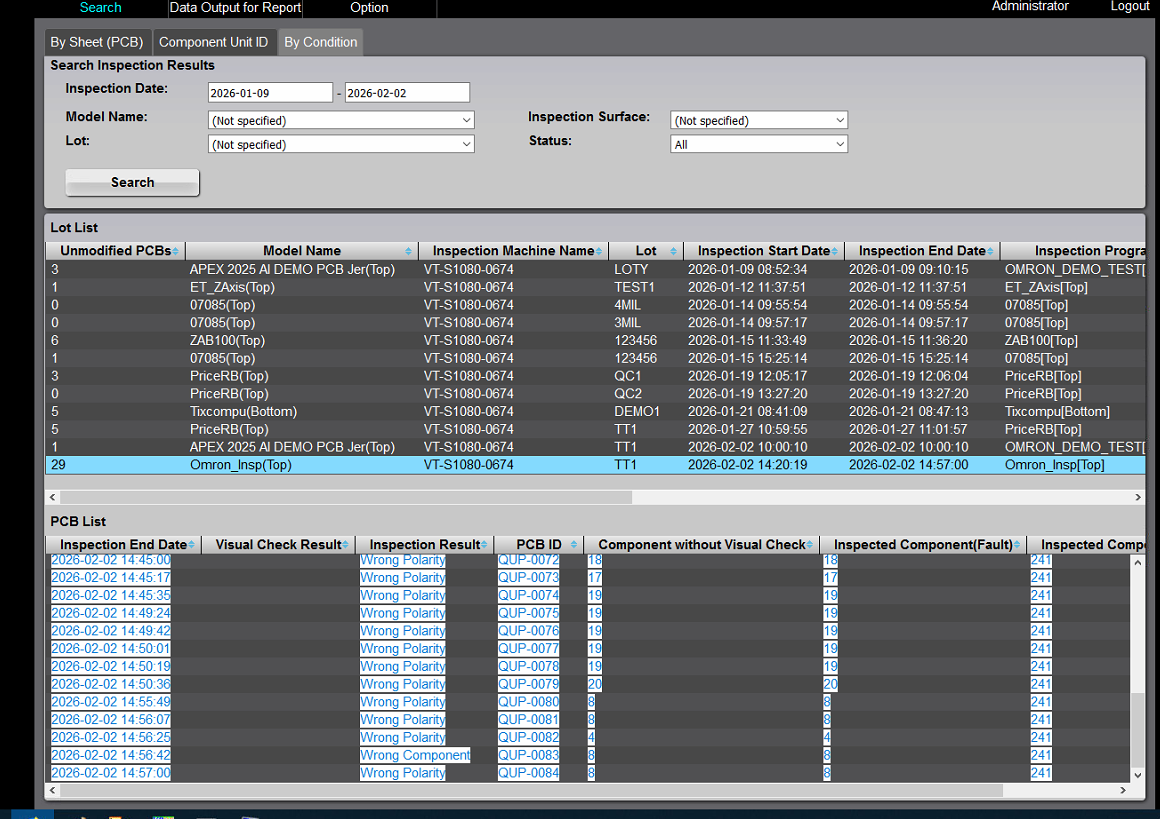
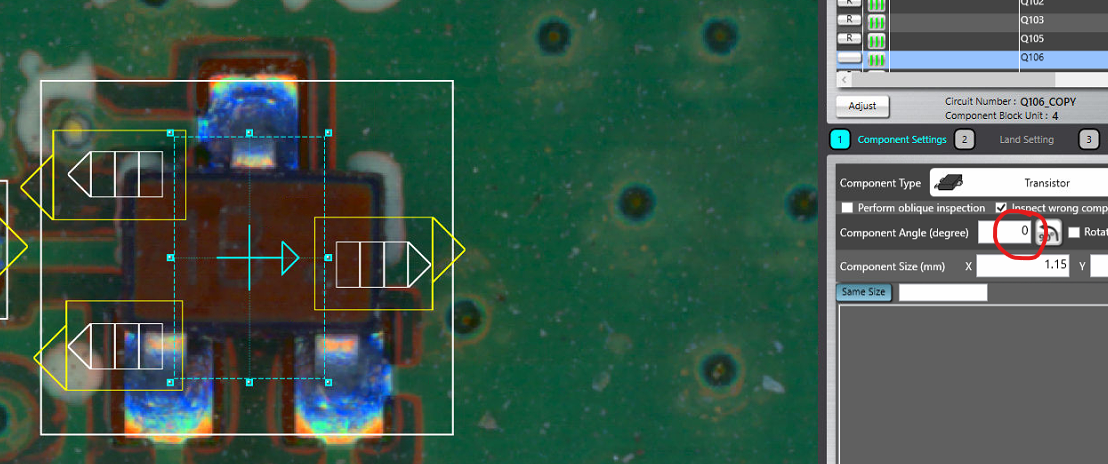
Hello Alexis, 1.-The way to generate a report that includes the serial number is by using V‑CA. Go to the “By Condition” tab, specify the start and end dates, and select the inspection program you want to review. V‑CA will then display a list of all PCBIDs or barcodes inspected during that time period. You can select the text in that list, copy it, and paste it into Excel to obtain a report similar to the attached file. Let me know if this meets your needs. 2.-Part orientation in our AOI is dictated by the Mount data or Centroid data file you use. for example, when you import centroid data file and the software automatically teaches a SOT-23, you will see boxes around the pads, leads and component body on the component body there is an arrow that indicates the angle of the part. For your reference, below images shows the arrow direction and angle If SOT is mounted as the following picture and the mount data file you used has 0° angle, the arrow fill point to the right and the system will register the Mask model / Comparation image in to the library and if in the future your mount data file is always consistent, software will place inspection windows on the right direction. If for whatever reason, the mount data file you are using has an angle of 90° for a part is mounted as the following image, it does not mean is wrong as long you keep same rotation rule in the future. My point is this: if you plan to use the PNP output file, that is perfectly fine, but you must use it consistently. If one day you instead use a mount‑data file exported from Altium or another design tool, it is very likely that the origin and angle definitions will be different. When that happens, you will see next phenomenon. In this example, it appears that when the part was originally created, it had a 90° angle (based on the explanation I previously shared). However, when I created a new inspection program using a Part Number that already exists in the library, the mount‑data file I used this time came from the design software, not from the PNP machine—so the angle and origin did not match with the component. Does that make sense? Francisco Villalpando Engineering Supervisor Direct: +[phone] [email]
Thank you for your quick response! Here’s a scenario – Say that in the future, one of our customers wants to know if SN 201 failed, but that board was in a panel with 3 other boards when it was ran on AOI. But now that the customer has it, its depaneled and no longer has the PCB ID with it. Would there be a way for us to know what the report for that specific serial number looks like? As of right now, for panelized assemblies, I have a PCB ID on the border that says “Panel1, Panel2, etc.” and then the individual SNs as a block ID on each board in that panel. I’ve attached some examples of what we currently have as far as reporting from our Yestech 2D AOI (defect report with SNs, yield report, and inspection report). Another option we discussed was using the Aegis software for reports. What type of information is reported if we activate that license? We are attempting to be AS9100 certified, and that requires full traceability from start to finish. Thank you so much! Thank you! Alexis French Tristate Electronic Mfg. Inc. [phone]
Omron Application EngineerOmron reply | Feb 4, 2026 at 9:53 AM
Hello Alexis, The tool used to generate both Panel and PCB reports is Q‑up Navi. In the PCB Analysis tab, you can scan either a PCB ID or a Block ID, and the software will display a component list along with the board layout. In this view, pink components represent defects, while green components indicate OK parts. By selecting any component and clicking the Process Compare button, the software will show you the component image along with its measurement results. You can follow this same process using either the Panel barcode or the Block barcode. One of the other reports included is the Yield Report. If you navigate to “Data Output Report”, you’ll find an option to export a similar type of report. This export can also provide additional details, such as the most defective part numbers or reference designators. If you have any questions about using Qup Navi, we can schedule a call, and I’ll be happy to walk you through more of the capabilities of this powerful tool. I was informed that you already have Factory Logix from Aegis, and they do support our machines. As far as I know, they use the CSV files generated by our system after AOI inspection and after the defect review process in V‑CA. However, I’m not fully aware of the exact data they collect from our system or the specific reporting capabilities they offer within Factory Logix. Because of that, it may be best to check with Aegis directly to understand the options and level of integration they can provide. Francisco Villalpando Engineering Supervisor Direct: +[phone] [email]
Hi Francisco, Thank you for explaining the V-CA a little more. We did want to ask you about adding in some options for failure types to choose during review. I was inspecting a set of boards the other day that had a missing component on a bunch of them, but we had actually ran out during the run on SMT due to a stockroom issue. When that happens, what we do currently is mark them as “Missing Part – Known Shortage” so that way, when we pull our data for the month/quarter/year, it doesn’t negatively affect SMTs evaluation, and so we are able to order them from the vendor if need be. We can separate the actual missing part defects from the shortages from stockroom. I was messing around with the option to do so in the user fault setting tab within V-DB the other day, but I didn’t totally understand and I didn’t want to mess anything up. Thank you so much for taking the time to help us out with all these questions. Thank you! Alexis French Tristate Electronic Mfg. Inc. [phone]
9 tiny or repeated images hidden.
OA
Omron Application EngineerOmron reply | Feb 6, 2026 at 1:01 PM
Hello Alexis, I put together a step-by-step guide to setup a new user fault code for VCA. Please review and let me know if you have any questions. Also, I don't remember if I mentioned it during training, you can enable in-line review station on the machine itself which will eliminate the need for a separate PC to review the results on the AOI. Please go to line stop settings, check the Line Stop Setting and enable the "enter visual inspection result" and select set on the bottom of the screen. Please let me know if you have any questions. I'm available to assist via TeamViewer. Best Regards
freshdesk-inline-150148983822.png
OI
Omron internalPrivate note | Feb 9, 2026 at 10:26 AM
Private
Subject: RE: VT-S1080 Questions [ AOI Case# 1690758] has been resolved. Description: Hello Smt, Thank you for your recent inquiry. We’re pleased to inform you that your case 1690758 has been resolved. As always, we're here to support you. If you need assistance in the future, please don’t hesitate to reach out to us via our support email: [email] If you believe further support is needed regarding this case, simply reply to this message with a brief status update, and we’ll be happy to assist you. Francisco Javier Villalpando Your Omron AOI Technical Support Group