Hello Team, I keep receiving this error, and the mouse, keyboard, and touchscreen become unresponsive. The machine appears to be stuck. I have restarted the machine several times, but the issue persists. Could you please assist? Thank you, Tanush Harish Bhaskar | Senior Engineer HUGHES | 19710 Observation Ln, Germantown, MD 20876 [email] | [phone]
Conversation
Engineer and customer thread
15 messages
ST
Saqib ToorOmron reply | Aug 19, 2026 at 10:02 AM
Hello Tanush, This error appears to indicate a network connectivity issue. The AXI system is attempting to access a network resource but is unable to establish communication. Please allow the process to time out, then verify network connectivity. Open a Command Prompt and run the following command: ping -l 4500 If the ping fails or returns errors, please have your IT team check the network connections and verify that communication to the server is available.
C
CustomerCustomer reply | Aug 19, 2026 at 10:32 AM
Saqib, The whole system is frozen, and it doesn’t allow me to do anything. Thank you, Tanush Harish Bhaskar | Senior Engineer HUGHES | 19710 Observation Ln, Germantown, MD 20876 [email] | [phone] ________________________________
Hello Team, I just noticed the U-HUB is damaged. Maybe that’s why the screen is frozen. Can I get a new U-Hub and send me instructions on how to replace it. Thank you, Tanush Harish Bhaskar | Senior Engineer HUGHES | 19710 Observation Ln, Germantown, MD 20876 [email] | [phone] ________________________________
ST
Saqib ToorOmron reply | Aug 19, 2026 at 3:00 PM
Hello Tanush, Do you have a spare U-HUB? It should be a simple replacement since it does not require any programming.
C
CustomerCustomer reply | Aug 19, 2026 at 3:27 PM
I do not. Could you please ship one. Thank you, Tanush Harish Bhaskar | Senior Engineer HUGHES | 19710 Observation Ln, Germantown, MD 20876 [email] | [phone] ________________________________
ST
Saqib ToorOmron reply | Aug 19, 2026 at 3:38 PM
Hello Tanush, Max Fabiano will have to provide quotes and availability for this. If it is normal USB hub then it might be quicker to replace it locally.
C
CustomerCustomer reply | Aug 19, 2026 at 3:43 PM
Private
I need a part number. [This is Max Fabiano's card. Their email is [email] Their phone number is +[phone].]
freshdesk-inline-150174816908.png
ST
Saqib ToorPrivate note | Aug 19, 2026 at 4:02 PM
Private
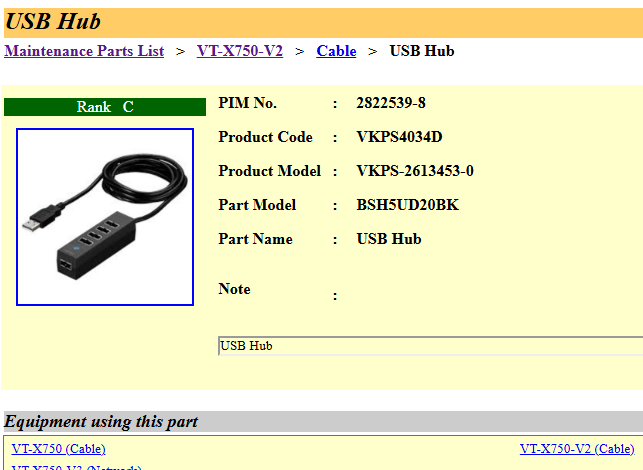
Max, I believe this is the right one:
freshdesk-inline-150174820024.png
C
CustomerCustomer reply | Aug 19, 2026 at 4:33 PM
Private
Hi Tanush, I will take care of this one for you. I already put the order though it will likely ship tomorrow. Thank you, [This is Max Fabiano's card. Their email is [email] Their phone number is +[phone].]
Team, If the USB hub is damaged, could it be causing the network issue? I connected a wireless dongleto access the screen, and that worked successfully. Our IT team also verified that the LAN cables are functioning properly. However, when the LAN cables are connected directly to the machine, it does not establish a network connection to the server. Thank you, Tanush Harish Bhaskar | Senior Engineer HUGHES | 19710 Observation Ln, Germantown, MD 20876 [email] | [phone] ________________________________
RM
Ryan MorrowOmron reply | Aug 20, 2026 at 4:25 PM
Hello Tanush, I wouldn't think that a bad USB hub would cause network issues. Are you solely using the motherboard ethernet port of PC or is it a USB to Ethernet. If it is the second, then it's possible a damaged hub could cause issue on USB controller but unlikely. I would think the more likely cause may be a IP address conflict on the network.
C
CustomerCustomer reply | Aug 21, 2026 at 8:53 AM
Currently there are two Lan cables one connected to the back of the machine via USB, and another connected directly to the machine port which is located behind the machine on bottom right. I noticed the lights don't blink for the LAN cables, so I connected both these cables to the PC behind the machine and now the light blinks, but I am still facing network issue. Should there be any configuration done? Thank you, Tanush Harish Bhaskar | Senior Engineer HUGHES | 19710 Observation Ln, Germantown, MD 20876 [email] | [phone] ________________________________
FV
Francisco VillalpandoOmron reply | Aug 21, 2026 at 4:49 PM
Hello Tanush, I don’t remember whether Hughes uses fixed IP addresses or if the IP addresses are assigned through DNS/DHCP based on the machine’s MAC address. Could you please check with your IT team and confirm that the machine has the correct IP address and network configuration to communicate with the server? Francisco Villalpando Engineering Supervisor Direct: +[phone] [email] (Non-ITAR)